Rillsoft Project meets AI
Resource and capacity planning with AI
Ask your project and resource data in natural language – straight from your AI assistant.
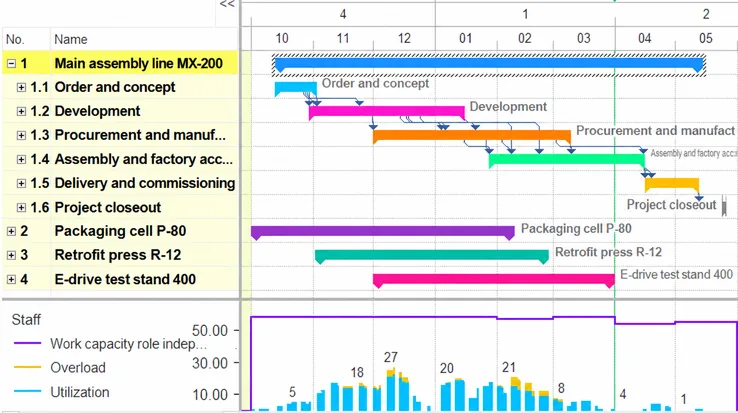
Rillsoft AI is the AI gateway to Rillsoft Project: an MCP server on top of the scheduling engine of a multi-project resource planner – not on top of a task list.
- MCP Server integrated
- Runs locally
- Changes can be undone
Who it is for
Who Rillsoft AI is made for
- Project-driven industrial and mid-sized companies running several projects in parallel that share people, machines and material.
- Planners, PMOs and project managers who work with or evaluate Rillsoft Project 10 on Windows and want to query or edit their plan with an AI assistant.
- Integrators and administrators who read or write planning data by script — with or without AI.
How it works
One question. The right project data. A reliable answer.
Where will capacity become a bottleneck in the next three months?
- Capacity view
- Skills
- Absences
- Demand & supply
- Monthly scale October – May
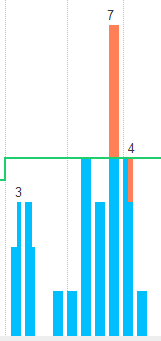
In the first three months – October to December 2026 – electrical design and technical purchasing exceed their available capacity – on 33 and 20 of 65 working days – because demand and base load coincide. The assembly skills only run short around Christmas and in January, and only just; the others stay within their capacity.
Capacity here means demand against supply per skill, team, person, machine or material – in the time grid of your view, with shortfall as the answer. Rillsoft Project did the calculating; the AI set the capacity view by role and read the shortfall column. Mechanical engineering sample package (shipped, synthetic), Rillsoft Project 10, read from the view.
Your benefits
What can you do with Rillsoft AI?
Spot the bottleneck Demand against supply per skill, team or machine – in the time window of your choice. See example → Find the right resource Who is free, qualified and without a schedule conflict? Also outside the preferred team when the site is fully booked. See example → Read the plan status Delayed tasks, missing float, variance from the baseline in dates, effort and cost. See example → Analyse the project portfolio Spot dependencies and competing resources: the capacity view across all projects of the portfolio is readable – changes are made in the individual project. See prompts →Your AI. Your projects.
An open connection.
- Projects
- Tasks
- Resources
- Capacities
- Portfolios
Security
Bound to your machine, no overpromise
- The server binds to
127.0.0.1only; requests carrying a browser origin are rejected. - Optional API key for multi-user and terminal-server machines – without a key there is no additional authentication.
- Optional read-only mode: ask, understand, change nothing. It does not replace organisational access control.
- Every mutating call is one undo step; file and session operations are not.
- What your AI client sends to its provider is governed by that provider’s privacy terms – not by Rillsoft.
- The trade-off: an MCP call carries no user identity and reaches exactly one Rillsoft Project instance.
There is no hosted Rillsoft MCP server. The server runs inside your installation.
Without AI
Scripts and integrations
The same endpoint works without an AI assistant: with curl, PowerShell or any language that speaks HTTP and JSON. Mirror absences from the leave system, pull reports on a schedule, generate projects from templates – every tool describes input and output as a JSON schema, errors carry stable codes.Handshake, tools/list and a first read-only call are on the MCP page.
Frequently asked
What to know before the first prompt
Does the AI recompute my schedule?
No. Dates, workload and the critical path are computed by Rillsoft Project. The AI reads the result and makes changes as ordinary editing steps that you take back with Ctrl+Z.
Does my project data leave the machine?
Rillsoft Project sends nothing. The MCP server is reachable on 127.0.0.1 only. What your AI client transmits to its provider is governed by that provider’s privacy terms.
How is this different from connecting an AI to a task tool?
What the AI receives is the calculated plan: dates, float, critical path, utilisation – it reads the result, Rillsoft Project does the calculating. Capacity means demand against supply per skill, team, person, machine or material; a task list knows due dates, not capacity. Rillsoft Project answers “whom do I take?” before naming a person: role on the task, candidates with availability, free capacity, cost and schedule conflict. How Rillsoft Project differs from other planning tools is shown in the comparison overview.