SAP orders can be checked for capacity shortfalls in Rillsoft Project through the MCP Gateway. The AI reads the data and creates the model; Rillsoft calculates dates and capacity. SAP remains unchanged.
The complete route is free to try: SAP provides Integration Suite, MCP Gateway and the S/4HANA Cloud sandbox in the BTP trial, and Rillsoft Project is available as a free 30-day trial. Every step on these pages can be rebuilt without a customer system and without a purchase – from setup to the bottleneck report.
Two examples using SAP sandbox data#
| Case | Reference result | Details |
|---|---|---|
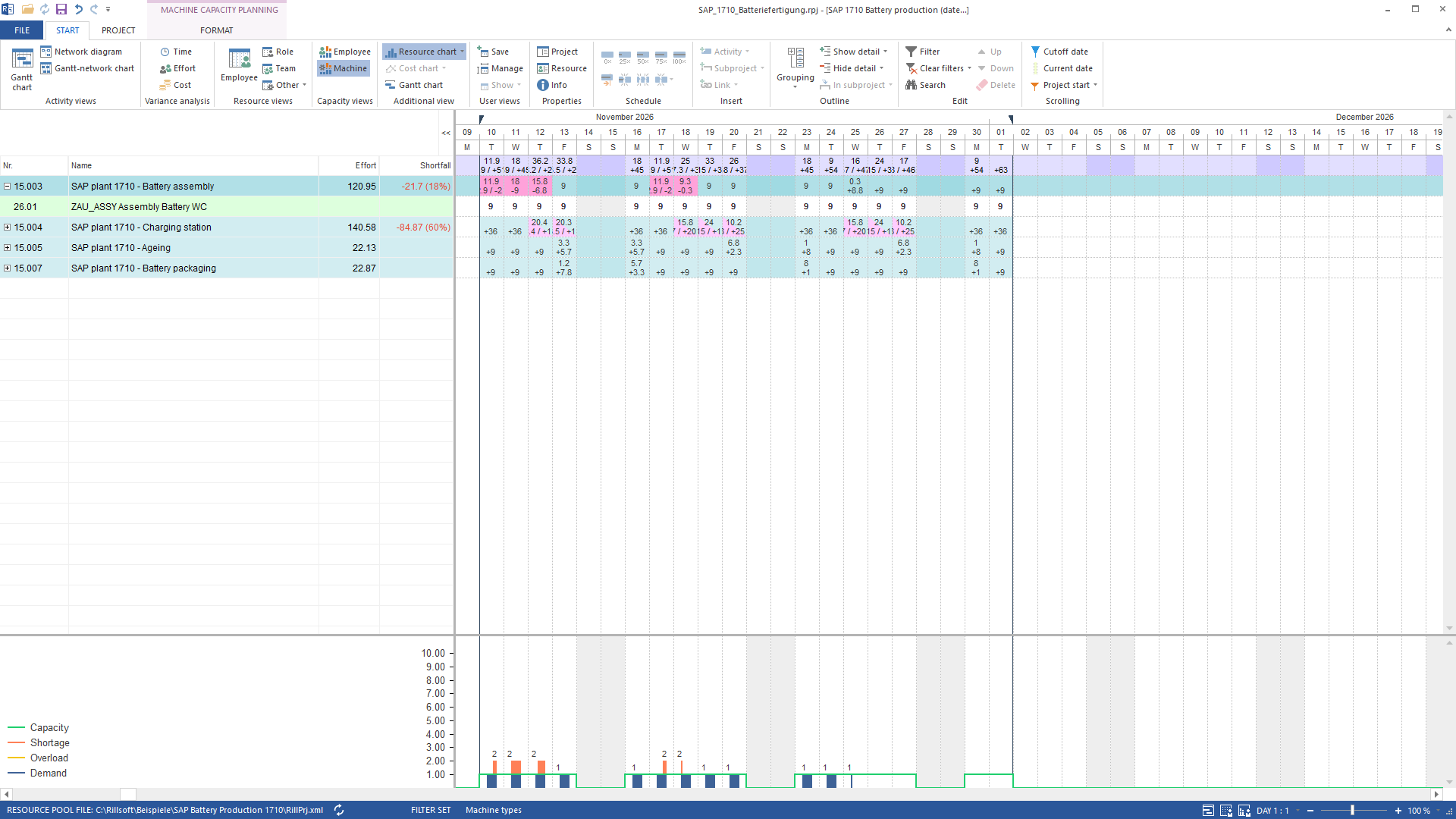
| Battery production | 6 orders, 48 operations; assembly: 21.7 h shortfall | Check SAP production order capacity with AI |
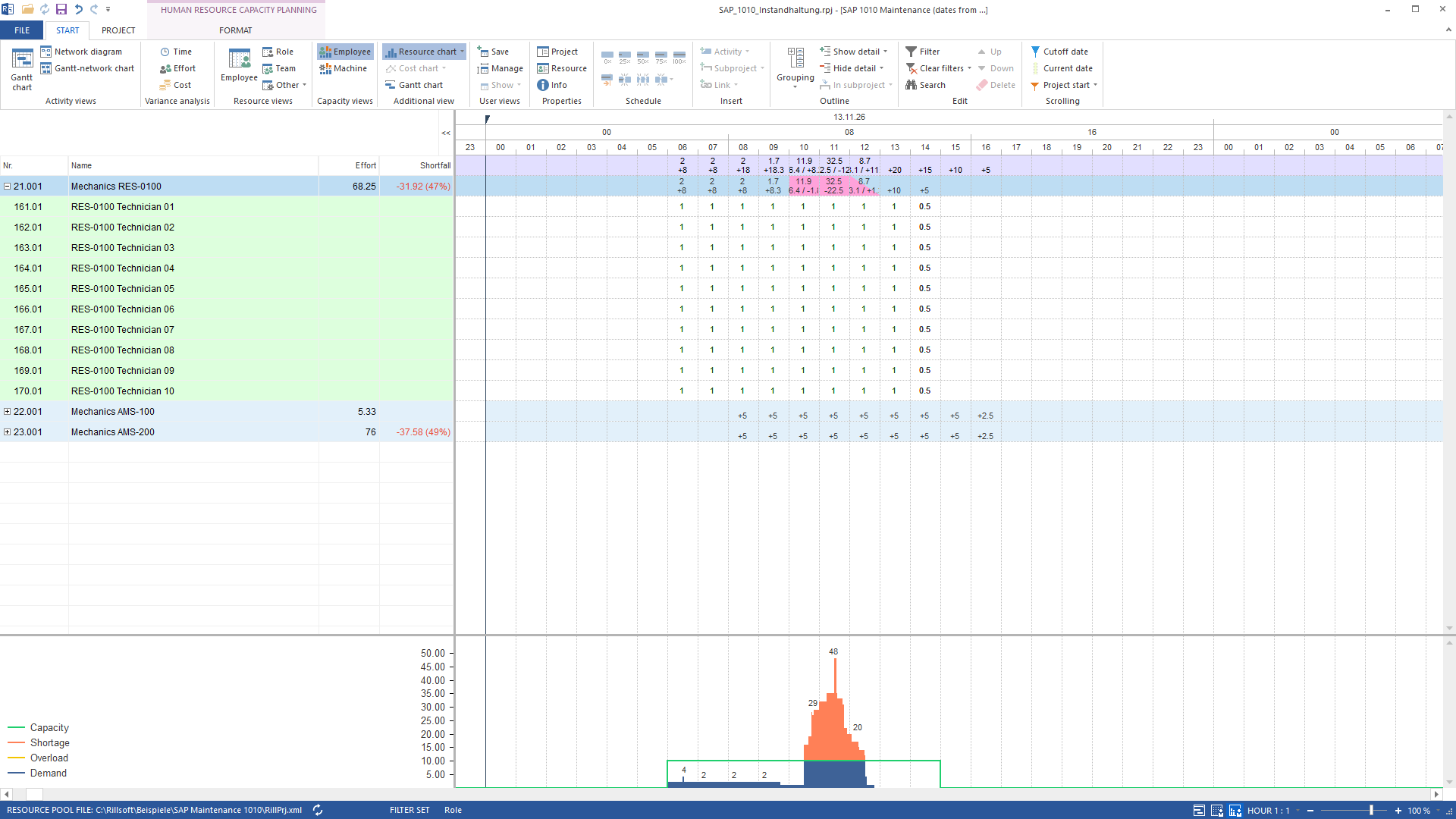
| Maintenance | 30 orders, 117 operations; RES-0100: 24.3 h hourly, 0 h in daily totals | Check SAP maintenance workforce capacity with AI |
The sandbox dates were shifted by whole weeks. People in the maintenance model are labelled placeholders. Each example states its source, filter, units and limits.
Data flow and prerequisites#
%%{init: {"theme": "base", "themeVariables": {"darkMode": false, "fontSize": "18px", "primaryColor": "#fff7ed", "primaryTextColor": "#172033", "primaryBorderColor": "#c2410c", "lineColor": "#475569", "edgeLabelBackground": "#ffffff"}, "flowchart": {"rankSpacing": 45, "nodeSpacing": 30}}}%%
flowchart TD
    C["Claude Code / Desktop"] --> B["Local bridge
bridge.js"]
    B -->|"OAuth + MCP"| G["MCP Gateway
Integration Cell"]
    G -->|HTTPS| I["iFlow
Cloud Integration"]
    I -->|"OData GET"| S["SAP S/4HANA sandbox"]
    C -->|"MCP on 127.0.0.1"| R["Rillsoft Project 10"]
The SAP sandbox key stays in the iFlow. The local client holds only the OAuth credentials for the gateway. The AI client may send the planning data it reads to its provider. Start with sandbox data and review your AI provider’s settings.
Reproduce the examples#
Reproduce the Rillsoft SAP demo step by step takes you from the package to a complete report. Setup consists of Set up SAP MCP Gateway for Rillsoft and Connect SAP and Rillsoft in one AI client.
Limits and use with a customer system#
The demo writes nothing back to SAP. This verified build provides no automatic capacity levelling with rescheduling through MCP. An external script can propose dates and Rillsoft can check them; this is not a product promise of optimisation.
Machine supply follows the project calendar. Overlapping assignments to specific machines can conceal shortfalls, so this report uses machine types. The user decides whether lines are interchangeable: separate types for each line, or one shared type with several machines.
For a customer system, communication arrangements and technical access, or Cloud Connector, replace the sandbox. Review permissions, data scope, AI data processing and supported APIs with the SAP administrators. SAP names Premium or Enhanced Edition for productive gateway use; a trial does not establish customer licensing entitlements. Contact Rillsoft.
Frequently asked questions#
Can Rillsoft Project schedule production orders from SAP?#
Yes, through an AI client connected to both MCP servers. The demo transferred 48 operations and reconciled 367.5 net hours. The AI transfers data; Rillsoft calculates the schedule and supplies capacity values.
Does the demo write back to SAP?#
No. The OpenAPI exposes six GET tools. Changes occur only in the new Rillsoft project and copied resource pool.
Which data goes where?#
The iFlow reads orders, operations, work centres and capacities. The AI client receives these through the gateway and transfers planning data to Rillsoft. Its connection to an AI provider must be considered separately from the local Rillsoft connection.
All pages on SAP and Rillsoft Project#
This page is the entry point. The route in detail:
- Set up SAP MCP Gateway for Rillsoft: the SAP side of the connection, from BTP Trial and Integration Suite to the verified read-only gateway call.
- Connect SAP and Rillsoft in one AI client: register both MCP servers in the AI client and test each one separately.
- Check SAP production order capacity with AI: battery production example with machine types and shift calendars.
- Check SAP maintenance workforce capacity with AI: maintenance example for plant 1010 with roles as placeholders.
- Reproduce the Rillsoft SAP demo step by step: package, checksums, run, reference values, report and restoration, with the complete instructions for the AI.
- Check SAP order capacity with an AI prompt: the ready-made prompt for your own run, short and in full.
Go to sections of the previous guide
Set up SAP MCP Gateway for Rillsoft
Connect SAP and Rillsoft in one AI client
Check SAP production order capacity with AI
Sources and trademarks#
Demo evidence: Rillsoft runs of 20 October 2026 for battery manufacturing, maintenance in plant 1010, line 26XR1 and four lines, each using Rillsoft Project 10.0.626. This guide was compiled from that evidence on 22 October 2026; the figures were confirmed on 24 October 2026 in the free prompt run (German and English, through to the report).
This example uses the MCP Gateway in SAP Integration Suite, which SAP describes as its intended access path for external AI agents connecting to SAP systems. The SAP API Policy, particularly section 2.2.2, and the terms and access restrictions of the services used still apply. The demo only reads sandbox data and does not write changes back to SAP.
SAP, SAP S/4HANA, SAP BTP and SAP Integration Suite are trademarks or registered trademarks of SAP SE or its affiliates in Germany and in other countries. This guide is published by Rillsoft GmbH and does not represent SAP certification or partnership.
- Product version
- Rillsoft Project 10.0.626; SAP Integration Suite Trial