Rillsoft AI
AI examples in Rillsoft Project
Three reproduced cases with synthetic data: find a resource bottleneck, staff across sites, compare the plan with its baseline.
Every example shows a concrete planning question, the data used, the steps in Rillsoft Project with a screenshot, the result and the tools behind it. The calculations happen in Rillsoft Project; the AI sets the view and reads the result.
“Find a resource bottleneck” and “Compare the plan with its baseline” run against industry packages shipped with the setup. “Staff across sites” uses a Rillsoft GmbH rail construction test project. People, companies and projects are synthetic. The two industry-package examples are validated against Rillsoft Project 10 Build 10.0.623; the rail construction example is derived from the test project.
Which example answers your question?#
Is a skill short in the portfolio – where, how many hours, in which projects? Then find a resource bottleneck. Is the local team not enough although the group has people? Then staff across sites. Has the plan slipped against its baseline – in dates, effort or cost? Then compare the plan with its baseline.
Three worked-through examples
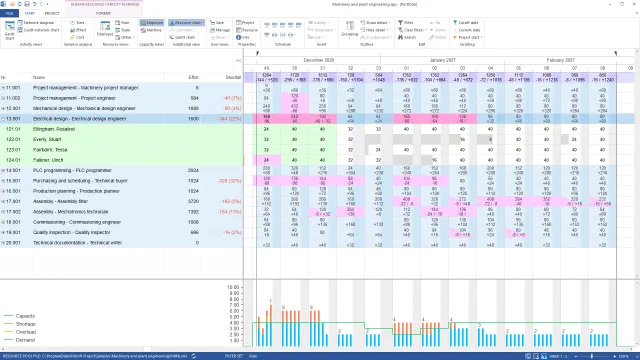 Find a resource bottleneck
Two capacity views: electrical design is short by 344 hours, purchasing by 328; the mechatronics peak on 21–23 December comes from P-80 and R-12.
Find a resource bottleneck
Two capacity views: electrical design is short by 344 hours, purchasing by 328; the mechatronics peak on 21–23 December comes from P-80 and R-12.
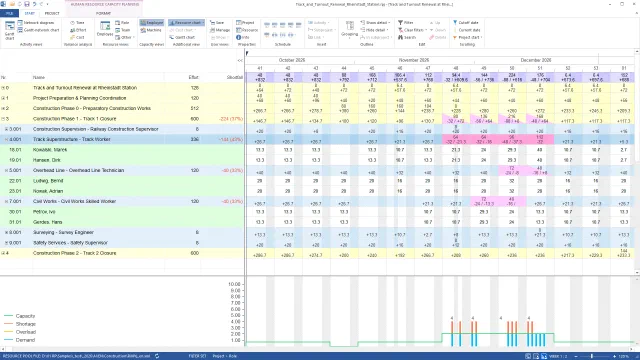 The right resource despite a site bottleneck
Is the branch crew enough for the track possession? Rail example: shortfall per role with and without the preferred team – the bottleneck is the site.
The right resource despite a site bottleneck
Is the branch crew enough for the track possession? Rail example: shortfall per role with and without the preferred team – the bottleneck is the site.
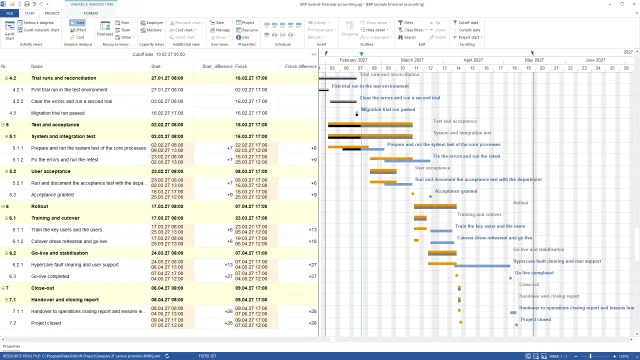 Compare the plan status with the baseline
Baseline, status date, actual data, three comparison views: on the ERP module acceptance slips by nine days and go-live by four weeks – effort and cost stay.
Compare the plan status with the baseline
Baseline, status date, actual data, three comparison views: on the ERP module acceptance slips by nine days and go-live by four weeks – effort and cost stay.