All people, companies and projects shown are synthetic Rillsoft sample data – from the shipped industry packages or, where stated, from a test project.
The question
Which skill in the portfolio is short between December and February, by how many hours – and in which projects are people missing?
The data
Industry package mechanical and plant engineering (02_maschinenbau): 60 people in seven teams, twelve skills, four projects plus a base-load project “Service and small orders”. The portfolio runs the packaging cell P-80 (October 2026 to January 2027), the assembly line MX-200 (October 2026 to April 2027), the retrofit of press R-12 (November 2026 to February 2027) and the test bench E-Drive 400 (December 2026 to March 2027) side by side. All people, companies and dates are synthetic; the package ships with Rillsoft Project.The steps
- Open the portfolio
The AI opens the package’s portfolio file without dialogs. The answer lists the projects it contains with period and whether one is read-only.
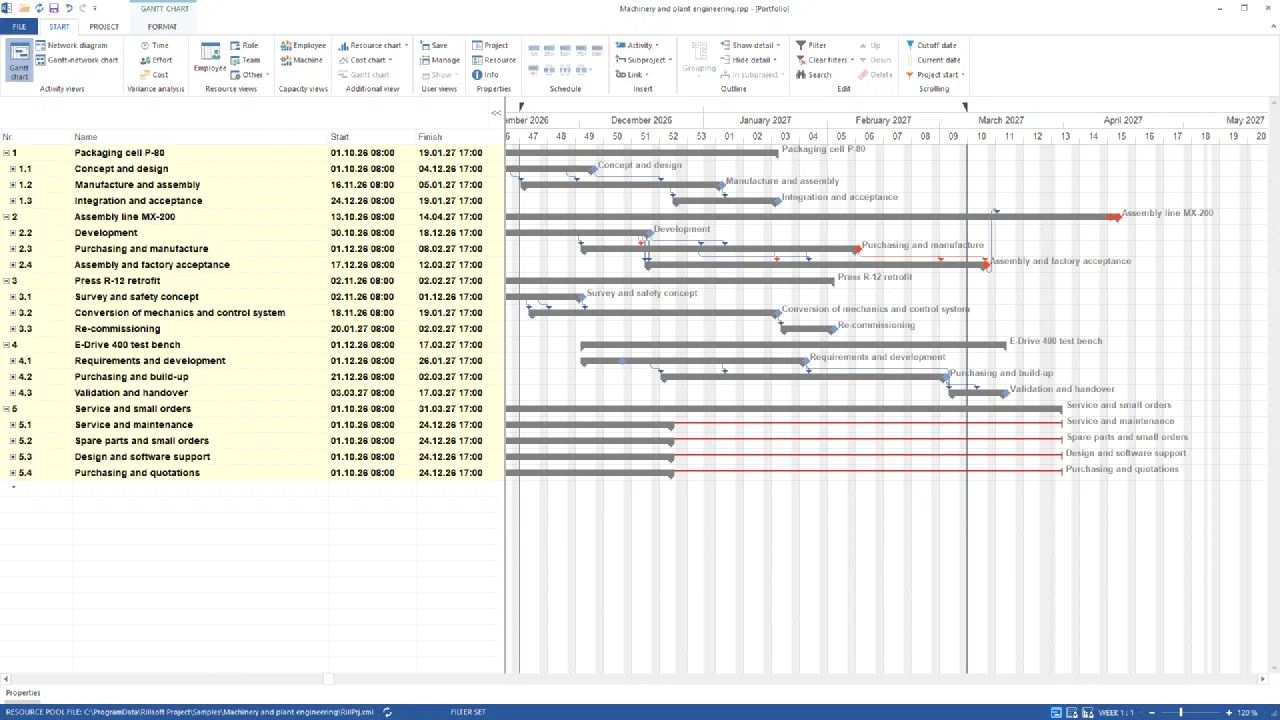
The portfolio in the Gantt chart: between December 2026 and February 2027 manufacturing and assembly of the packaging cell, procurement and assembly of the assembly line, the on-site conversion of the press and the build-up of the test bench run at the same timeGerman UI - Configure the capacity view
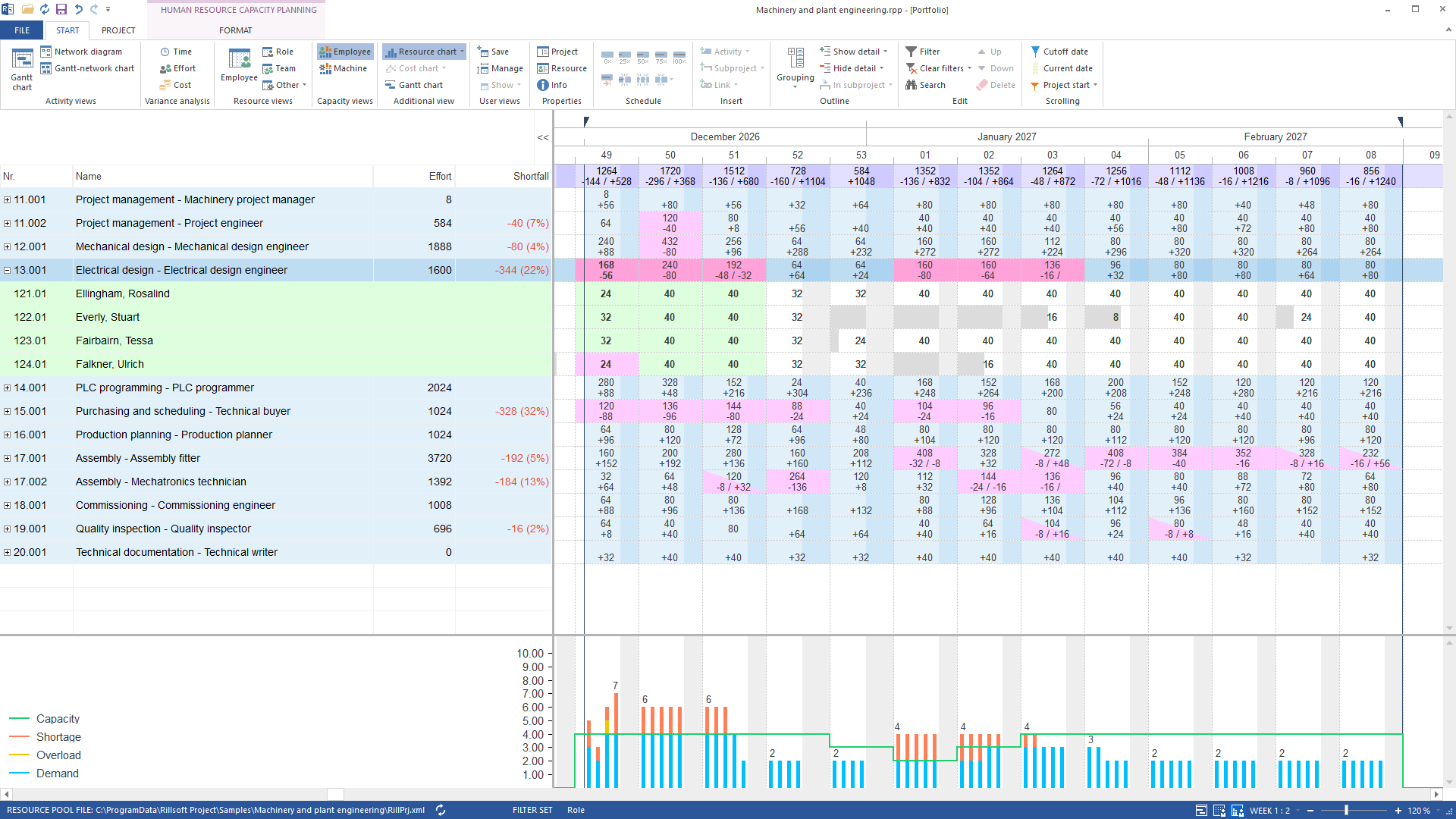
The AI switches to human resource capacity planning grouped by role – one skill per row –, sets the time filter to December through February and the time scale to week 1:2, and expands the row with the largest shortfall: Electrical design engineer.
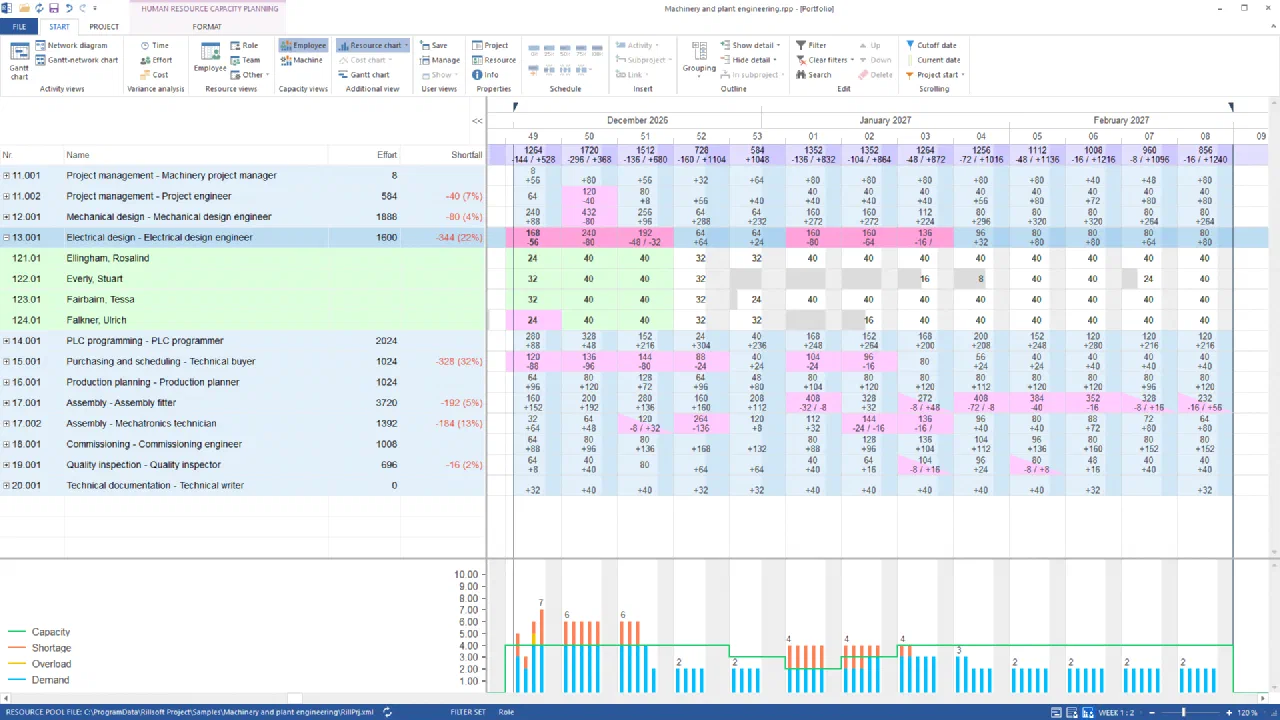
Human resource capacity planning by role, December to February, in hours: seven skills show a red shortfall. Electrical design is short by 344 hours – four people against a demand of up to seven in week 49 and six in weeks 50 and 51; in January holidays halve the capacityGerman UI - Read the report
The AI reads the visible view as a report: per skill and week demand, supply and difference.
Between December and February seven skills are short – and the largest gaps are not in assembly. Electrical design engineer is short by 344 hours (22 % of demand, calendar weeks 49 to 3). Technical buyer is short by 328 hours (32 %, weeks 49 to 2). In assembly, Assembly fitter is short by 192 hours (5 %, peak week 4 with 72 hours). Mechatronics technician is short by 184 hours (13 %, peak week 52 with 136 hours). On top come Mechanical design engineer with 80 hours (4 %, week 50), Project engineer with 40 and Quality inspector with 16 hours. The same hours appear in the shortfall column of the view. The remaining five skills stay within capacity.
- Explain the bottleneck
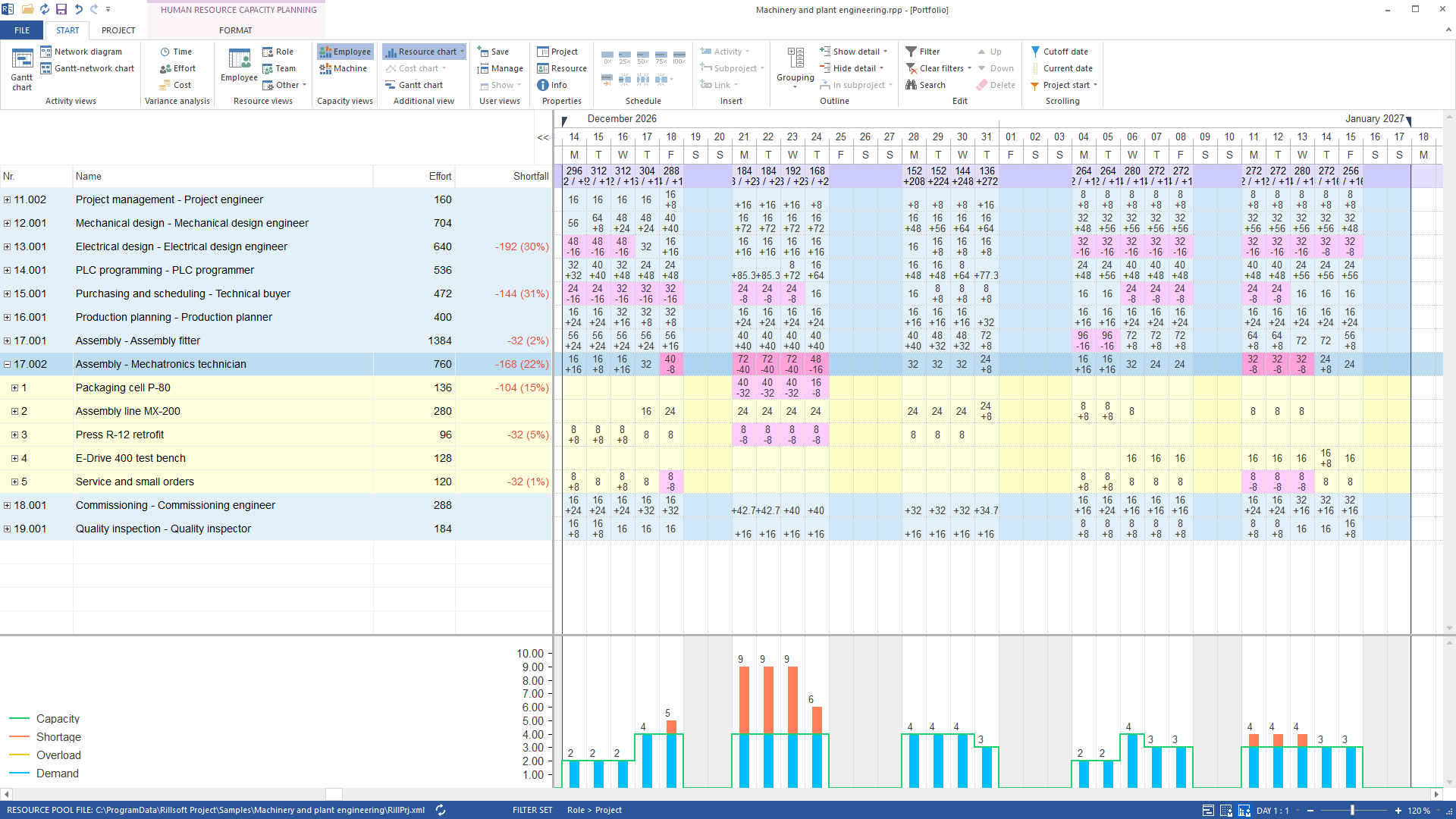
The AI sets the time scale to day 1:1 and the time filter to 14 December through 17 January, groups by role and project and expands the Mechatronics technician row. Four people provide 32 hours a day. From 21 to 23 December 2026 the portfolio asks for 72 hours – nine people. Assembly line MX-200 gets its 24 hours in full. Missing each day are 32 hours in Packaging cell P-80 (demand 40) and 8 hours in Press R-12 retrofit. E-Drive 400 test bench and the base load bind no mechatronics technicians on these days.
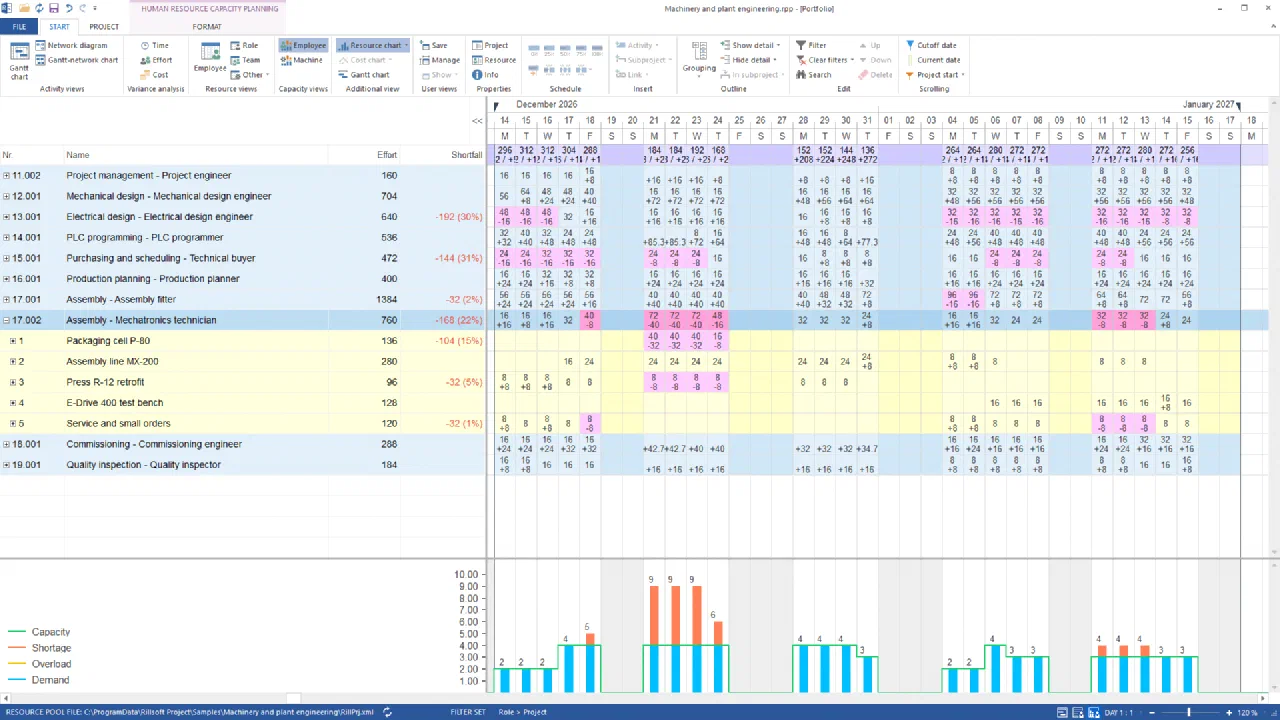
Mechatronics technician row expanded by project, daily scale: from 21 to 23 December five mechatronics technicians are missing each day – 32 hours in Packaging cell P-80, 8 in Press R-12 retrofit; Assembly line MX-200 is coveredGerman UI
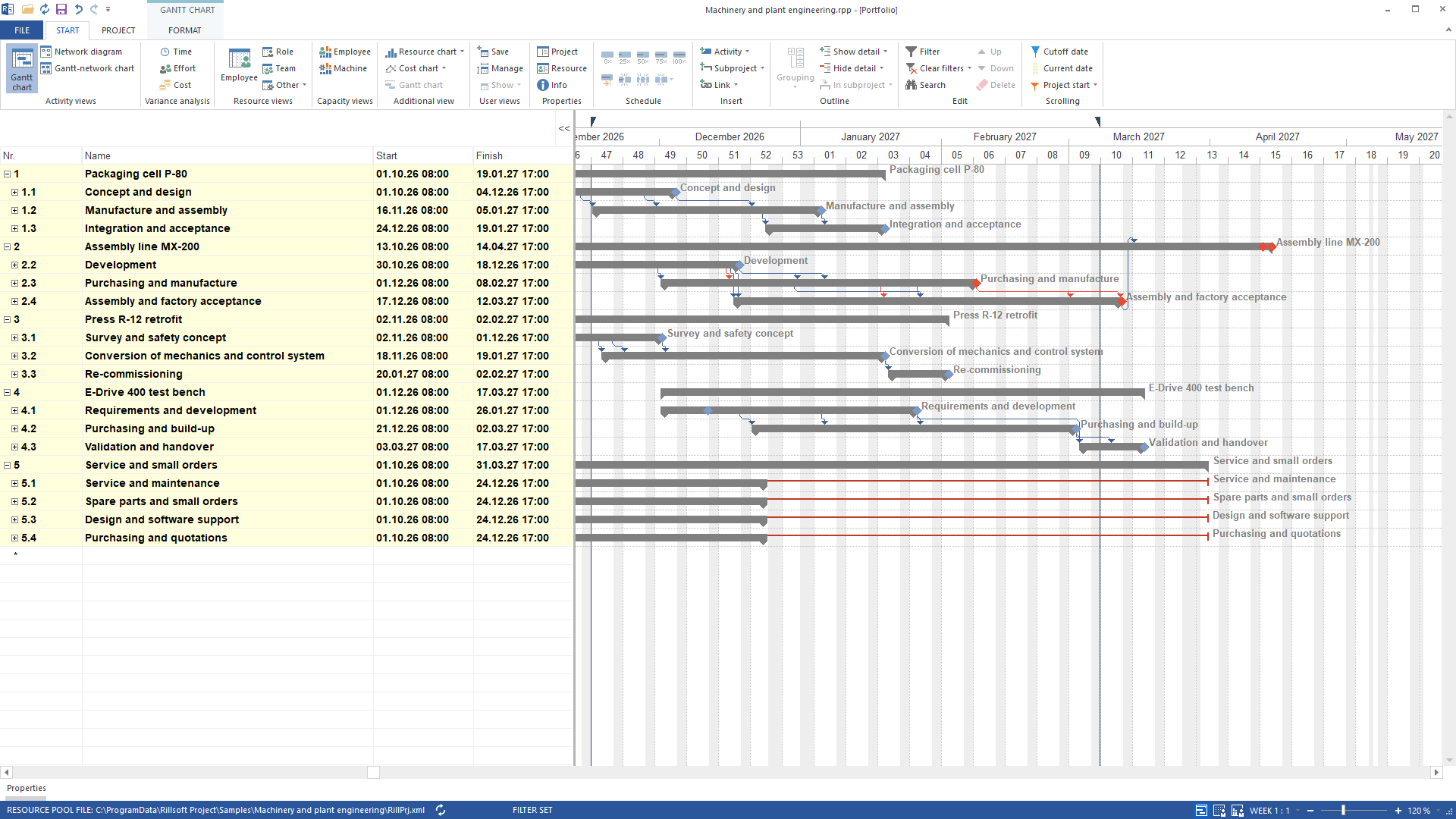
The result
The answer names seven skills with hours, share and calendar week and shows in which projects the hours are missing. For management this means: the bottleneck is not in assembly. It sits in electrical design and technical purchasing in December and January – 344 and 328 missing hours. The assembly gap of 192 and 184 hours is barely half of that; its peak is at the four mechatronics technicians from 21 to 23 December, when Packaging cell P-80 and Press R-12 retrofit need people at the same time.
The options: spread the design and purchasing tasks, move the packaging cell assembly before Christmas or buy capacity. The decision is taken in November, not in December. Without the calculated capacity per skill this would be a list of tasks. Only demand against supply per week turns them into 344 missing hours.
What runs behind it
rillsoft_portfolio_file_open— File or session operation – not an undo steprillsoft_view_state_apply— View – one undo step, changes no project datarillsoft_timescale_apply— View – one undo step, changes no project datarillsoft_outline_apply— Read-only mode is enoughrillsoft_row_selection_apply— Read-only mode is enoughrillsoft_analysis_report_get— Read-only mode is enough
Limits and variants
The sample package ships in German and English with identical figures; the names on this page follow the English package. The capacity view shows shortfall per skill, not the overload of individual people; the personnel view does that. The figures count skill capacity in hours, not heads: a person with two skills appears in both rows. The percentages refer to the demand within the chosen time window – another window gives other shares for the same hours. A portfolio is evaluated, not changed. Read-only mode is not enough for this example: the view switch is an undo step; outline, selection and the report itself are read-only. Related prompts:Reproduce it yourself
Get started- Industry package
02_maschinenbau- Product version
- Rillsoft Project 10 (Build 10.0.623)
- Product language
- English (package Machinery and plant engineering)
- Last verified
- 2026-09-27
- Verification
- Figures and statements verified on the named sample package against the named product build – MCP session, view and report; German and English package with identical figures.