All people, companies and projects shown are synthetic Rillsoft sample data – from the shipped industry packages or, where stated, from a test project.
The question
How is the work in December spread across the job roles, day by day – and on which days is the load highest?
The data
Test portfolio steel and facade construction (test data of Rillsoft GmbH – not part of the delivery; the steps can be reproduced with any project or portfolio of your own whose tasks carry roles): five projects from December 2026 to May 2027 – Aarefeld distribution centre steel structure and building envelope, small orders and service, Kessler hall extension with crane runway, Limmatbogen district school facade refurbishment and Reusspark housing balconies. Three of them run in December. One shared resource pool with roles from seven departments, from project management through detailing, work preparation and production to erection and quality assurance. Effort in hours. The data is German; the AI translates the role names for the English chart, and the English screenshots come from a copy whose resource pool carries the same translated role names. All people and dates are synthetic.The steps
- Ask for the inputs
Before the first call the AI asks for the four inputs that define the chart and repeats them in one sentence: object (the open steel and facade construction portfolio), period (1 to 31 December 2026), time scale (day – one column per day) and time unit (hours, as set in Rillsoft Project).
Role usage for the steel and facade construction portfolio, 1 to 31 December 2026, per day, in hours.
- Set up the role usage view
The AI reads the current view state so that it can restore it at the end. Then, in one step, it switches to the role usage view, grouped flat by role, absolute presentation, time filter on December, and sets the time scale to day.
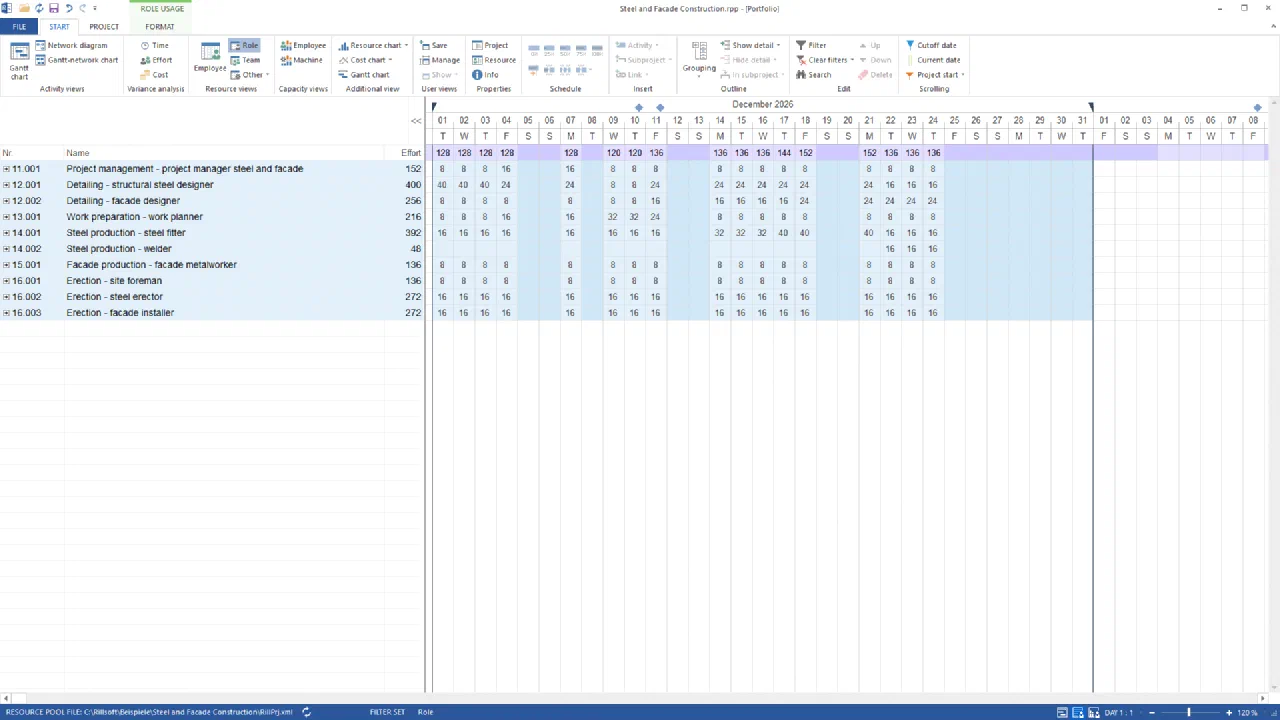
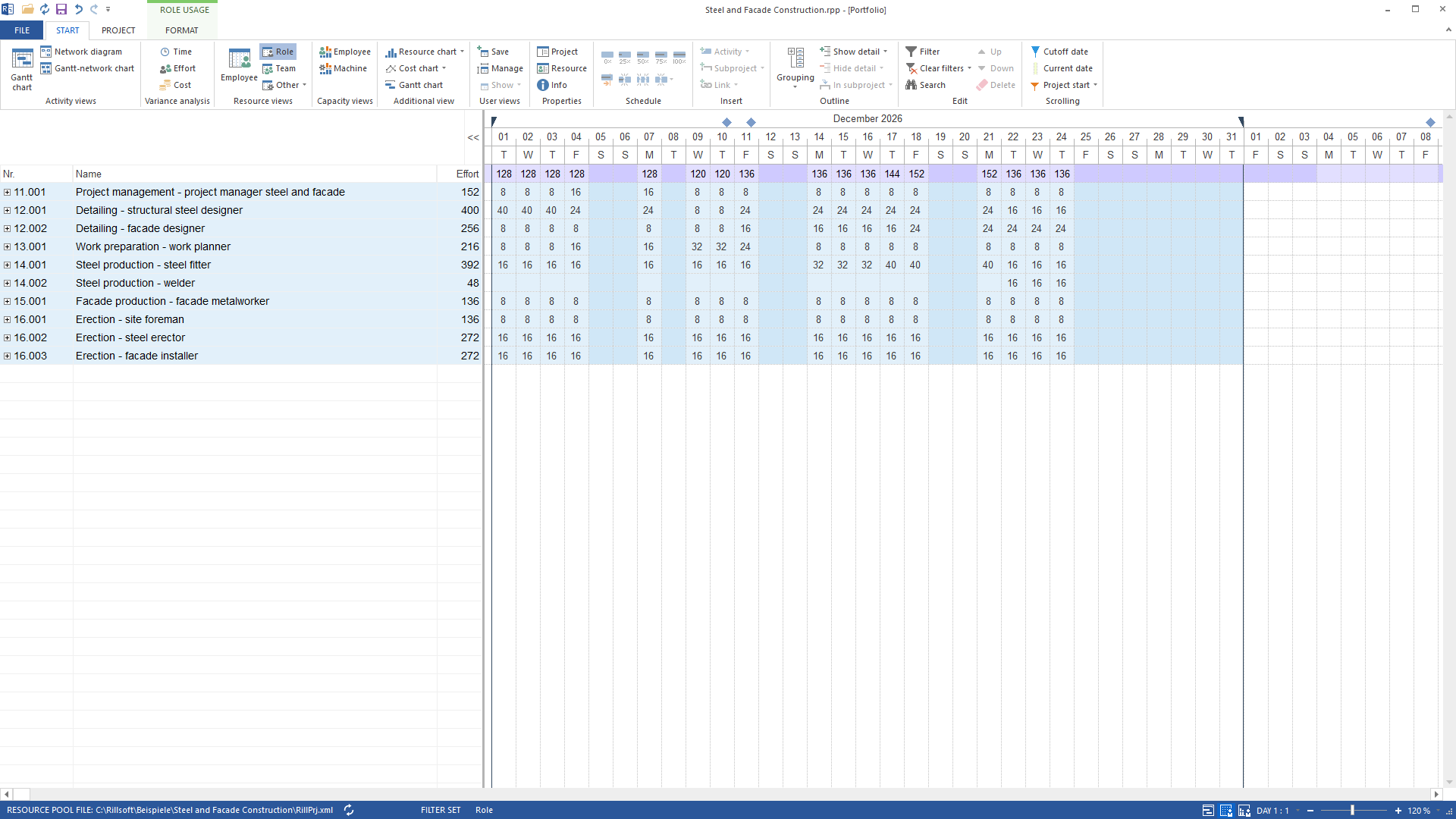
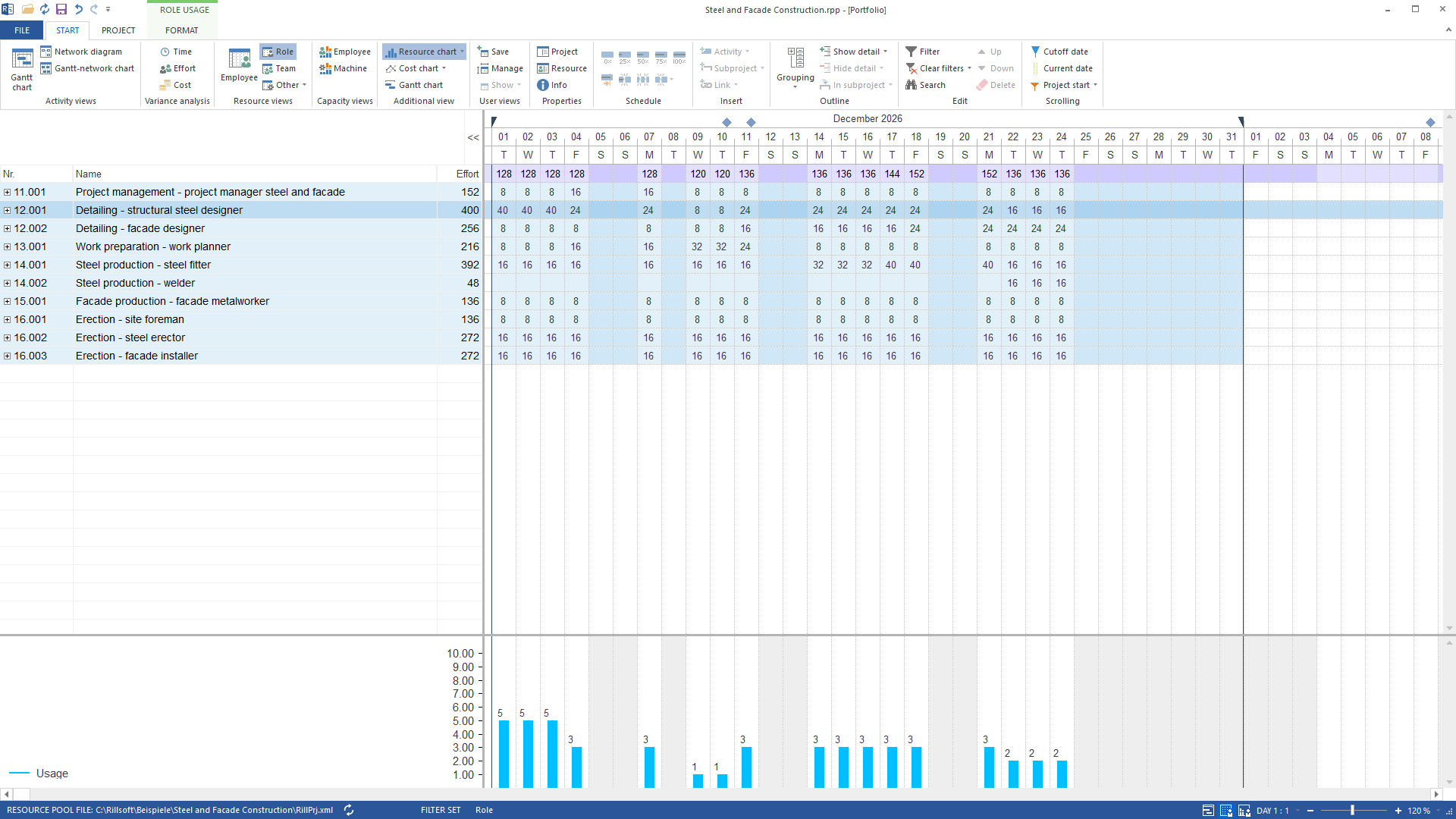
Role usage of the portfolio in December 2026, per day and by role: the totals row at the top is the column height of the later chart, the effort column each role's December total - Read the report
The AI reads the report of the visible view: the list of roles with demand in the period and one value per role and day. Days without demand are not in the report, so the AI builds the 31 days from the period and sets missing days to zero. It recalculates nothing from tasks or durations; it only adds up.
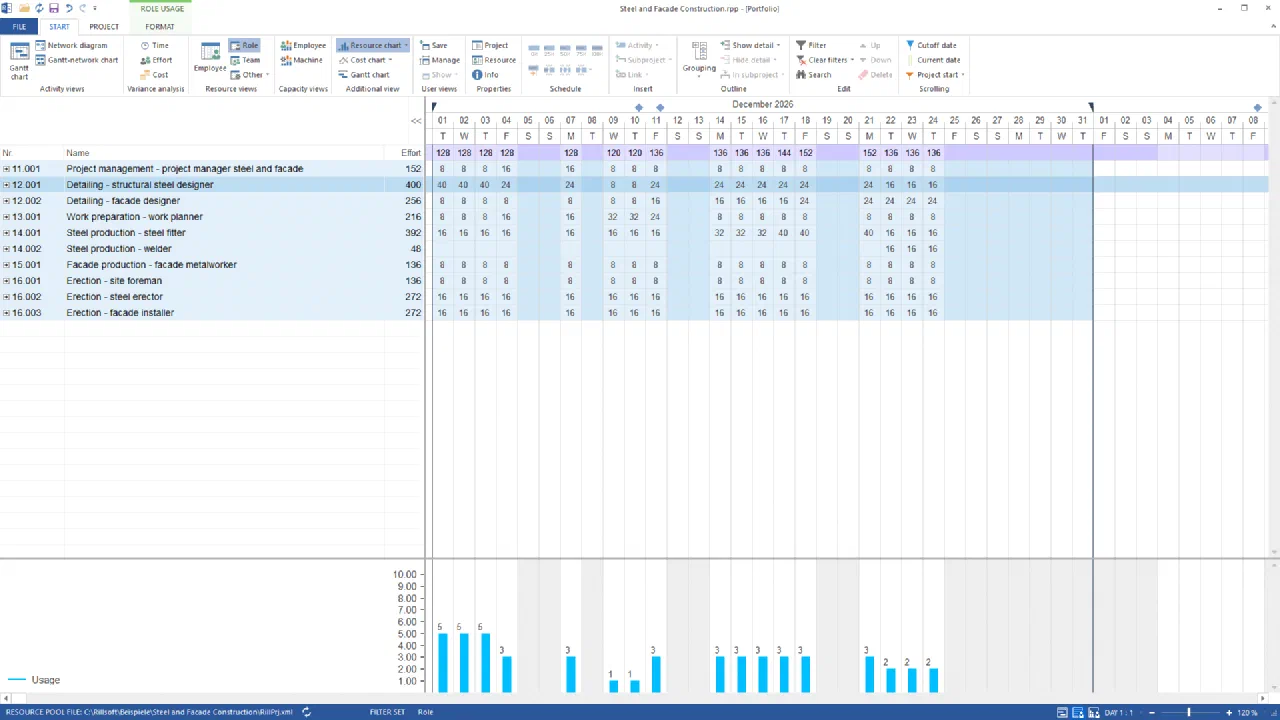
One value per role and day: the selected structural steel detailing needs 40 hours a day from 1 to 3 December, drawn as five people in the resource chart Ten roles, 2,280 hours in total. The largest shares fall to detailing – structural steel designer (400 h) and steel production – steel fitter (392 h), the smallest to steel production – welder (48 h, only 22 to 24 December).
- Draw the chart
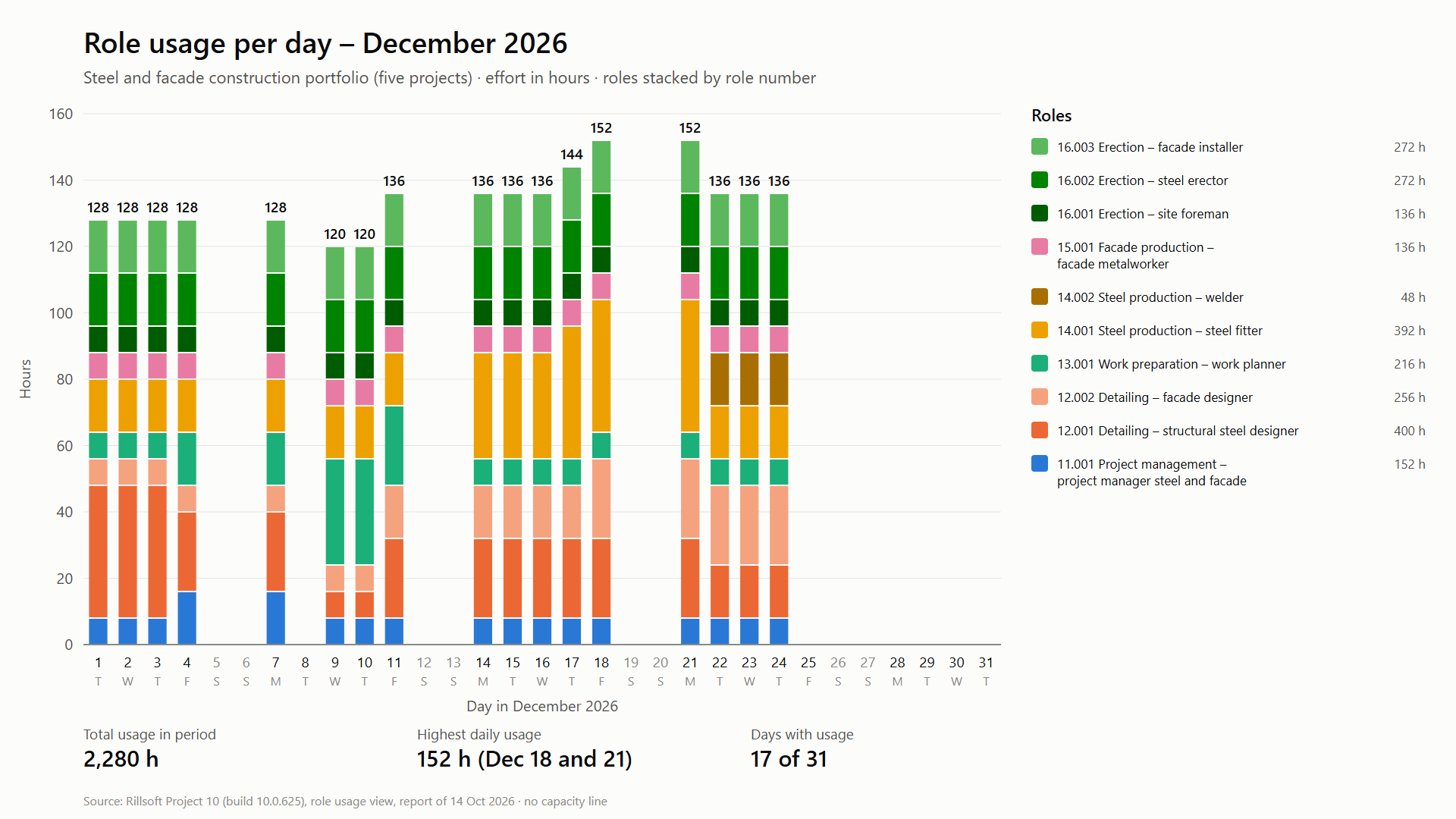
The AI draws the stacked column chart: one column per day, one segment per role in its own colour, stacked by role number, the daily total above each column, the legend on the right with each role’s December total, a footer with three key figures and the source. There is no capacity line. Finally it restores the view state it read; nothing is saved.
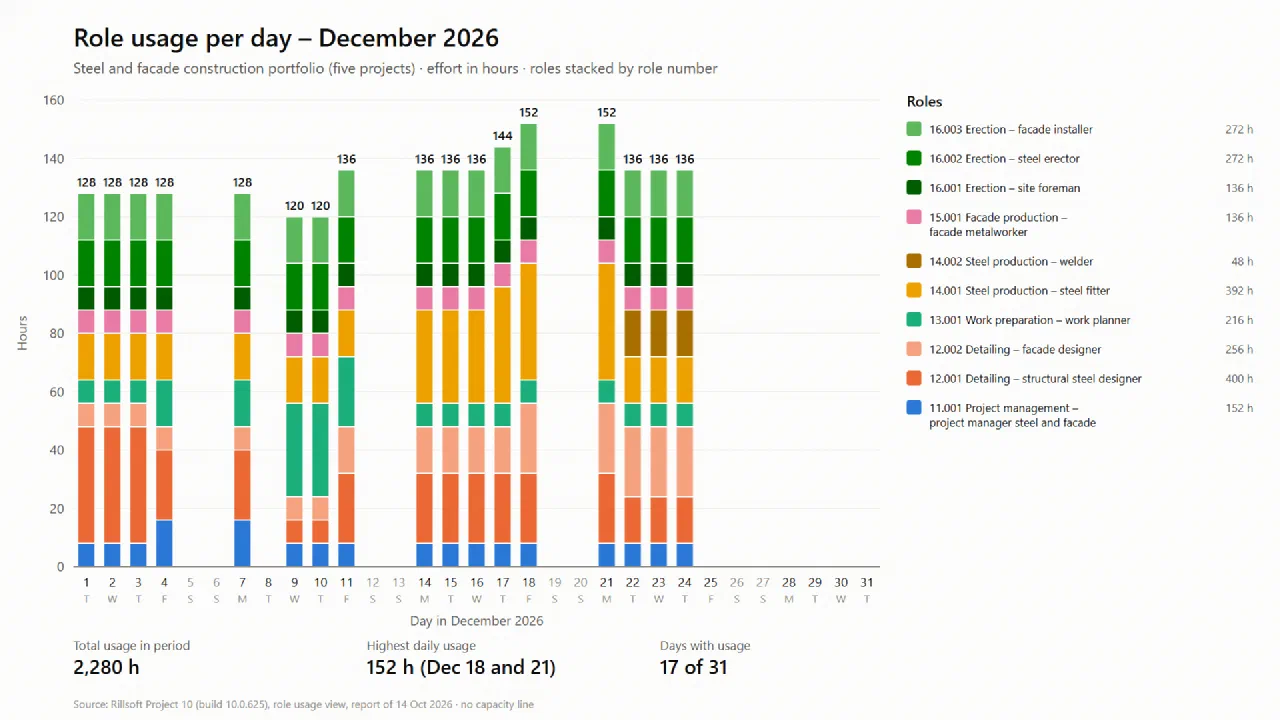
Result of the prompt: role usage in December 2026, stacked by role per day – 2,280 hours, peaks of 152 hours on 18 and 21 December Total usage in December 2,280 hours. Highest daily usage 152 hours on 18 and 21 December. 17 of 31 days with usage.
The result
The chart shows at a glance who carries December: detailing and steel production together account for almost half the hours (1,096 of 2,280), erection with three roles for another 680. The peaks on 18 and 21 December come from detailing, steel fitters and erectors working at the same time; from 22 December the welders join in and structural steel detailing winds down.
Every figure can be checked in Rillsoft Project: with the time scale set to week, the totals row of the role usage shows 512, 504, 704 and 560 hours – the same 2,280 in total. The chart says nothing about capacity or overload; that is what comparing demand with capacity per week is for.
What runs behind it
rillsoft_portfolio_file_open— File or session operation – not an undo steprillsoft_project_tree_get— Read-only mode is enoughrillsoft_view_state_get— Read-only mode is enoughrillsoft_view_state_apply— View – one undo step, changes no project datarillsoft_timescale_apply— View – one undo step, changes no project datarillsoft_analysis_report_get— Read-only mode is enough
Limits and variants
Rillsoft Project does not draw the stacked chart itself; it supplies the values of the role usage, the AI adds them up and draws. The report names no unit – it comes from the program’s effort unit. If the chart is to show person-days instead of hours, the AI switches the unit after asking (rillsoft_project_update, a change) instead of converting with eight hours per day itself, and switches it back afterwards. If the period cuts into a week or a month, the report counts only the part inside the period; the AI marks such edge columns. Beyond about 30 columns the chart becomes unreadable – use a coarser time scale. Read-only mode is not enough, because the view and time scale are changed. Related prompts:Reproduce it yourself
Get started- Industry package
Stahl- und Fassadenbau.rpp- Product version
- Rillsoft Project 10 (Build 10.0.625)
- Product language
- German (test portfolio steel and facade construction)
- Last verified
- 2026-10-14
- Verification
- Figures and statements verified on the named sample package against the named product build – MCP session, view and report; German and English package with identical figures.