All people, companies and projects shown are synthetic Rillsoft sample data – from the shipped industry packages or, where stated, from a test project.
The question
Is the branch's own working group enough for the possession of track 1 (the period in which the track is closed) – and if not: is the skill missing, or only its binding to the site?
The data
Sample project track and turnout renewal at Rheinstadt station (a Rillsoft GmbH rail construction test project – not part of the shipped packages; the steps can be reproduced with any own project that carries a preferred team on a sub-project): 28 people in 13 roles across eleven disciplines, four working groups North A, South B, West and East. The project runs from October 2026 to February 2027 – construction phase 0 prepares, phase 1 closes track 1 from 24 Nov to 18 Dec 2026, phase 2 track 2 in January 2027. For the example phase 1 gets the working group North A as its preferred working group (in the product: preferred team) – the English project file does not carry it yet, the first step sets it: only its people count as capacity. All people and dates are synthetic.The steps
- Set the preferred working group
The AI opens the project, reads the project tree, sets North A as the preferred team of the sub-project construction phase 1 – possession of track 1 (one undo step) and opens its properties.
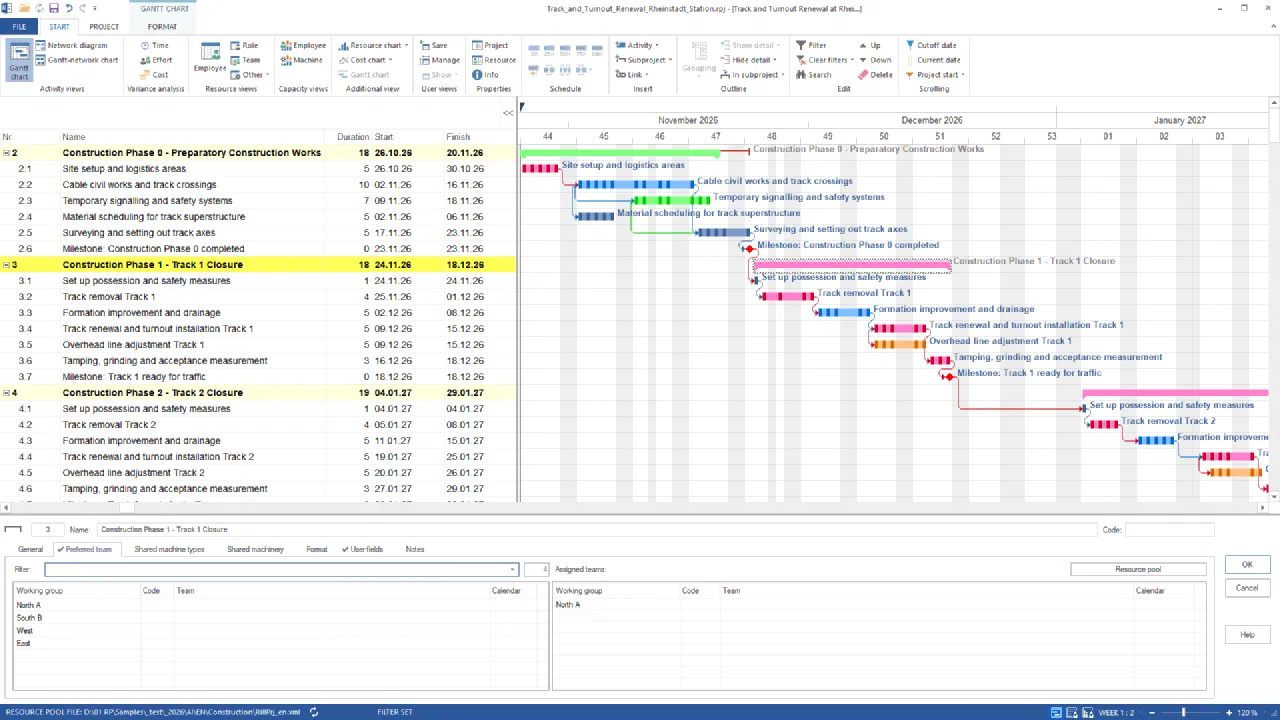
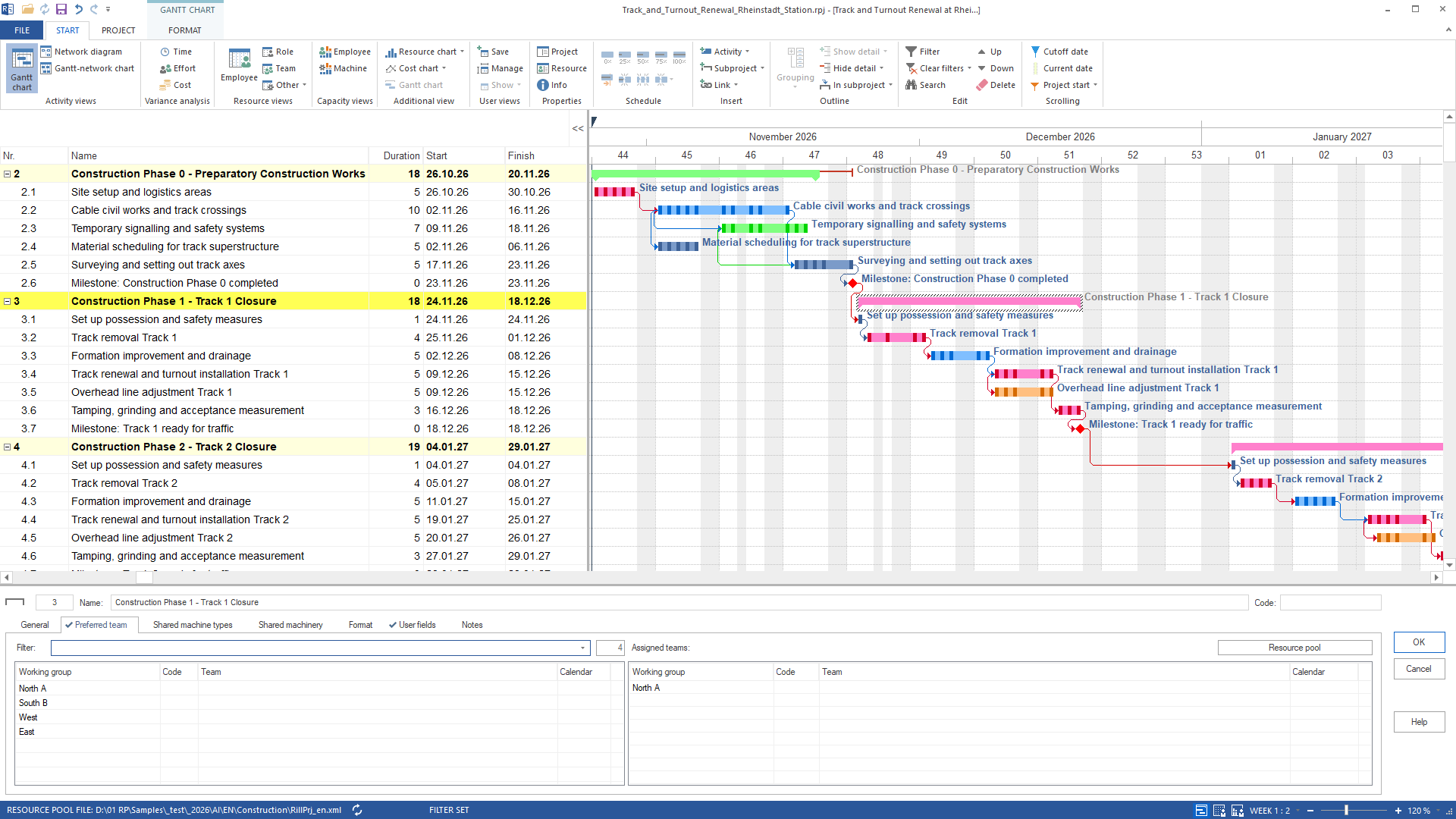
Sub-project construction phase 1 – track 1 closure: on the preferred team tab only North A of four working groups is assigned – the capacity of the possession is calculated from this group Construction phase 1 – track 1 closure runs from 24 Nov to 18 Dec 2026 with six tasks from setting up the possession to tamping, grinding and acceptance measurement, and the milestone “track 1 ready for traffic”. Preferred working group: North A.
- Capacity view by project and role
The AI switches to the human resource capacity planning grouped by project and role, weekly scale, October to January, and reads the report.
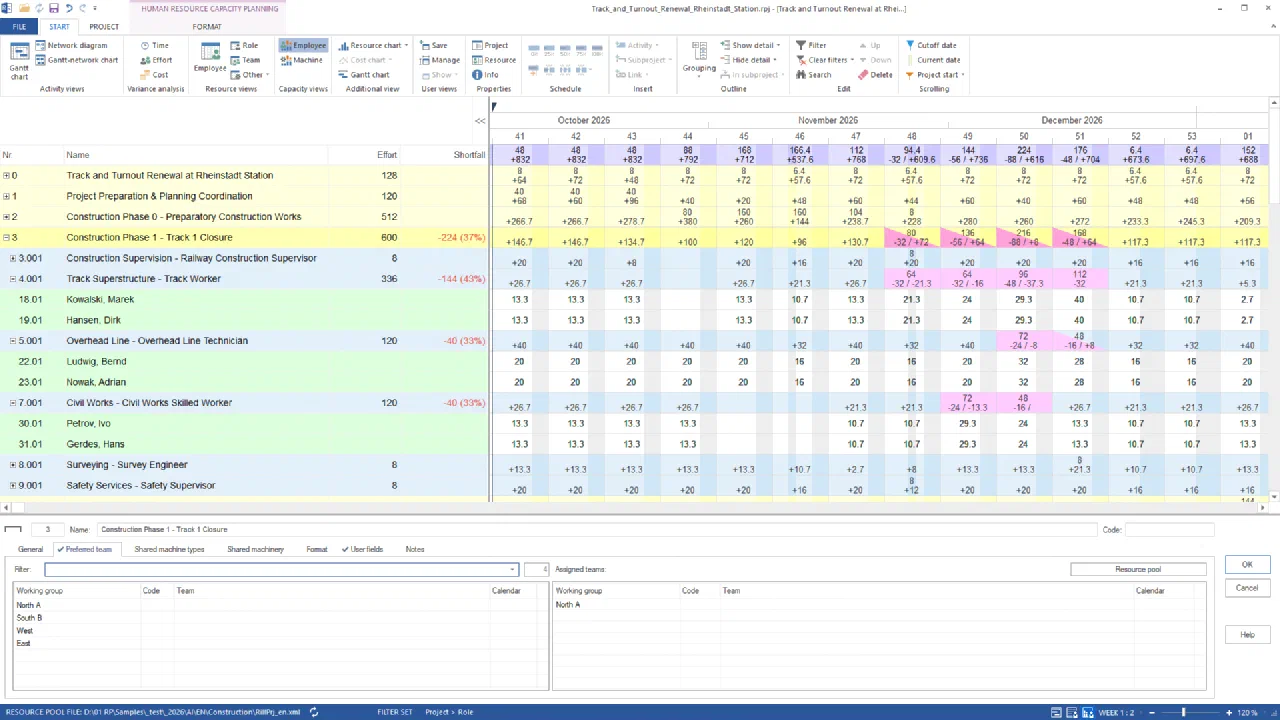
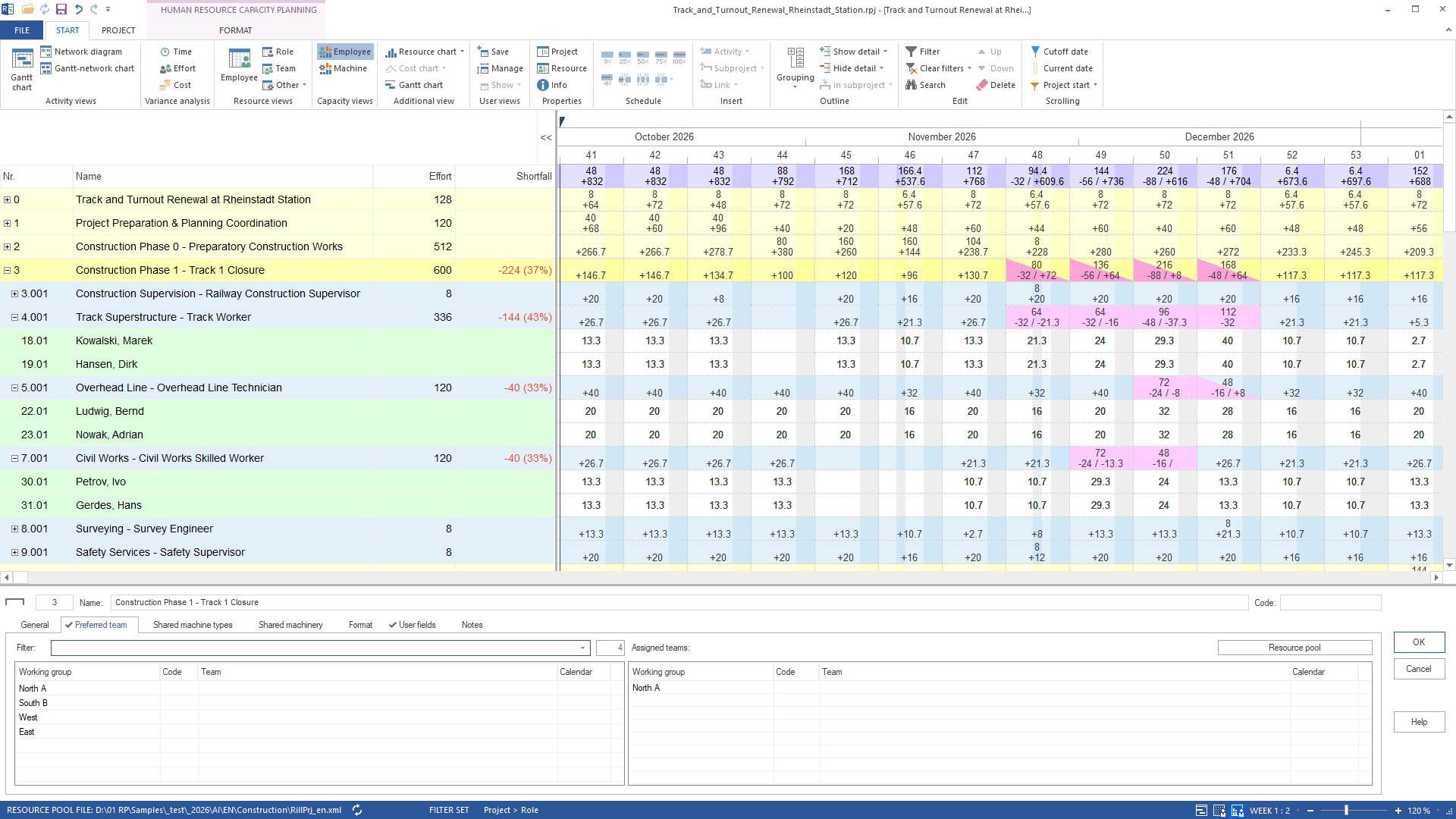
Capacity planning with preferred working group North A: phase 1 is short by 224 hours – three roles with two people each carry the gap Construction phase 1 is short by 224 hours, 37 % of its demand of 600 hours. Track workers are short by 144 hours (43 %): 32 in calendar week 48, 32 in week 49, 48 in week 50, 32 in week 51. Overhead line is short by 40 hours (24 in week 50, 16 in week 51), civil works by 40 hours (24 in week 49, 16 in week 50). Only North A counts as capacity: two people per role.
- The bottleneck in the chart
The AI opens the resource chart below the table for the row track workers; it draws this role only, per day.
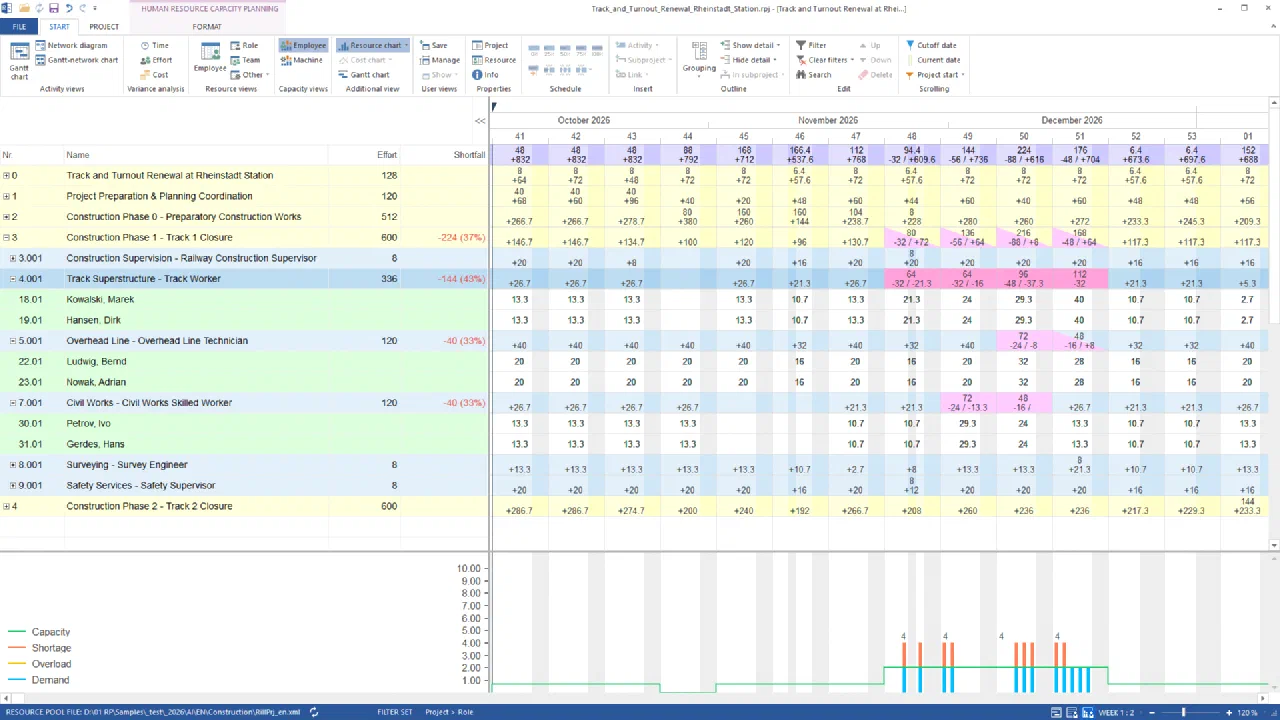
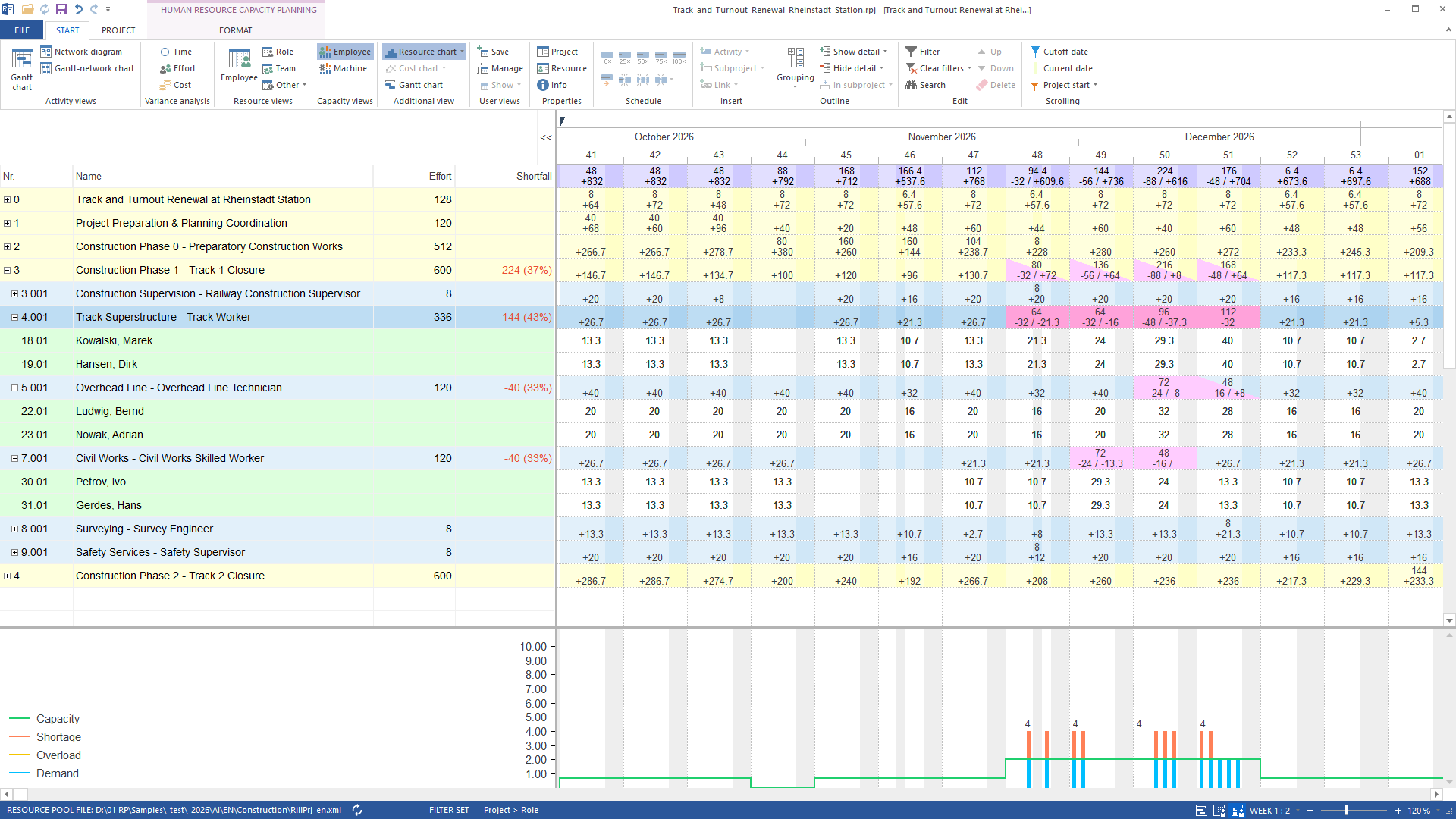
Resource chart of the track workers: track removal (25 Nov to 1 Dec) and track renewal with turnout installation (9 to 15 Dec) need four per day against a capacity of two – the orange bars are what North A cannot cover Track removal from 25 Nov to 1 Dec and track renewal and turnout installation from 9 to 15 Dec each need four track workers per day against a capacity of two. The gap is two per day – in hours 144 across weeks 48 to 51. Tamping, grinding and acceptance measurement from 16 to 18 Dec need two and are covered. The people of North A on this row are Kowalski and Hansen.
- Cross-check without the working group binding
The AI removes the preferred working group from the sub-project – one undo step – and reads the same view again.
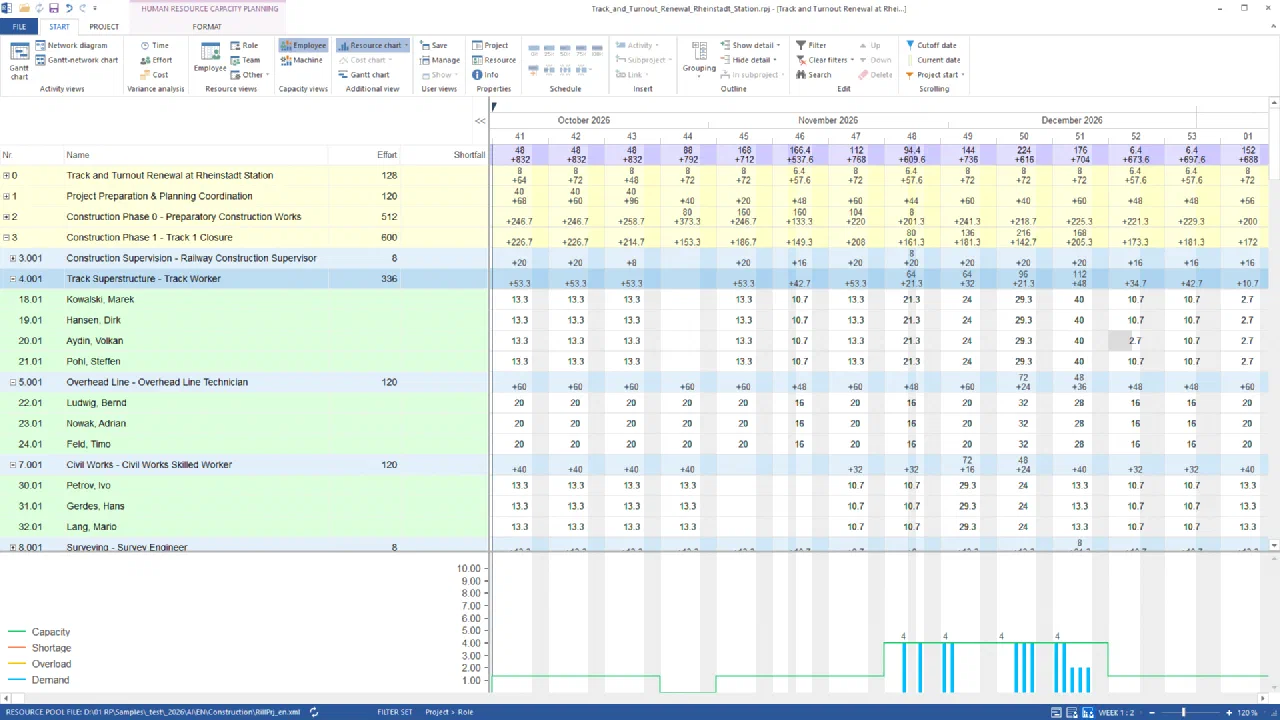
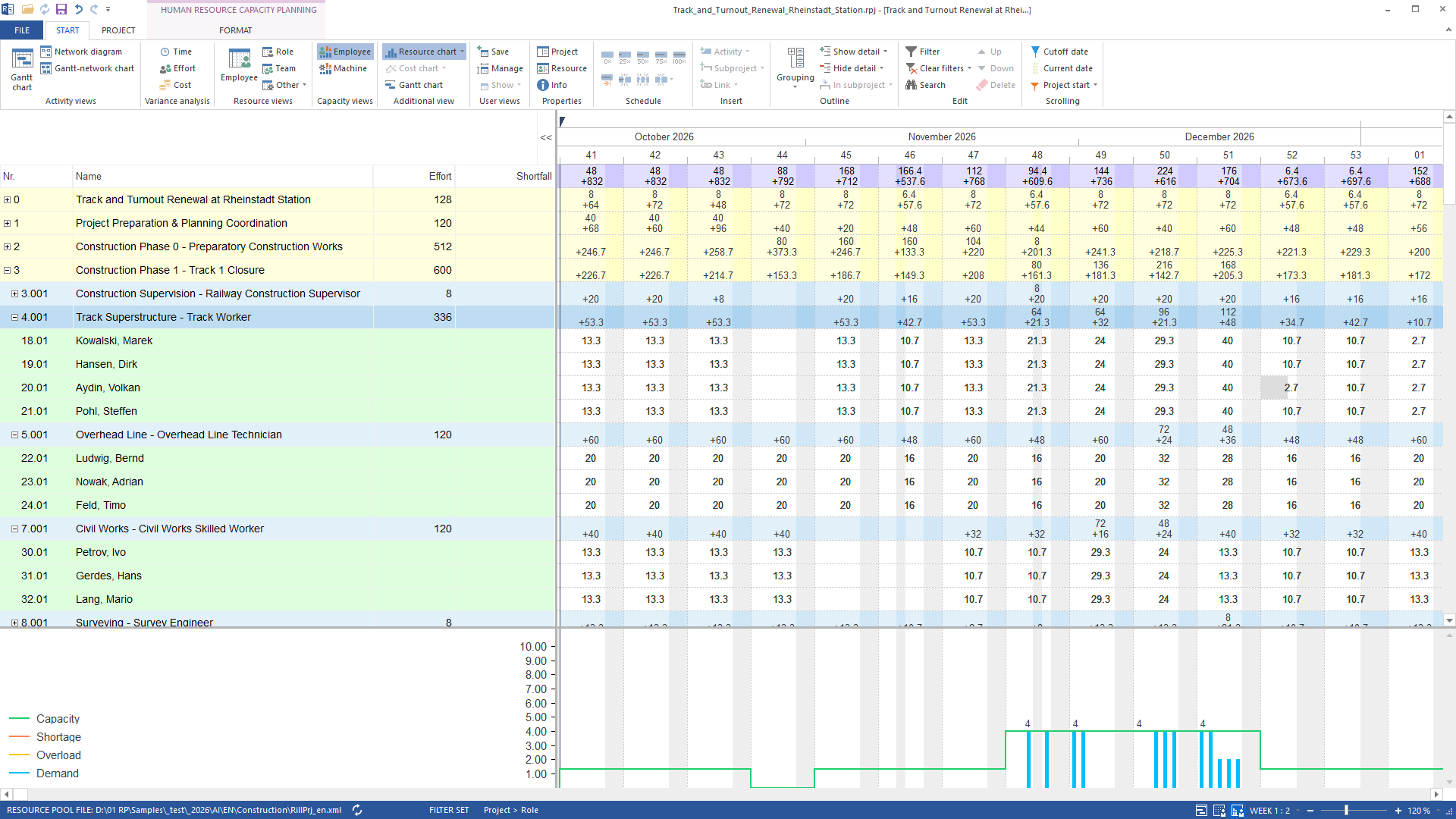
Without the working group binding the capacity is sufficient: four track workers, three overhead line technicians, three civil works specialists – the shortfall was the site, not the skill Without the binding to North A phase 1 is covered: the capacity line of the track workers rises to 4 per day and meets the demand, the row shows a surplus in every week (+21.3, +32, +21.3, +48 hours in weeks 48 to 51); overhead line and civil works count three people each. The bottleneck is not the skill but the working group – Aydin and Pohl belong to working group West. One undo restores the preferred working group.
The result
The answer separates two questions that look the same in the capacity view: is the skill missing, or is it only missing in the preferred working group? For management: the possession of track 1 cannot be run with North A alone – 144 track-worker hours are missing across the four possession weeks, two people per day. With the two track workers from West it is covered. Whether the working group on the sub-project is opened or two people from West are assigned deliberately is the planner’s decision, not the filter’s. Without capacity per role both cases would be one red row; only demand against the working group’s supply shows that two track workers are missing – and where they are.What runs behind it
rillsoft_project_file_open— File or session operation – not an undo steprillsoft_project_tree_get— Read-only mode is enoughrillsoft_project_team_preference_set— Changes the project (one undo step)rillsoft_property_panel_open— Read-only mode is enoughrillsoft_view_state_apply— View – one undo step, changes no project datarillsoft_timescale_apply— View – one undo step, changes no project datarillsoft_row_selection_apply— Read-only mode is enoughrillsoft_analysis_report_get— Read-only mode is enoughrillsoft_project_team_preference_remove— Changes the project (one undo step)rillsoft_history_undo— File or session operation – not an undo step
Limits and variants
The preferred working group acts on the sub-project as a capacity filter: the capacity view counts only its people, demand stays the same. Removing it is a change to the project – one undo step, no file write; saving happens only on explicit request. The weekly hours per person refer to the open project, pro rata for people with several projects; the package carries no absences. Read-only mode is not enough for steps 1 and 4 (setting and removing the working group are changes); steps 2 and 3 run read-only once the view is set. Preferred teams in Rillsoft Project are described on the product page. Related prompts:Reproduce it yourself
Get started- Industry package
AI/EN/Construction- Product version
- Rillsoft Project 10 (Build 10.0.623)
- Product language
- English (test project rail construction)
- Last verified
- 2026-09-27
- Verification
- Figures and statements verified on the named sample package against the named product build – MCP session, view and report; German and English package with identical figures.