What do I need?#
- Rillsoft Project version 10 on Windows; earlier versions have no MCP server.
- An AI client or a script that speaks the Model Context Protocol over Streamable HTTP in protocol revision 2025-06-18. Older revisions are not accepted by the server.
- For the first steps a shipped industry example; all data in it is synthetic.
Set up in three steps#
Start the server, point the client at the endpoint, check one read-only call – the first contact needs nothing more. Every step can be reverted on its own, and no step changes a project.
Enable the server#
| Way | Effect |
|---|---|
RillPrj.exe /mcp | server on 127.0.0.1:3928 for this session |
RillPrj.exe /mcp:8123 | server on 127.0.0.1:8123 |
| Settings → MCP server → “enable” | server starts immediately and at every program start on the configured port |
| no flag, setting inactive | no listener, no open port |
The start flag overrides the settings for the session and suppresses the start screen and the auto-recovery prompt so that an unattended start does not hang on a dialog. The status line on the settings page shows whether the server is running, running via flag, blocked (port in use, probably a second instance) or inactive.
Connect a client#
The endpoint is http://127.0.0.1:<port>/mcp – the path is exact, even
/mcp/ is a 404. Configuration of an MCP client:
{
  "mcpServers": {
    "rillsoft-project": {
      "type": "http",
      "url": "http://127.0.0.1:3928/mcp"
    }
  }
}
With an API key set, one header is added:
{
  "mcpServers": {
    "rillsoft-project": {
      "type": "http",
      "url": "http://127.0.0.1:3928/mcp",
      "headers": { "Authorization": "Bearer <KEY>" }
    }
  }
}First safe test#
No call works without initialisation. Three messages are enough, and none of them changes the project:
initialize– the server assigns a session; the id is in the response headerMcp-Session-Id.notifications/initialized– the confirmation unlocks the tools. From now on every request carriesMcp-Session-IdandMCP-Protocol-Version.tools/list– the contract: every tool with title, description, input and output schema. A first read-only call isrillsoft_project_tree_get, the complete computed project tree.
Every tool answer delivers the result twice: as plain text in
content[0].text and machine-readable in structuredContent. At the end a
DELETE /mcp with the session id ends the session.
The three steps as curl calls in Git Bash
# 1. initialize – the session id is in the response header
MCP_SESSION=$(curl -s -i -X POST http://127.0.0.1:3928/mcp \
  -H "Content-Type: application/json" \
  -H "Accept: application/json, text/event-stream" \
  -d '{"jsonrpc":"2.0","id":0,"method":"initialize","params":{"protocolVersion":"2025-06-18","capabilities":{},"clientInfo":{"name":"curl","version":"1.0"}}}' \
  | tr -d '\r' | awk -F': ' 'tolower($1)=="mcp-session-id"{print $2}')

# 2. from now on every call carries session and protocol revision
mcp() { curl -s -X POST http://127.0.0.1:3928/mcp \
  -H "Content-Type: application/json" \
  -H "Accept: application/json, text/event-stream" \
  -H "Mcp-Session-Id: $MCP_SESSION" \
  -H "MCP-Protocol-Version: 2025-06-18" -d "$1"; }

# 3. the confirmation unlocks the tools
mcp '{"jsonrpc":"2.0","method":"notifications/initialized"}'

# the contract: every tool with title, description, input and output schema
mcp '{"jsonrpc":"2.0","id":1,"method":"tools/list"}'

# a first read-only call: the complete computed project tree
mcp '{"jsonrpc":"2.0","id":2,"method":"tools/call","params":{"name":"rillsoft_project_tree_get","arguments":{}}}'
How is access protected?#
The API key is optional. Empty means: no authentication. If a key is set in
the settings, every request – regardless of how the server was started –
requires Authorization: Bearer <KEY>, otherwise the server answers 401.
The comparison runs in constant time. The key is needed on multi-user and
terminal-server machines, because 127.0.0.1 is machine-wide, not
session-wide.
What do read-only mode and licence cover?#
In read-only mode tools/list shows exactly the tools of the access class
read-only: no task, no assignment, no date, no file, no undo step.
Mutating calls – including file, pool and undo tools – return a clear tool
error without touching the project.
Some read-only tools visibly change something: the window tools only the window, the display tools the view state that is saved with the project file (columns, outline, selection). The project counts as modified afterwards. The description of each of these tools states this effect.
Most tools check no licence; they are as open as the document model. Four follow the licence like their counterpart in the user interface: the candidate list, the assistants “assign staff” and “remove staff”, and the role derivation. If the function is missing from the licence, they return an error instead of working silently.
What you see is what the AI gets#
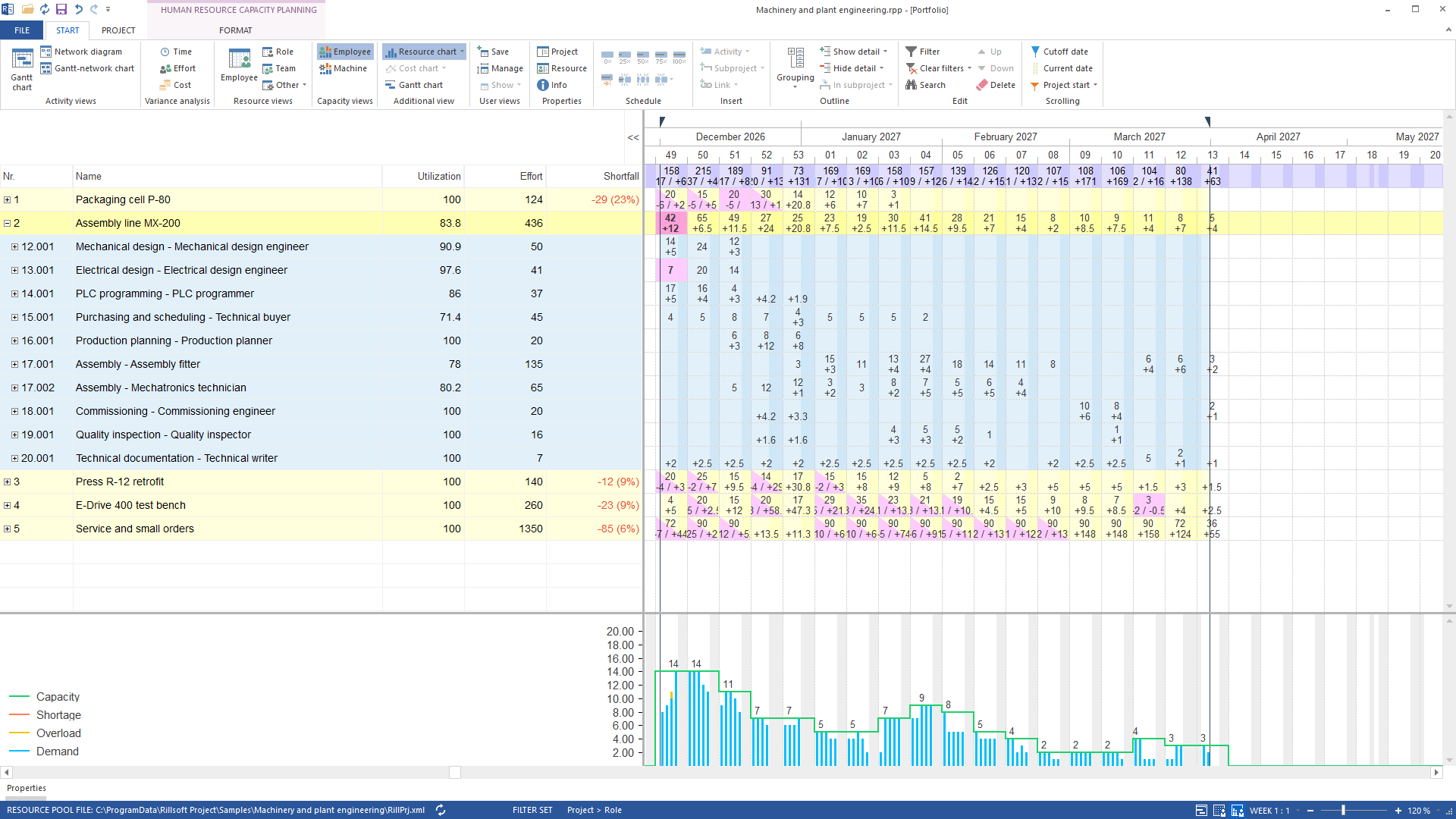
The capacity report computes nothing itself. It serialises the visible, already computed view: period from the time filter, grid from the calendar scale, metric from the selected display. Every perspective the AI sets is on screen at the same time – and one Ctrl+Z restores view, structure, time filter and display together. The same applies to every mutation: if Rillsoft Project detects a conflict on completion, it rolls back itself and the tool reports the reason with the project unchanged.
Without AI: scripts and integrations#
Not a chat plug-in but access to Rillsoft Project as a whole – with or without
AI, by script, with sample data included. The same endpoint works without an AI
assistant. The mcp function from the
curl example above already is a script; in PowerShell a call looks like this:
$body = @'
{"jsonrpc":"2.0","id":1,"method":"tools/list"}
'@
curl.exe -s -X POST http://127.0.0.1:3928/mcp `
  -H "Content-Type: application/json" `
  -H "Mcp-Session-Id: $env:MCP_SESSION" `
  -H "MCP-Protocol-Version: 2025-06-18" -d $body
Typical uses: mirror absences from the leave system into the resource pool on a rolling basis, pull capacity and plan/actual reports on a schedule, generate projects from templates, set a view reproducibly for a screenshot. Every tool describes input and output as a complete JSON schema; both are enforced at runtime. Field names are English and identical in both directions, so an answer can be passed on to the next call without renaming.
Two pitfalls when starting automatically: start Rillsoft Project from
PowerShell or cmd, because a POSIX shell such as Git Bash rewrites the /mcp
flag into a path. And the server listens only a few seconds after the program
has started.
How fast does the server respond?#
Measured on the largest shipped sample project of the plant engineering package with 650 elements, 637 dependencies and about 1,500 assignments, in the debug build on the reference machine:
| Operation | Time |
|---|---|
| open the project | 7.8 s (control measurement on another machine: 6.6 s) |
| read the complete tree | 2.0 s (control measurement: 1.1 s) |
| memory after opening | 102 MB |
| mutating call | about 0.4 s on this project, about 0.16 s on a small one |
Working with a finished project is uncritical. Only the scripted construction of large projects is slow, because every mutating call creates a complete undo snapshot; the whole plant engineering package with twelve projects takes about 16,700 calls.
What about several instances?#
Rillsoft Project is a single-document application: one instance, one
project, one port. The server binds exclusively to its port; a second
instance on the same port fails at start and reports this in the status line.
For parallel projects every instance gets its own port (/mcp:3928,
/mcp:3929, …) and its own server entry in the client. There is deliberately
no automatic port search – the client must know which instance it addresses.
There is no project directory and no addressing by project id; a project is
opened by its file path.
How does the server report errors?#
Protocol errors and business rejections are separate: the caller cannot correct a protocol error, but builds the second attempt from a business rejection.
| Case | Answer |
|---|---|
Origin header present | HTTP 403 |
API key set and Authorization wrong | HTTP 401 |
path not exactly /mcp | HTTP 404 |
request after initialize without session or protocol revision | HTTP 400 |
| unknown or expired session (30 minutes idle) | HTTP 404 – start again with initialize |
| arguments violate the input schema | JSON-RPC -32602 with field path, e.g. arguments.timescale.level |
| unknown UUID, conflict, lock, licence, read-only | result.isError: true with plain text and a stable code in _meta.errorCode |
The error text is an agent’s self-correction channel. It names the field path, the permitted values or the tool that establishes the missing state. Next to it stands a stable English error code that is the same in the German, English and Russian language versions – a retry rule is built on the code, not on the wording. At most 32 sessions run concurrently; JSON-RPC batches are rejected.
If no port opens after a hard program end: the auto-recovery dialog waits for
an answer when the server was started via the setting rather than the flag.
Answer the recovery files *.mbk under %TEMP%\Rillsoft or remove them
beforehand for scripted runs.
Reference: the ten tool areas#
The six cards above summarise; in full, the tools cover ten areas – the grouping of the product documentation. The contract per tool – schemas, access classes, error codes – is described on the developers page; what an area looks like in practice is shown by the linked examples.
| Area | What a client does with it |
|---|---|
| Read the project and its conflicts | read the complete computed status with dates, float, critical path and assignments; plus the six warning lists of the info panel: delayed, overloaded, lost, unassigned or partially assigned, cross-project |
| Analyse capacity | set the resource and capacity view and read it as a report – demand against supply per role, team, person, machine, material (example: find a resource bottleneck) |
| Staff | candidates per task with availability, free capacity, cost and schedule conflict; assistants for many tasks |
| Multi-site planning | preferred team on the subproject, open the candidate filter, staff across sites (example: staff across sites) |
| Build the project | create subprojects, tasks, dependencies, roles, people, machines, material; restructure, split, schedule |
| Baseline and plan/actual | create and select baselines, read the three comparison views for time, effort and cost (example: compare the plan with its baseline) |
| Actual data | progress per task, status date, status-date scheduling, progress derivation |
| Resource pool | read master data; open a work unit, maintain master data, mirror absences, calendars with holiday source, save once |
| Portfolio | open a portfolio without dialogs and evaluate the projects it contains |
| Session and display | undo and redo, open and save files, control window layout, columns, outline, property panel |
Next step#
The prompt library shows sixteen questions with prerequisites, tool chain and limits. The contract with schemas and error codes is on the developers page. If you want to feel it first, begin with getting started.
Technical questions
The questions that come before the first call
What is an MCP server?
An MCP server offers tools to an AI assistant via the Model Context Protocol – here the tools of the running Rillsoft Project: project structure, dates, resources, capacity, baseline. The AI calls them and reads the calculated plan; Rillsoft Project does the calculating.
Can I evaluate only, without any risk of changes?
Yes. In read-only mode the server offers read-only tools only; mutating calls are rejected with a clear error. A few display tools change the view state that is saved with the project – their description says so.
Which AI clients work?
Any client that speaks the Model Context Protocol over Streamable HTTP in revision 2025-06-18. We have verified the connection with Claude and Codex; the configuration is under Get started.
Do I need a special licence?
Not for reading and evaluating. The candidate list, the staffing assistants and the role derivation follow your licence like their counterparts in the user interface.
Does it work with a portfolio?
Open and evaluate yes, change no. The capacity view across projects is readable; structural changes in a portfolio are rejected by the server, and the portfolio file is never written.
Does it run in English or Russian too?
Yes. Tool names, schemas and error codes are identical in all three language versions; messages follow the language of the installed Rillsoft Project.
- Product version
- Rillsoft Project 10
- Verification
- Details from the Rillsoft Project 10 product documentation (as of 2026-09-08); reconciliation with the released build is pending.