All people, companies and projects shown are synthetic Rillsoft sample data – from the shipped industry packages or, where stated, from a test project.
The prompt
Which actions should be initiated now? In Rillsoft Project derive actions from the dashboard figures – per project from moving commitments (with the delayed tasks before them), progress gap and share of the shortfall with the largest role, plus per role with a shortfall from its shortfall and for the bottleneck role from the candidates without schedule conflict. First ask me for portfolio, period and unit; the reference date is the status date. Give per action the triggering figure, the question and the rank (projects in the order of the attention list, then roles). Mark every action as a proposal, execute nothing and calculate no effect. Undo every plan change and save nothing.Changes the project (one undo step) Licence-dependent function
Show the detailed prompt
Create an action plan from the figures of the management dashboard in Rillsoft Project.
First ask me for:
- Scope: portfolio (name the open one and let me confirm),
- Period: start and end for the resources (if I give none, suggest the project period),
- Unit: name the one set in the project,
- Thresholds: schedule amber up to 5, red above 5 working days; progress amber above 5, red above 15 percentage points; resources amber above 0, red above 10 percent – ask whether they apply.
The reference date is the status date; name it.
Data in one pass:
- Per project: commitments (fixed milestones from the reference date) with the shift from the negative start float in working days and the delayed tasks before them; progress gap via recalculation at the reference date with undo; share of the shortfall from the capacity comparison per role and per role and project on the day scale with the largest role; ranking as in the attention list.
- Per role: shortfall from daily values; for the role with the largest shortfall the open tasks on bottleneck days and the candidates without schedule conflict from the candidate list.
- Reset the view, undo every plan change, assign nobody, save nothing.
Actions, each from one figure and marked as a proposal:
- moving commitment: agree the date with the client or accelerate the delayed tasks before it;
- progress gap: update actual progress, prioritise the tasks with the largest gap;
- share of the shortfall: move tasks of the largest role out of the bottleneck days or secure capacity;
- role with a shortfall: increase capacity or move demand; for the bottleneck role name the candidates without schedule conflict.
Rank: projects in the order of the attention list, per project schedule before resources before progress, then the roles by shortfall. Calculate no effect.
Report:
1. Header with scope, reference date, period and source.
2. Key findings with figures: number of actions and red ones; actions of the first project; the bottleneck role; the note that everything is a proposal.
3. Table of the actions: rank, for, action, triggering figure, question, light.
4. Table per project: rank, lights schedule, progress, resources with values, overall.
5. Table of the roles with a shortfall.
6. Data and rules.In your words
- Steering committee: What do we have to decide this week? Actions from the dashboard, each with the figure that triggers it, in the order of the attention list.
- One project only: Which actions does Assembly line MX-200 need now – schedule, progress, resources – with the figures behind them?
- Roles only: Actions only on the roles with a shortfall: shortfall per role, and for the bottleneck role the candidates without schedule conflict.
What you need
- An open portfolio with fixed milestones as commitments, dependencies, maintained actual progress, a set status date and roles with people.
- Write access for the MCP server, because the planned progress needs a recalculation with undo; the plan stays unchanged.
- A licence with resource management for the candidate list of the bottleneck role.
What you get
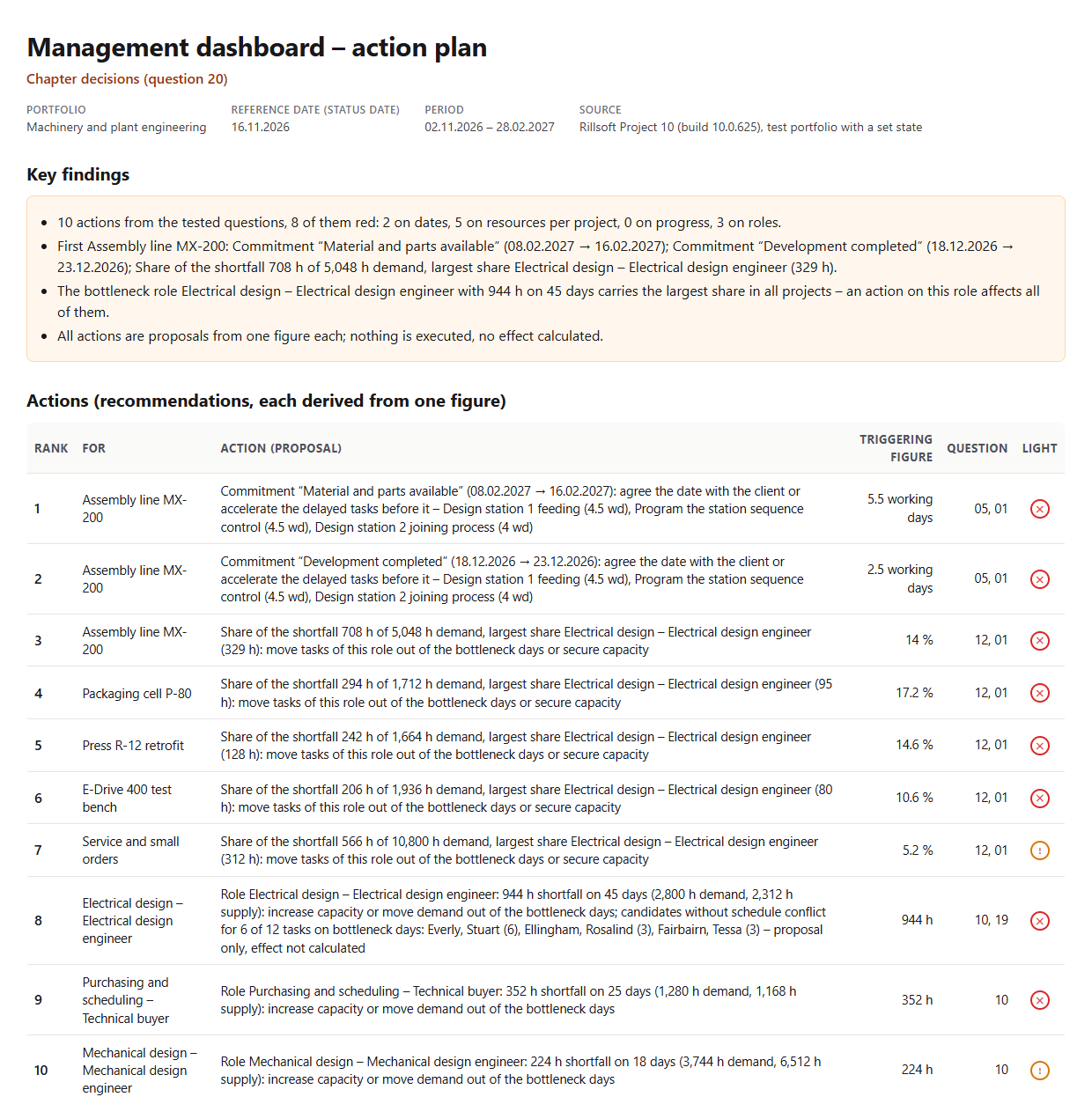
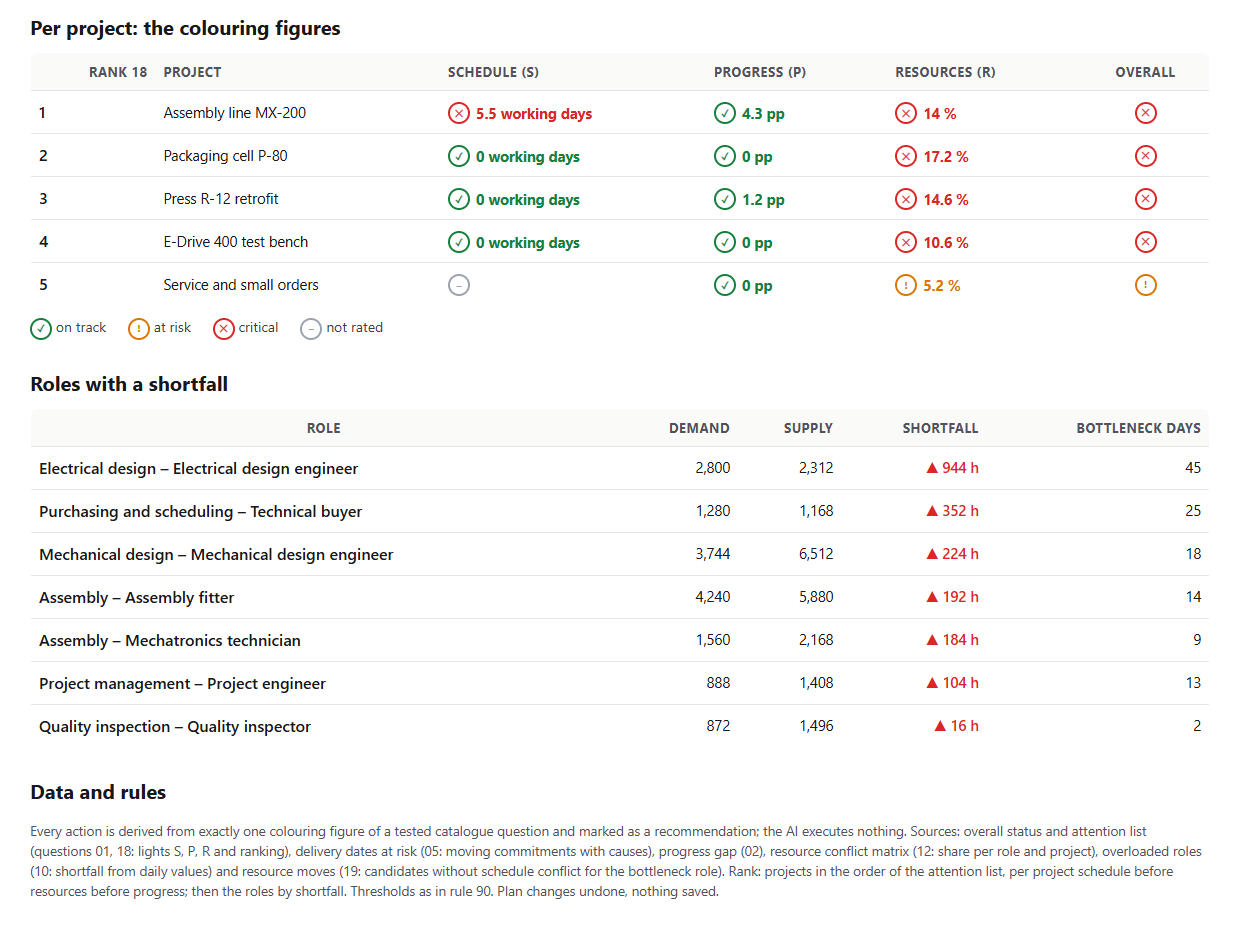
An action plan with key findings, the action table and the figures behind it. In the test portfolio Machinery and plant engineering (five projects, status date 16 Nov 2026 and a backlog in two projects set for the test) ten actions result, eight of them red: two on moving commitments in Assembly line MX-200 (5.5 and 2.5 working days, with the three delayed tasks before them), five on the share of the shortfall per project (MX-200 14 percent, P-80 17.2, R-12 14.6, E-Drive 400 10.6, Service 5.2 percent – everywhere with Electrical design as the largest role) and three on roles: Electrical design with 944 hours on 45 days and candidates without schedule conflict for six of twelve tasks, Purchasing and scheduling 352 hours, Mechanical design 224 hours.
No progress action, because progress is green in all projects. Every action names the triggering figure, the catalogue question and its rank; all are marked as proposals, nothing is executed, no effect calculated.
Why it is useful
A dashboard shows lights; management wants to know what follows from them. Because every light in Rillsoft Project hangs on a figure – float of a commitment, progress gap, shortfall –, the AI can translate every figure into an action and say where it comes from. That makes the plan traceable: no free consulting, but per action one figure, one question, one rank – as a proposal, without executing anything.How the answer is produced
In one pass the AI reads the project structure with float, calendars and conflict list, calculates the planned progress with undo, reads the capacity comparison per role and per role and project on the day scale and, for the bottleneck role, the candidate lists. From every amber or red figure it forms an action by a fixed template and ranks them: projects as in the attention list, per project schedule before resources before progress, then the roles by shortfall. In the test run lights, ranking and shortfall matched the single questions on the same state, and no writing tool apart from the undone recalculation was called.rillsoft_project_tree_get rillsoft_calendar_list rillsoft_project_conflict_list rillsoft_task_progress_recalculate rillsoft_history_undo rillsoft_view_state_apply rillsoft_analysis_report_get rillsoft_task_resource_candidate_list
Limits
Every action is a proposal from exactly one figure; the AI executes nothing and calculates no effect – that is shown only by the program after a change, see Capacity after rescheduling. Green dimensions produce no action; costs belong to Cost overrun by project. The question belongs to the catalogue of management questions and builds on the attention list. The product page of Rillsoft Project describes portfolio and resource planning. Related prompts:Try it
Get started- Industry package
Machinery and plant engineering.rpp- Product version
- Rillsoft Project 10 (Build 10.0.625)
- Last verified
- 2026-10-17
- Verification
- Figures and statements verified on the named sample package against the named product build – MCP session, view and report; German and English package with identical figures.