All people, companies and projects shown are synthetic Rillsoft sample data – from the shipped industry packages or, where stated, from a test project.
The prompt
Which projects need attention now? Rate the projects in Rillsoft Project with traffic lights for schedule, progress, resources and costs and rank them: red before amber, then by number of red lights, then by the values of those that are not green. First ask me for project or portfolio and the period for resources; the reference date is the status date. For the costs, open the project files of the portfolio one after another as the last step, save nothing and reopen the portfolio at the end. Justify each place with the figures that set the colour and add below what to clarify – marked as a recommendation and only from these figures. Undo every plan change and save nothing.Changes the project (one undo step)
Show the detailed prompt
Create a prioritised attention list of the projects from Rillsoft Project.
First ask me for:
- Scope: project or portfolio (name the open one and let me confirm),
- Period for resources: start and end (if I give none, suggest the next three months from the status date),
- Thresholds: name the defaults and ask whether they apply (as in the overall status).
The reference date is the status date; name it.
Data:
- Schedule read-only: fixed milestones from the status date with a negative start float are at risk; new date and working days by the project calendar; causes are delayed tasks that lie before them through the dependencies. Projects without fixed dates: schedule “not rated”.
- Progress: let planned progress at the status date be calculated, read it, undo at once and check actual progress; gap weighted by effort in percentage points and hours.
- Resources: staff capacity comparison at day scale per role and per role and project; on each bottleneck day spread the missing hours over the projects by share of demand; per project the percentage of its demand and the two roles with the largest share.
- Costs: cost variance against the baseline per project (current plan, no actual costs). A portfolio has no baseline: as the last step, open the project files one after another (paths from the portfolio), read the cost variance per project without a time filter, save nothing and reopen the portfolio; ask first if it has unsaved changes. Without a baseline “not rated”.
Ranking: overall light (red before amber before green), then number of red, then of amber lights, then the values of the lights that are not green in the order schedule, resources, progress, costs.
Report:
1. Header with scope, reference date and source.
2. Three to five key findings with figures.
3. One card per project: place, overall light, four lights with symbols, “Why” with the figures that set the colour, and “To clarify” as a recommendation that follows from one of these figures.
4. Data basis and rules.
Reset the view afterwards and save nothing.In your words
- Managing director: Which three projects do I need to look after this week, and why?
- Portfolio review: Rank all projects by need for action and tell me for each what to clarify.
- Next quarter: Which projects need attention if I look at resources for the next quarter?
What you need
- An open project or portfolio with maintained actual progress, a set status date and committed dates as fixed milestones.
- Job roles on the tasks, a resource pool and dependencies between the tasks; for the cost light a baseline per project, otherwise it stays “not rated”.
- Read-only mode is not enough: the AI has planned progress calculated and undoes that at once; it also switches view, time filter and time scale and resets them at the end. For the costs it opens the project files one after another last and then the portfolio again, saving nothing.
What you get
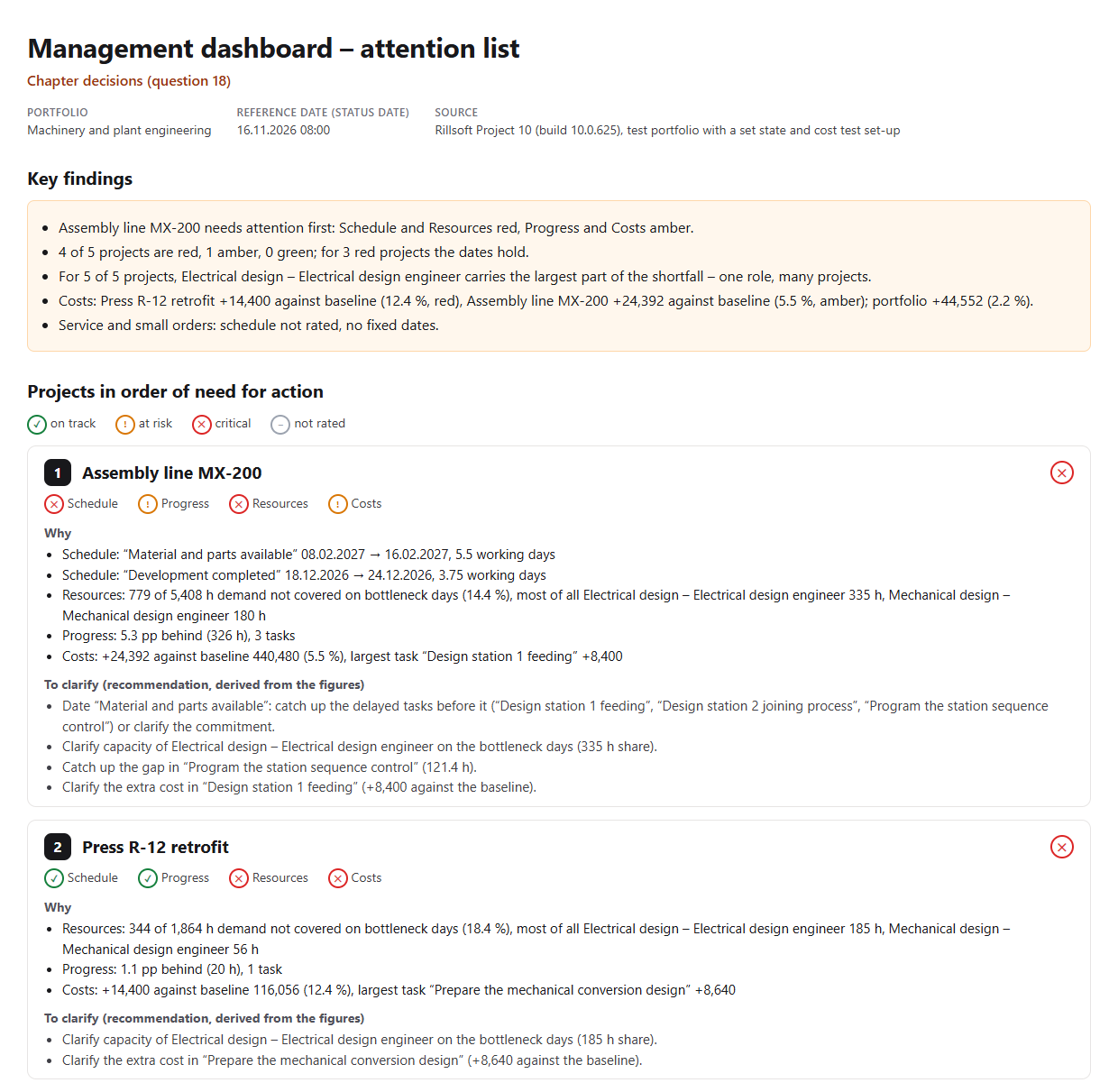
A list with key findings and one card per project. In the test portfolio Machinery and plant engineering (five projects; status date 16 Nov 2026, a backlog in two projects and extra effort against the baseline in three projects set for the test) Assembly line MX-200 is in first place: schedule and resources red, progress and costs amber. “Material and parts available” would have to move from 8 Feb to 16 Feb 2027, 5.5 working days; 779 of 5,408 hours of demand on bottleneck days are not covered; the current plan is 24,392 (5.5 %) above the baseline. To clarify: catch up the three delayed tasks before the date or clarify the commitment, the capacity of Electrical design (335 hours share), the gap in “Program the station sequence control” and the extra cost in “Design station 1 feeding” (+8,400).
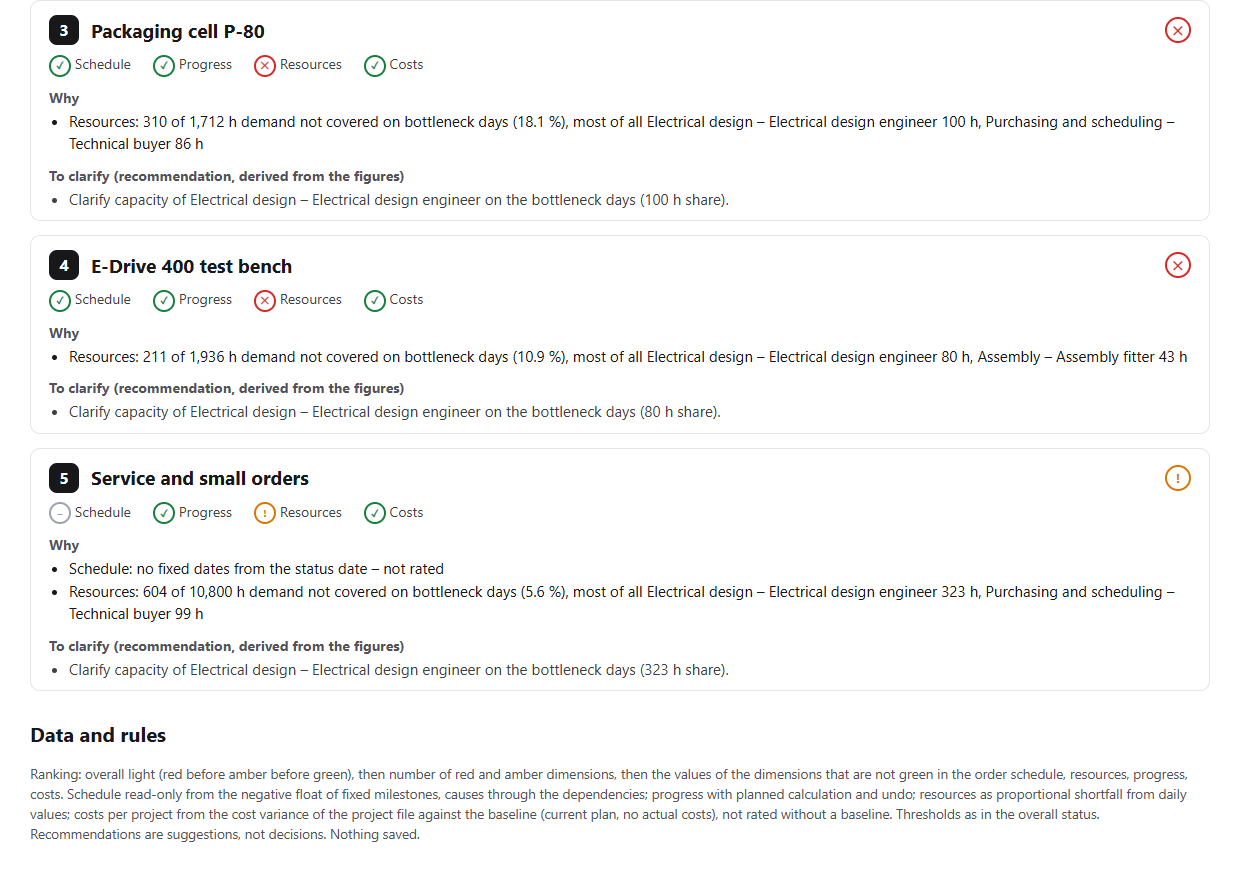
Second place goes to Press R-12 retrofit: resources and costs red (+14,400, 12.4 % above the baseline), its dates hold. Places 3 and 4 go to P-80 and E-Drive 400 – red on resources only. Service and small orders is amber and has no fixed dates. For all five projects, Electrical design carries the largest part of the shortfall – one role, many projects. The lights and the order are the same as in the overall status; the AI reads the costs last from the project files, because a portfolio has no baseline.
Why it is useful
Management has little time and many projects. A ranking alone does not say what to do; without a ranking, time goes to the loudest place. The attention list ranks by fixed rules, gives the Rillsoft Project figure for each place and derives the next clarification step from it – as a suggestion, not a decision.How the answer is produced
In one pass the AI reads the schedule from the float of the fixed milestones with causes through the dependencies, planned progress with an immediate undo and the capacity comparison per role and per role and project. Last it reads the costs per project from the cost variance of the project files and reopens the portfolio. From that it forms the lights as in the overall status, ranks by the agreed order and writes for each project the figures that set the colour and the clarification steps. The details are shown by delivery dates, progress and the resource conflict matrix.rillsoft_view_state_get rillsoft_project_tree_get rillsoft_calendar_list rillsoft_project_conflict_list rillsoft_task_progress_recalculate rillsoft_history_undo rillsoft_view_state_apply rillsoft_timescale_apply rillsoft_analysis_report_get rillsoft_portfolio_file_open rillsoft_project_file_open rillsoft_variance_report_get
Limits
The ranking is a rule, not a judgement of the projects; it can be changed. Recommendations are suggestions from the figures – management decides on measures. The list rates the plan at the status date, not a forecast; costs compare the current plan with the baseline per project file, not booked actual costs; without a baseline the cost light stays “not rated” – the details per task come from Which projects exceed their planned costs?. All 22 questions are in the catalogue; the product page of Rillsoft Project describes multi-project management. Related prompts:Try it
Get started- Industry package
Machinery and plant engineering.rpp- Product version
- Rillsoft Project 10 (Build 10.0.625)
- Last verified
- 2026-10-17
- Verification
- Figures and statements verified on the named sample package against the named product build – MCP session, view and report; German and English package with identical figures.