All people, companies and projects shown are synthetic Rillsoft sample data – from the shipped industry packages or, where stated, from a test project.
The prompt
Compare the current plan with the selected baseline: where do dates, effort and cost deviate most?Changes the project (one undo step)
In your words
- IT services: Which phases of the ERP project became more expensive or later than the baseline before cutover?
- Mechanical engineering: What has shifted on the assembly line since the baseline taken at order clarification?
What you need
- An open project with at least one baseline; without one the report returns an error with a hint.
- Read-only mode is not enough: the AI selects the baseline and switches the three comparison views – one undo step each; baseline contents and project data stay untouched.
What you get
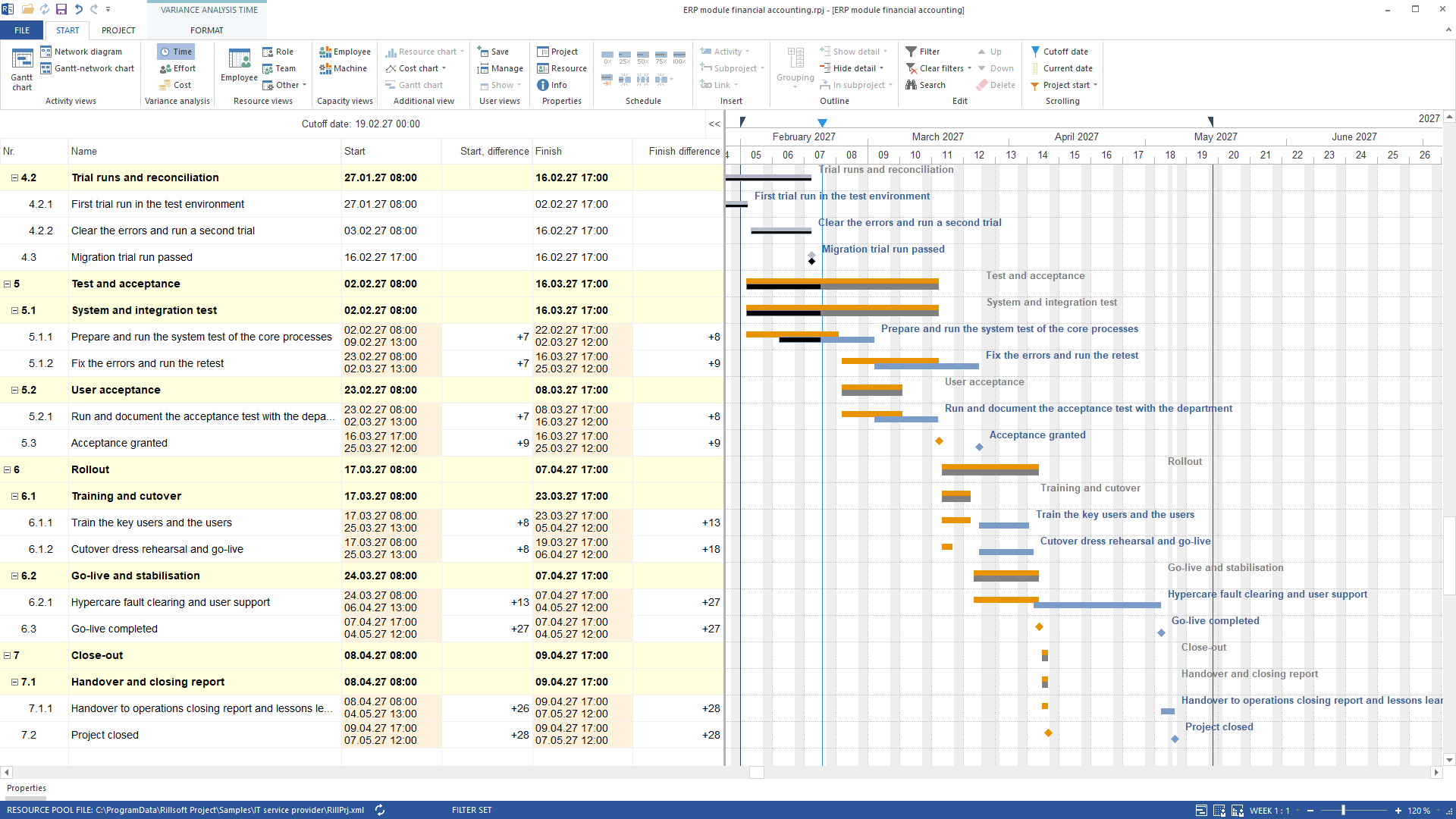
The answer states per element in WBS order the planned value from the baseline, the actual from the current status and the variance – for time in hours per start and finish, for effort in the volume metric of the view (hours or person-days, as configured), for cost as computed resource cost. Younger elements without a counterpart are marked accordingly.
On ERP module financial accounting of the IT package – comparison plan “Plan V1”, status date 19 February 2027, system test half done, status date computation – the time view reports: system test finish +187 hours (22 February → 2 March), Acceptance granted +211 hours (16 → 25 March), Go-live completed +643 hours (7 April → 4 May); effort and cost without variance because only dates moved. The example shows the way there.
Why it is useful
The plan/actual comparison is the one figure management wants to see. Three views in one answer save switching between them.How the answer is produced
The AI lists the baselines, selects one on request, sets the comparison views time, effort and cost one after the other and reads the report per view. No tool changes baseline contents.rillsoft_baseline_list rillsoft_baseline_select rillsoft_view_state_apply rillsoft_variance_report_get
Limits
The dynamic baseline (number 0) combines per task the counterpart from all baselines. With an active time filter only elements whose actual or planned period intersects it appear. The Rillsoft Project product page describes the plan/actual comparison.Try it
Get started- Industry package
04_it_dienstleister- Product version
- Rillsoft Project 10 (Build 10.0.623)
- Last verified
- 2026-09-27
- Verification
- Figures and statements verified on the named sample package against the named product build – MCP session, view and report; German and English package with identical figures.