All people, companies and projects shown are synthetic Rillsoft sample data – from the shipped industry packages or, where stated, from a test project.
The prompt
Draw the costs from Rillsoft Project for a period as a column chart: two columns per project, baseline and current plan. First ask me for project or portfolio and for the start and end of the period. Spread the costs of each task evenly over its working time by the calendar and count the part inside the period; check the calculation on the current effort against the role usage in the same period. Above each pair the extra costs with a red ▲, a table below. Save nothing.Changes the project (one undo step)
Show the detailed prompt
Create a column chart of baseline and current plan costs for a period from Rillsoft Project.
First ask me for:
- Scope: project or portfolio (name the open one and let me confirm),
- Period: start and end (if I give none, suggest the current quarter),
- Level: in a portfolio the projects; in a single project the top level.
If the open portfolio has unsaved changes, ask whether I want to save or discard them.
Baseline means the costs in the baseline, current plan the costs of today's plan; there are no booked actual costs. The program does not return costs per time period – a time filter does not shorten the amounts.
Data:
- Read the calendars in the portfolio. Set the role usage by project and role, absolute, time filter on the period, and read the report: the sum per project is the current effort in the period (for the check).
- Open the project files one after another. Read the project tree (calendar per task, top level) and, without a time filter, the cost variance, the time variance and the effort variance; match the tasks by UUID.
- Per task: share = working time inside the period divided by working time from start to finish, both from the same calendar (not the duration from the report – tasks on their people's calendar are shorter because of absences). Baseline with the baseline dates, current plan with today's dates. Costs in the period = costs × share.
- Check: current effort × share, summed per project, equals the role usage in the period; projects without a variance have baseline equal to current plan. If not, report that instead of the chart.
Presentation:
- Two columns per project side by side, baseline in light grey-blue, current plan in strong blue, one axis from 0, values above the columns.
- Above each pair with extra costs a red ▲ with amount and percent of the baseline.
- Title "Costs baseline and current plan per project – <start>–<end>", subtitle with the calculation, the baseline and "amounts without a currency"; legend baseline, current plan, extra costs.
- Below it a table: project, baseline in period, current in period, variance, percent of baseline, share of the period in the total baseline; total row.
- One sentence on how it was calculated and checked, and the source with date.
Save nothing, reopen the portfolio at the end and reset view and time scale.In your words
- Quarterly report: Show me baseline and current costs of all projects in the fourth quarter as columns, with the extra costs above.
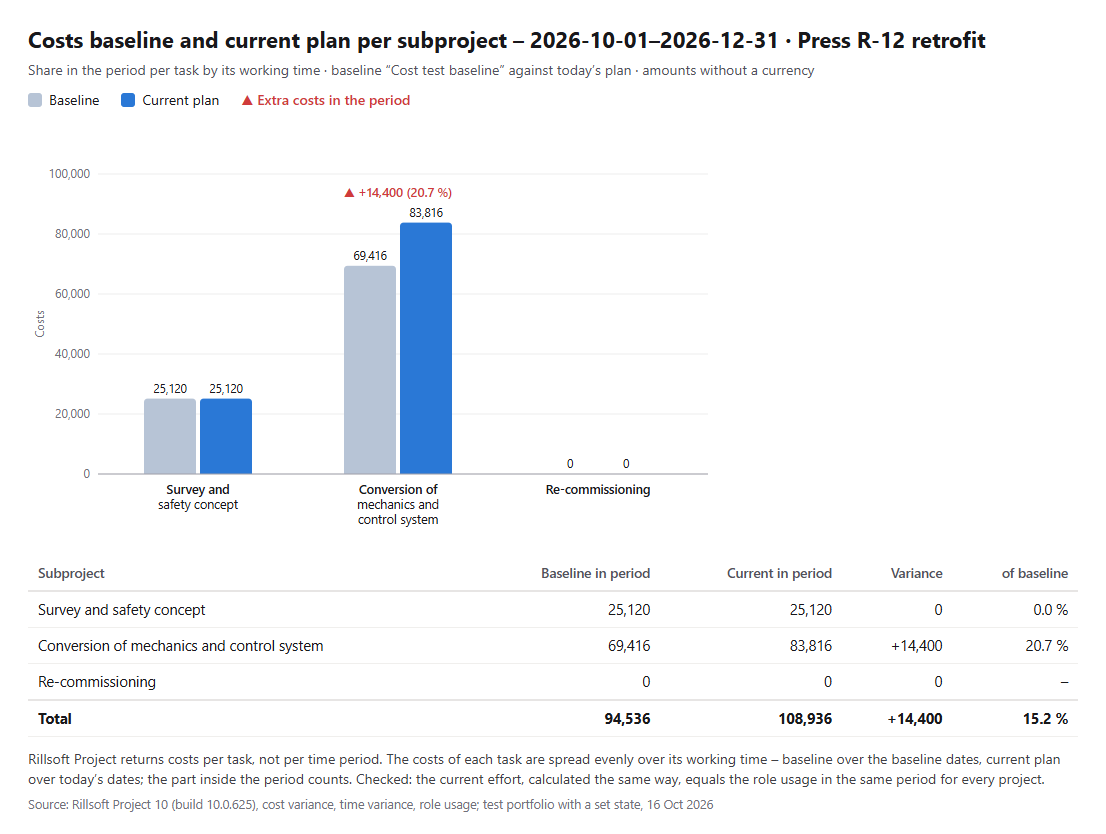
- Single project: What do baseline and current costs of the Press R-12 retrofit look like in November and December per subproject?
- Annual planning: Which costs fall into the first half of 2027 according to the baseline and today's plan? Per project, please.
What you need
- A portfolio or project in which every project has a baseline.
- Answers to the AI’s questions: scope, period and level.
- An AI client that can draw charts (as an image, HTML or a file). Rillsoft Project supplies the figures per task; the AI spreads them over the period and draws.
- Read-only mode is not enough: opening files and switching view, time filter and time scale count as writing in the interface. The AI changes nothing in the plan; at the end it resets the view.
What you get
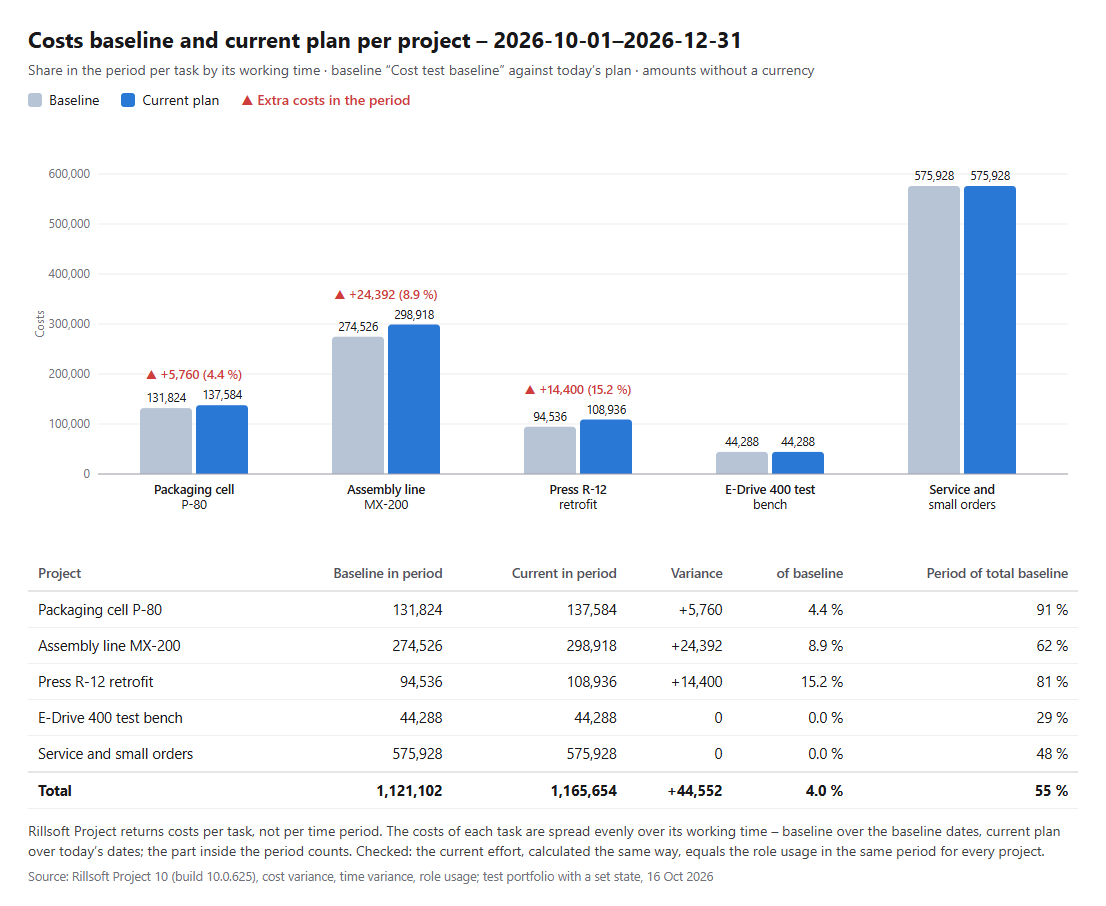
A column chart with two columns per project, the extra costs above, a table and one sentence on the calculation. In the test portfolio Machinery and plant engineering (five projects, one baseline each and extra effort in three projects set for the check), the fourth quarter of 2026 holds 1,121,102 according to the baseline and 1,165,654 according to today’s plan – +44,552 or 4.0 %, a good half (55 %) of the portfolio’s baseline costs.
Assembly line MX-200 carries the largest amount with +24,392 (8.9 %), the Press R-12 retrofit the largest share with +15.2 %; within R-12 the extra costs sit entirely in “Conversion of mechanics and control system”. The AI checks the calculation on the current effort: in all five projects it matches the role usage in the period.
Why it is useful
Management asks for costs in a quarter or half-year, but Rillsoft Project shows the cost variance only per task over the whole duration. The prompt cuts the costs to the period and backs the calculation with a figure the program itself returns for the period – the effort of the role usage.How the answer is produced
The AI reads the calendars and the role usage with a time filter in the portfolio, then opens the project files one after another and reads costs, dates and effort per task in the baseline and the current plan. It spreads the costs of each task evenly over its working time by the calendar, sums the part inside the period and checks the same calculation on the current effort. The chart over the whole project duration comes from Draw baseline and current plan costs as a bar chart.rillsoft_portfolio_file_open rillsoft_calendar_list rillsoft_view_state_get rillsoft_view_state_apply rillsoft_timescale_apply rillsoft_analysis_report_get rillsoft_project_file_open rillsoft_project_tree_get rillsoft_variance_report_get
Limits
The costs in the period are a calculation by the AI: spread evenly over the working time of each task and checked on the current effort against the role usage. Tasks with an uneven distribution would show up in that check. “Current plan” means the costs of today’s plan, not booked actual costs; amounts without a currency. There is no split by role because the cost reports contain no roles. The question belongs to the catalogue of management questions, topic costs. The product page of Rillsoft Project describes planned/actual comparison. Related prompts:Try it
Get started- Industry package
Machinery and plant engineering.rpp- Product version
- Rillsoft Project 10 (Build 10.0.625)
- Last verified
- 2026-10-16
- Verification
- Figures and statements verified on the named sample package against the named product build – MCP session, view and report; German and English package with identical figures.