All people, companies and projects shown are synthetic Rillsoft sample data – from the shipped industry packages or, where stated, from a test project.
The prompt
Which projects exceed their planned costs? First ask me for project or portfolio and whether the thresholds apply – amber above 5 %, red above 10 % of the baseline. Open the project files in Rillsoft Project one after another, read the cost variance against the baseline per project without a time filter and show baseline, plan, variance and percent with a traffic light, plus the tasks the extra costs come from. Save nothing and reopen the portfolio at the end.Changes the project (one undo step)
Show the detailed prompt
Create an overview of the cost variance per project against the baseline from Rillsoft Project.
First ask me for:
- Scope: project or portfolio (name the open one and let me confirm),
- Thresholds: name the default and ask whether it applies – amber above 5 %, red above 10 % of the baseline.
If the open portfolio has unsaved changes, ask whether I want to save or discard them.
Tell me beforehand: a portfolio has no baseline; so you open the project files one after another, save none of them and reopen the portfolio at the end.
Data:
- From the portfolio, the projects with the path of their file.
- Per project, open the file, apply the cost variance view without a time filter and read the variance report. Name the baseline per project; without a baseline the project is "not rated".
- Per project, baseline, plan, variance and percent of the baseline; causes are the tasks with a variance, with their share of the project variance.
- Check that the tasks add up to the project variance; if not, report that instead of the overview.
- Do not recalculate costs yourself. "Plan" means the costs of today's plan, not booked actual costs; amounts without a currency, as the program returns them.
Report:
1. Header with scope, comparison (baseline against today's plan) and source.
2. Three to five key findings with figures: total variance, the project with the highest variance in percent and its largest task, a project with a large amount but a small percentage, projects without a variance.
3. Bars per project: variance as a percentage of the baseline, one axis, thresholds as dashed lines, colour only as a traffic light with a symbol.
4. Table per project with traffic light and a total row.
5. For each project with a variance, the tasks with baseline, plan, variance and share.
6. Data and rules.
Save nothing and reopen the portfolio at the end.In your words
- Monthly review: Where are our projects above the baseline, and which tasks drive the extra costs?
- Single project: How far is the Press R-12 retrofit above its baseline? Show me the tasks with extra costs.
- Stricter: Cost variance per project, but red from 8 % above the baseline.
What you need
- A portfolio or project in which every project has a baseline; projects without a baseline stay “not rated”.
- Answers to the AI’s questions: scope and whether the default thresholds apply.
- Read-only mode is not enough: opening files and applying a view count as writing in the interface. The AI changes nothing in the plan; opening the project files closes the portfolio – save unsaved changes beforehand or answer the question.
What you get
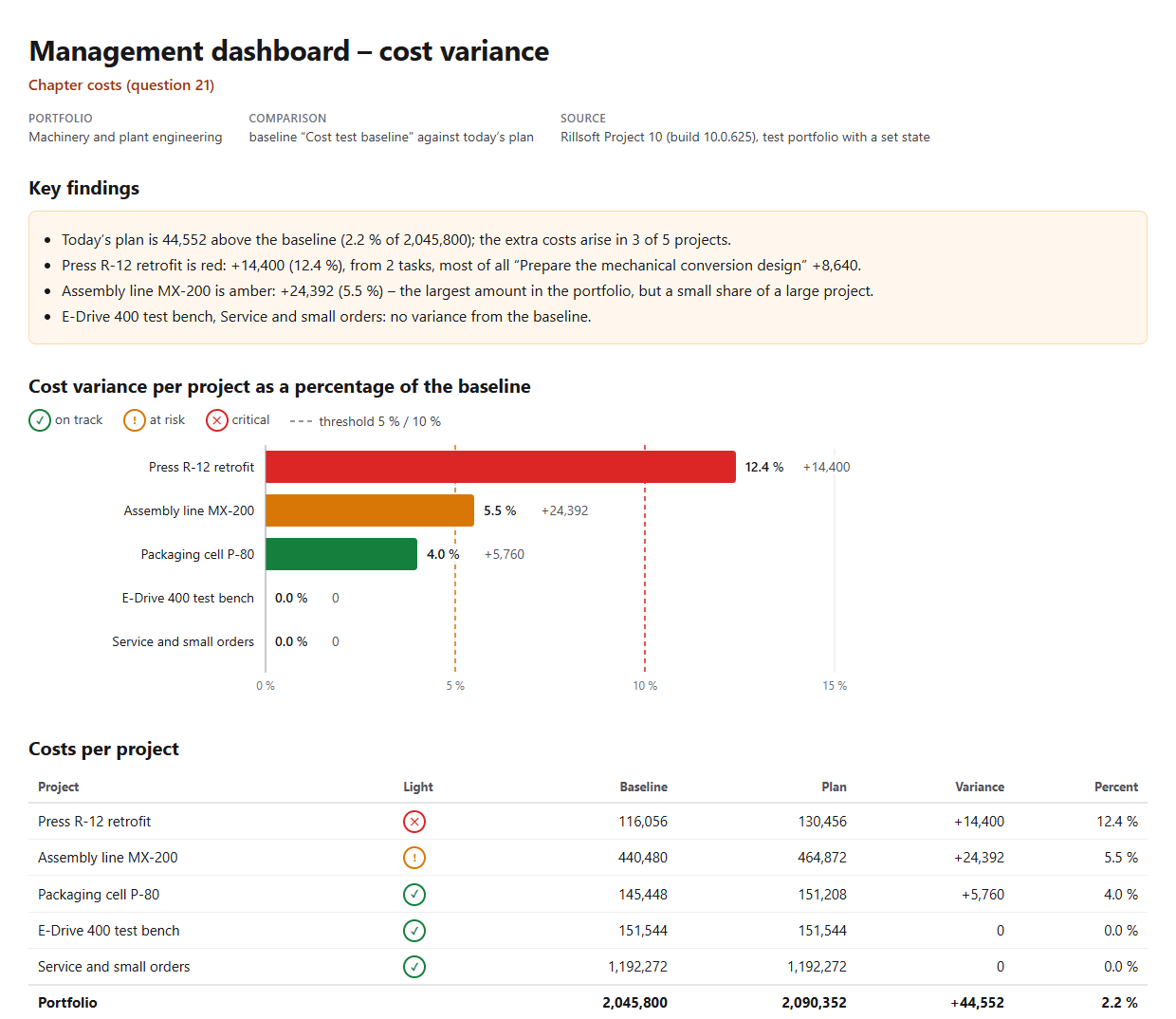
An overview with key findings, bars per project, a cost table and the tasks with extra costs. In the test portfolio Machinery and plant engineering (five projects, one baseline each and extra effort in three projects set for the check), today’s plan is 44,552 above the baseline, 2.2 % of 2,045,800; the extra costs arise in three of five projects.
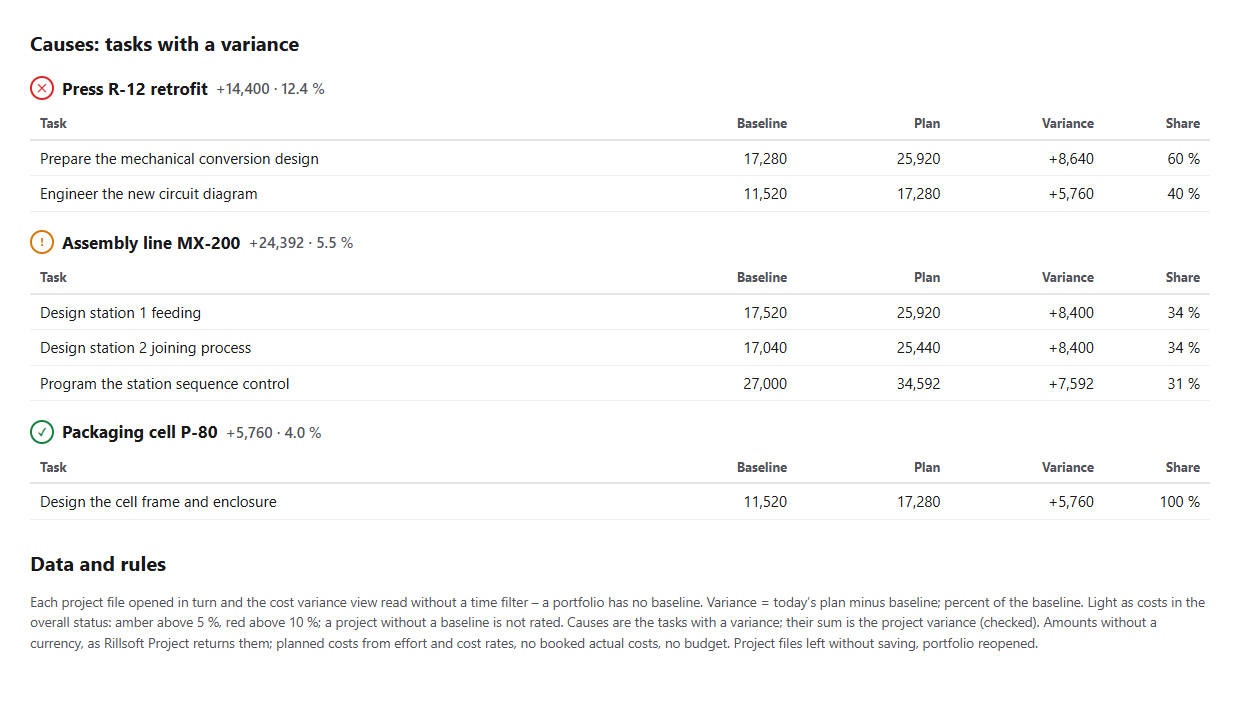
Red is the Press R-12 retrofit with +14,400 or 12.4 %, most of all from “Prepare the mechanical conversion design” (+8,640). Assembly line MX-200 has the largest amount with +24,392 but is only amber (5.5 %) – amount and percent rank differently, and the report names both. The AI checks that the tasks add up to the variance of each project.
Why it is useful
Costs matter to management, but in a portfolio Rillsoft Project shows no baseline. The prompt fetches the cost variance from each project file, rates it like the cost light in the overall status and names the tasks the extra costs depend on – comparable in percent and tangible as an amount.How the answer is produced
The AI reads the project files from the portfolio, opens them one after another, applies the cost variance view without a time filter and reads the variance report: baseline, plan and variance per row. It calculates the percent of the baseline, rates it like the cost light in the overall status, checks the sum of the tasks and reopens the portfolio at the end.rillsoft_portfolio_file_open rillsoft_project_file_open rillsoft_view_state_apply rillsoft_variance_report_get
Limits
The variance compares today’s plan with the baseline; booked actual costs and a budget are not available through the interface. Extra costs arise when effort is added after the baseline – the overview is not a post-calculation. Amounts appear without a currency. Comparing dates, effort and costs within a single project is done by Compare the current plan with the selected baseline; the question belongs to the catalogue of management questions, topic costs. The product page of Rillsoft Project describes planned/actual comparison. Related prompts:Try it
Get started- Industry package
Machinery and plant engineering.rpp- Product version
- Rillsoft Project 10 (Build 10.0.625)
- Last verified
- 2026-10-16
- Verification
- Figures and statements verified on the named sample package against the named product build – MCP session, view and report; German and English package with identical figures.