All people, companies and projects shown are synthetic Rillsoft sample data – from the shipped industry packages or, where stated, from a test project.
The prompt
Create a plan in Rillsoft Project from this project description: phases as subprojects, tasks with duration, dependencies and the roles needed. The project starts on 1 October 2026.Creates a new project
Show the detailed prompt
Create a plan in Rillsoft Project from this project description: phases as subprojects, sections within them as subprojects too, tasks with duration, dependencies and the roles needed from the resource pool. The project starts on 1 October 2026. Do not set any dates yourself, Rillsoft Project calculates them. Where no duration is given, ask me.
Packaging cell P-80. We are building a robot cell for a customer that packs products into cartons. The project has three phases.
Concept and design. In the concept, one project engineer spends eight days clarifying the requirements and packaging materials with the customer. Right at the start, two project engineers record the product range and packing patterns in three days, and another surveys the existing line and its interfaces on site in three days. Once all three are done, one project engineer sizes the cell layout and cycle time in three days and then prepares the risk assessment in one day. Then the customer releases the concept. In mechanical design, two design engineers design the cell frame and enclosure in two weeks after the concept release. After that, two design engineers spend two weeks on the product infeed and magazine and one spends two weeks on the gripper and format parts; after the infeed, two design engineers derive the drawings and bills of material in two weeks. Electrical design starts once the cell frame is designed: one electrical design engineer engineers the circuit diagram for two weeks, then the safety equipment for one week, then the cabinet layout and cable schedules for two weeks. After the gripper, one mechanical design engineer prepares the pneumatic diagram in one week. Once drawings, pneumatic diagram and cable schedules are done, the design is released.
Manufacture and assembly. Purchasing: as soon as the product infeed is designed, a technical buyer orders the robot and bought-out parts in two weeks and then schedules and tracks the deliveries for three weeks; a quality inspector inspects the goods inward for one week after the order. Manufacture: after the drawings and bills of material, two assembly fitters manufacture the frame and format parts in three weeks; a quality inspector inspects the manufactured parts for one week and finishes together with the manufacture. Assembly: once manufacture, parts inspection and deliveries are complete, three assembly fitters assemble the cell mechanically in two weeks. At the same time, three mechatronics technicians install the robot and gripper in three days (not before the goods inward), and two mechatronics technicians build the control cabinet and wire the cell in four days (not before the design release). Then the cell is assembled.
Integration and acceptance. Commissioning: after assembly, two PLC programmers write the PLC program and the HMI in one week; one PLC programmer programs the robot paths in three days as soon as the robot and gripper are installed. Then two commissioning engineers commission and run in the cell in three days. Acceptance and handover: finally, one commissioning engineer runs the trial with the customer packaging materials in one day, and a quality inspector carries out the acceptance and hands over the documentation in two days. Then the cell is accepted.In your words
- IT services: Here is our proposal for the ERP rollout. Turn it into a plan with the phases from the proposal, starting on 11 January.
- Construction: Create a shell construction plan from this building description; where no duration is given, ask me.
What you need
- A new, empty project and a resource pool whose roles fit the description – the AI uses the roles of the pool and does not create new ones.
- Read-only mode is not enough: the prompt creates subprojects, tasks and dependencies.
- A description with tasks, durations, order and the number of people per task; the only date needed is the project start.
What you get
In the sample package Machinery and plant engineering, some 470 words of free text describe the packaging cell P-80: three phases, tasks with a duration in days or weeks, who does them and what follows what – without any date apart from the project start (full version above). From it the AI created 3 phases with 8 sections, 26 tasks, 4 milestones, 38 dependencies and 26 role assignments; Rillsoft Project calculated the finish as 20 January 2027. Compared with the shipped project Packaging cell P-80, the phases, sections, tasks, durations and the 2,040 hours in the same nine roles are identical. The AI placed the two-day acceptance after the trial run rather than alongside it – the description allows both – so its plan finishes one working day after the shipped project (19 January 2027). Only the staffing was left open – the 26 tasks are in the conflict list “Unassigned resources”; the next step is the prompt Staff the open roles.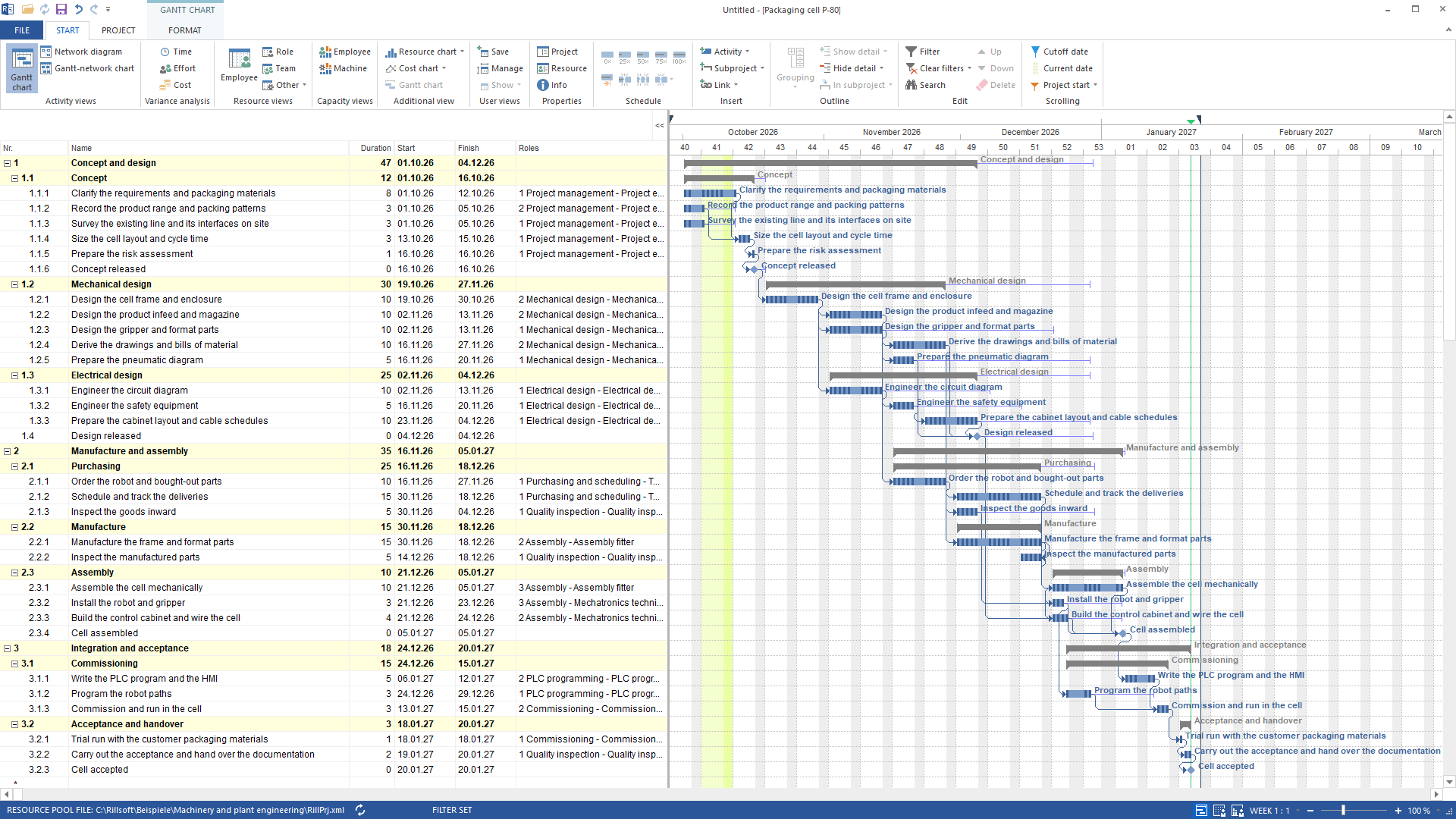
Why it is useful
The first plan often starts from a proposal, meeting minutes or an e-mail. Typed in task by task, it takes hours and brings errors into durations and dependencies. Created from the description, it is there in minutes – with dates from the same planning engine as any other plan in Rillsoft Project.How the answer is produced
The AI reads the roles from the resource pool, creates subprojects and tasks with a duration, assigns role and quantity per task and links the tasks – finish-to-start, start together or finish together, as the description says. It sets no dates: Rillsoft Project calculates them from duration, dependency and calendar. Two extra steps belong to it: a new milestone is fixed and gets released so that it follows its predecessor; and at the end the AI releases the fixed subprojects so that they follow the dates of their tasks. Every changing call is one undo step – some 125 in the example.rillsoft_resource_pool_catalog_list rillsoft_project_update rillsoft_subproject_create rillsoft_task_create rillsoft_task_role_assignment_set rillsoft_task_dependency_create rillsoft_task_update rillsoft_project_reschedule rillsoft_subproject_update rillsoft_project_tree_get
Limits
Where the description gives no duration, the AI asks or estimates – an estimate is then stated in the answer. Rillsoft Project calculates the dates, not the AI. The prompt does not create roles, it uses those of the resource pool; it does not assign people. Machines and material were not part of the description in the example and were not created. The dates in the example hold for a cutoff date at the project start: a new project carries today as its cutoff date, and rescheduling places nothing before it – if the project start lies in the past, the dates move back accordingly. An existing Excel sheet is better brought in through the import. The Rillsoft Project product page describes project structure and scheduling.Try it
Get started- Industry package
02_maschinenbau- Product version
- Rillsoft Project 10 (Build 10.0.624)
- Last verified
- 2026-10-05
- Verification
- Figures and statements verified on the named sample package against the named product build – MCP session, view and report; German and English package with identical figures.