All people, companies and projects shown are synthetic Rillsoft sample data – from the shipped industry packages or, where stated, from a test project.
The prompt
Which project areas are developing critically? In Rillsoft Project take the first-level subprojects of each project as areas and give for each area the delayed tasks with their delay in working days, the committed dates (fixed milestones) that would have to move, with new date and working days, and the share of open tasks without finish float. Rank the areas by traffic light and largest delay: amber above 0, red above 5 working days. First ask me for project or portfolio; the reference date is the status date. Name the tasks of every area at risk. Do not change the plan.Read-only mode is enough
Show the detailed prompt
Create a list of critical project areas from Rillsoft Project.
First ask me for:
- Scope: project or portfolio (name the open one and let me confirm),
- Thresholds: name the default and ask whether it applies – amber above 0, red above 5 working days of delay or shift.
The reference date is the status date; name it.
Data, read-only:
- Project structure with float: an area is a first-level subproject below the project; tasks directly below the project form the area “project”. Per area the tasks in total and open.
- Delayed tasks from the conflict list, only with a delay above 0 working days, per area with delay and finish.
- Committed dates = fixed milestones from the reference date per area; a negative start float means the date would have to move by that many calendar hours – calculate the new date and the shift in working days by the project's calendar from it.
- Open tasks without finish float per area as a number and share – they do not colour, because finish float only runs up to the next fixed frame and is mostly 0 in such plans.
- Do not recalculate dates yourself; do not change the plan.
Report:
1. Header with scope, reference date and source.
2. Key findings with figures: how many areas are critical, at risk, on track or completed; per area at risk the largest delay and the moving commitments with old and new date.
3. Ranking of the areas: project and area, open of total, delayed tasks, largest delay, commitments moving, no finish float, light with symbol and colour – light from the larger of delay and shift; completed areas “not rated”.
4. Table per project: areas, critical, at risk, delayed tasks, no finish float, light.
5. Tasks of the areas at risk: delayed tasks with delay, moving commitments, open tasks without finish float.
6. Data and rules.In your words
- Weekly meeting: Which phases in the portfolio are critical? I want to see per subproject how many tasks are delayed and whether a committed date moves.
- One project: In which phases of Assembly line MX-200 is it stuck? Delayed tasks with delay and the affected milestones per phase.
- Stricter: List the critical areas, but red already from three working days of delay.
What you need
- An open project or portfolio with subprojects, maintained actual progress and a set status date.
- Committed dates as fixed milestones; without them the light stays with the delay of the tasks.
- Float switched on in the program so the finish float per task can be read; otherwise the column is omitted.
- Read-only mode is enough: the AI reads project structure, float, calendars and the conflict list and changes nothing.
What you get
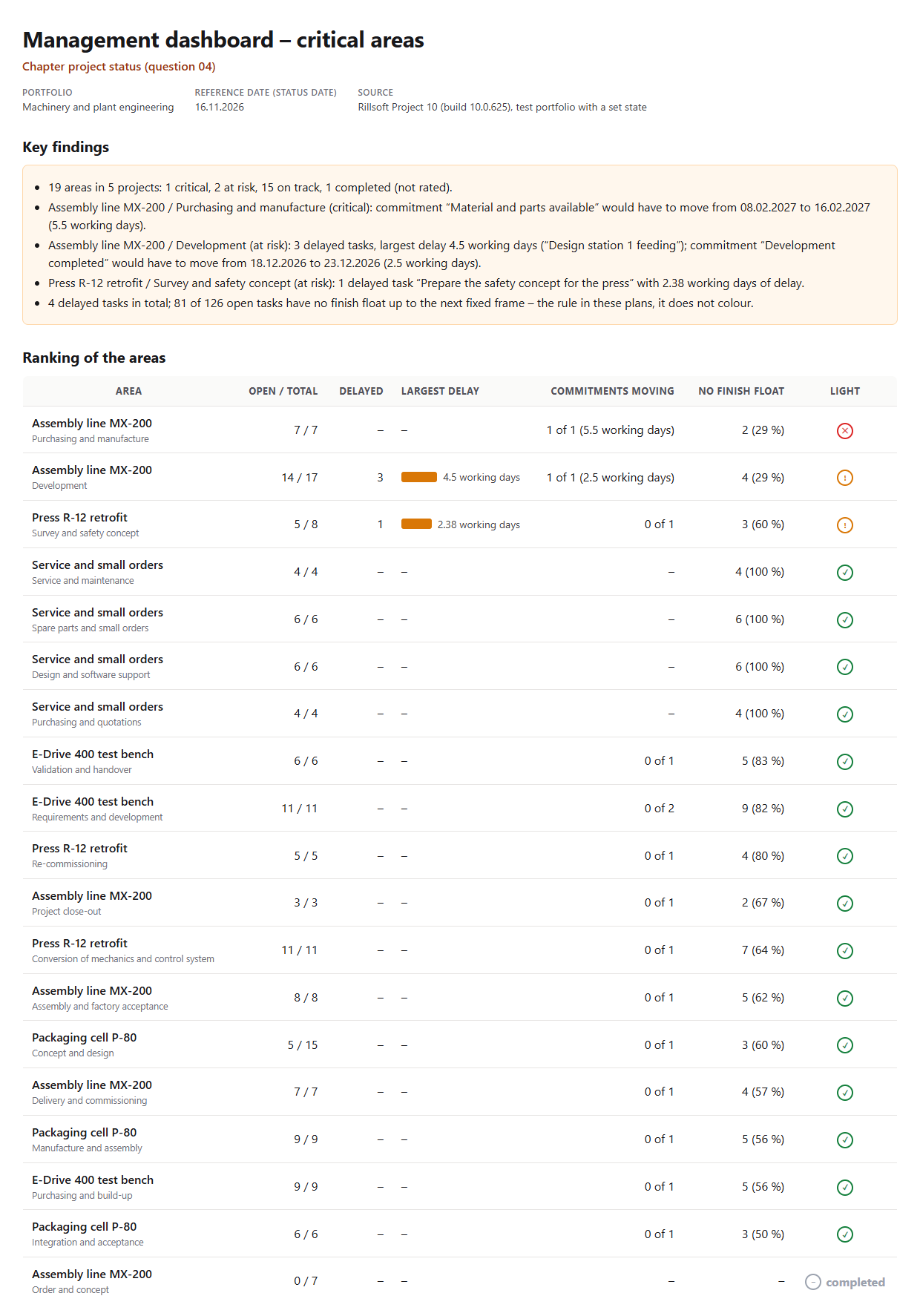
A ranking of the areas with key findings, two tables and the tasks of the areas at risk. In the test portfolio Machinery and plant engineering (five projects, status date 16 Nov 2026 and a backlog in two projects set for the test) there are 19 areas: one is critical, two are at risk, 15 on track, one completed. Critical is Purchasing and manufacture in Assembly line MX-200, because the commitment “Material and parts available” would have to move from 8 Feb to 16 Feb 2027 (5.5 working days). At risk are Development in MX-200 with three delayed tasks of up to 4.5 working days and one moving commitment (2.5 working days), and Survey and safety concept in Press R-12 retrofit with one delayed task (2.38 working days).
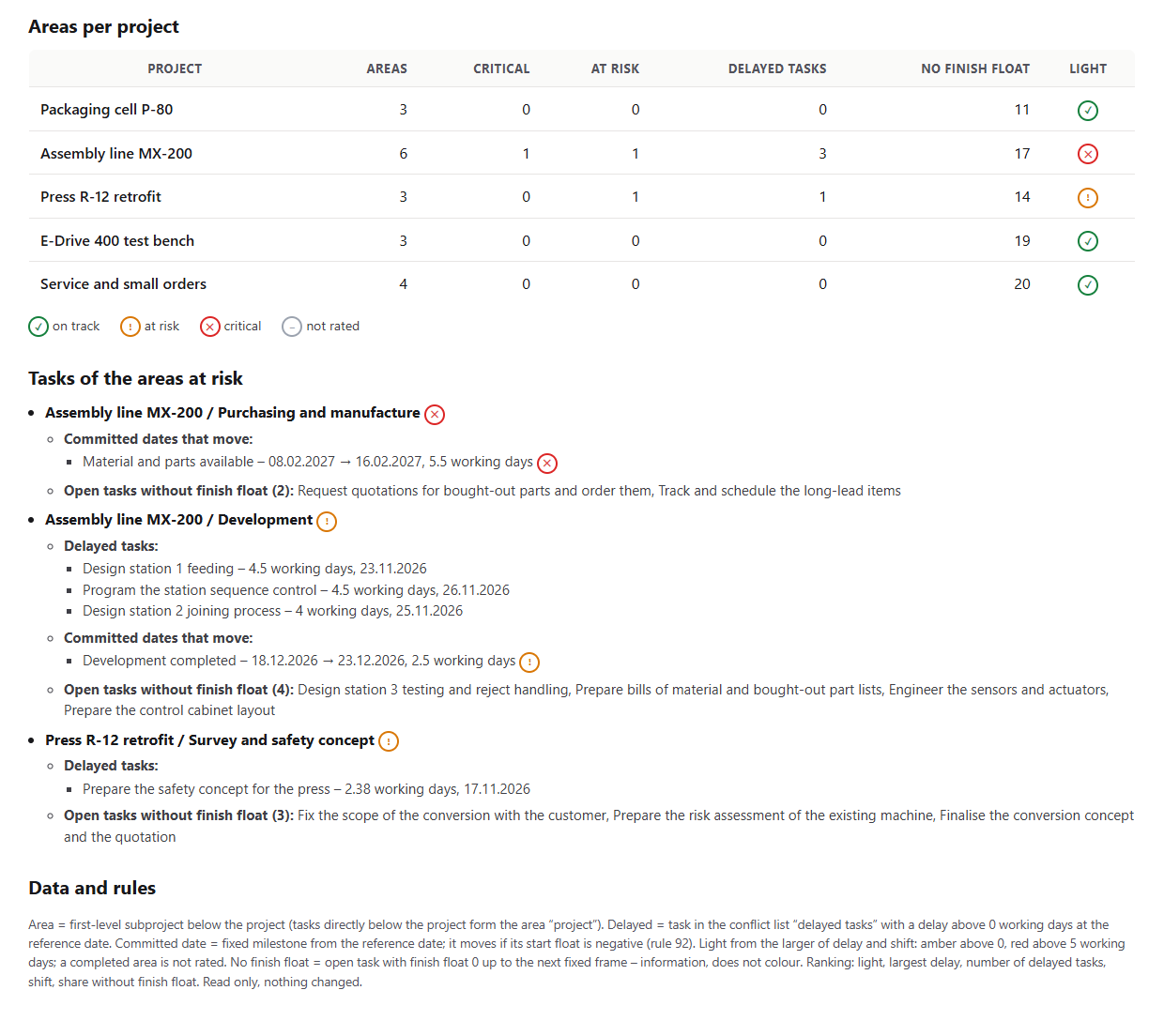
81 of 126 open tasks have no finish float up to the next fixed frame – the rule in plans with fixed milestones, so this share does not colour. Per project, MX-200 is red, R-12 amber, the other three green. The tasks of the areas at risk are listed with delay and finish below the table.
Why it is useful
Management does not ask about single tasks but where it is stuck: in which project, in which phase. The conflict list shows delayed tasks, the project tree the float – both per task. The AI groups that per subproject, applies the thresholds of the schedule light and says which area is critical and why – without touching the plan.How the answer is produced
The AI reads the project structure with float and takes the first-level subprojects of each project as areas. From the conflict list it assigns the delayed tasks with their delay, from the tree the fixed milestones from the reference date and their start float: if it is negative, the commitment moves by that many calendar hours, the AI calculates the new date and, with the project calendar, the working days. The light per area follows the larger of delay and shift. It counts open tasks without finish float but does not let them colour. In the test run the delayed tasks per area matched the conflict list and the moving commitments matched the prompt Delivery dates at risk.rillsoft_project_tree_get rillsoft_calendar_list rillsoft_project_conflict_list
Limits
The list rates the schedule at the status date, not a forecast; the progress gap is rated by the prompt Progress gap, because it needs a plan change with undo. An area is a first-level subproject; deeper levels count towards it. Finish float only runs up to the next fixed frame and is mostly 0 in such plans. The question belongs to the catalogue of management questions; the tasks themselves are listed by the prompt Delayed tasks without float. The product page of Rillsoft Project describes status date and float. Related prompts:Try it
Get started- Industry package
Machinery and plant engineering.rpp- Product version
- Rillsoft Project 10 (Build 10.0.625)
- Last verified
- 2026-10-17
- Verification
- Figures and statements verified on the named sample package against the named product build – MCP session, view and report; German and English package with identical figures.