All people, companies and projects shown are synthetic Rillsoft sample data – from the shipped industry packages or, where stated, from a test project.
The prompt
Which tasks are delayed against the status date, and which have no free float left?Read-only mode is enough
In your words
- IT services: Which migration tasks are behind the status date, and which of them are critical?
- Public sector: Which tasks of the school renovation must finish inside the holiday window and have no reserve?
What you need
- An open project with a status date set – without it the list of delayed tasks is empty (how to set it is shown in the example compare the plan with its baseline).
- Read-only mode is enough.
What you get
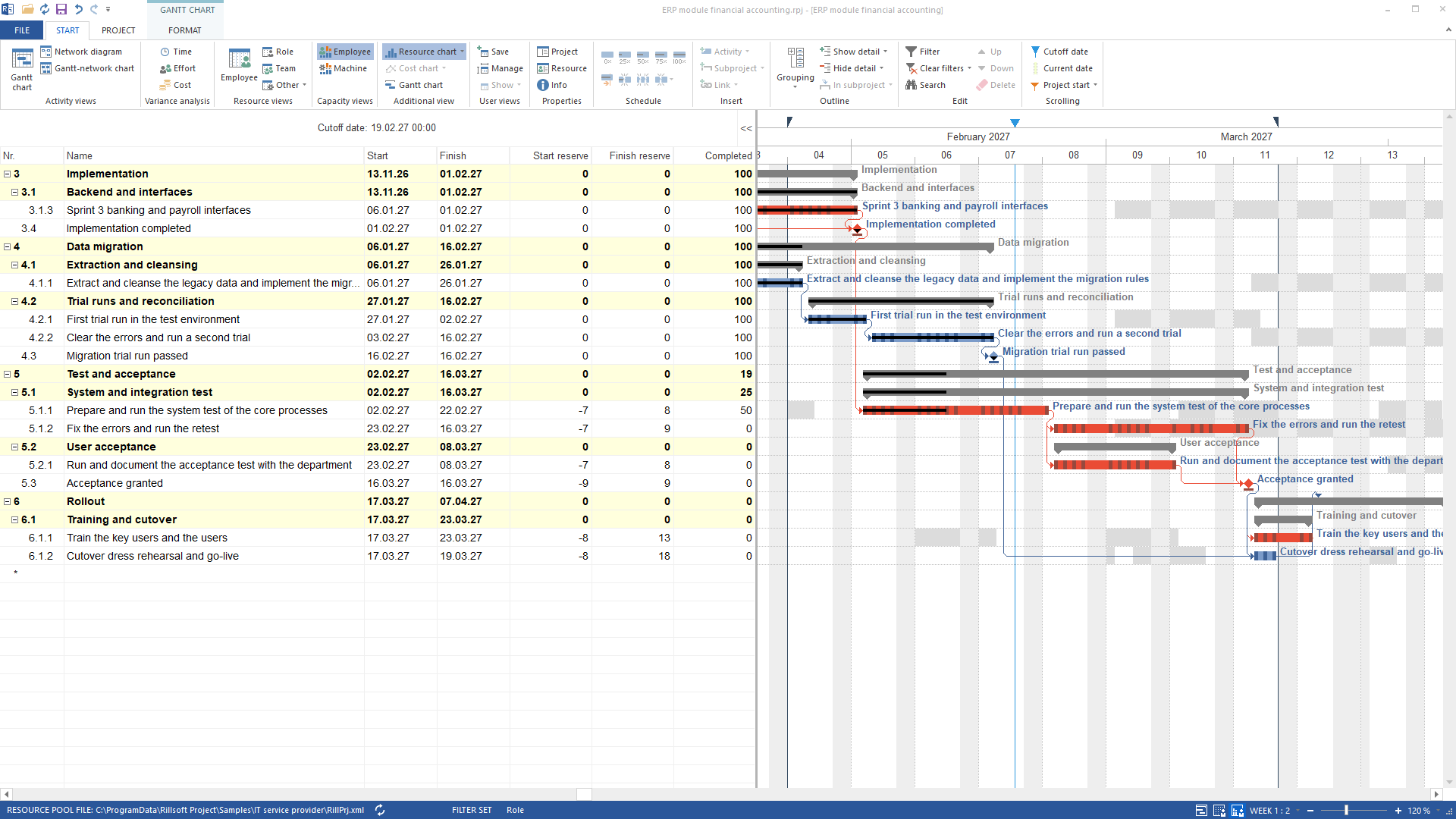
In the sample package IT service provider the answer names two groups. With status date 19 February 2027 and a system test only half done, one task appears in the conflict list “Delayed tasks”: “Prepare and run the system test of the core processes” (2 to 22 February) with a backlog of 5.5 working days.
The second group comes from the project tree: in the same state 19 of the 26 tasks have start and finish reserve zero because every phase and milestone is fixed; the seven tasks from the system test to the operations handover carry a negative start reserve (−173 to −629 hours) – with the backlog they no longer fit into their fixed frames. Once the status date rescheduling takes the backlog into account, the following dates move: the system test is no longer delayed, all 26 tasks have no reserve, 28 elements are critical. Without a status date the first list is empty.
Why it is useful
Delay and missing float are the two early-warning signals of a schedule. Seeing them per task allows recording progress, rescheduling or redistributing reserves. A list of due dates shows deadlines; only status date and calculated reserve say which task is really late.How the answer is produced
The AI reads the conflict list “Delayed tasks” and the project tree with float per task. Both come from the scheduling engine of Rillsoft Project.rillsoft_project_conflict_list rillsoft_project_tree_get
Limits
“Delayed” depends on the status date: a status date set back empties the list. The “critical” flag is not a reserve indicator; the reserve hours are authoritative. Subprojects carry no reserve. The Rillsoft Project product page describes status date and float.Try it
Get started- Industry package
04_it_dienstleister- Product version
- Rillsoft Project 10 (Build 10.0.623)
- Last verified
- 2026-09-27
- Verification
- Figures and statements verified on the named sample package against the named product build – MCP session, view and report; German and English package with identical figures.