All people, companies and projects shown are synthetic Rillsoft sample data – from the shipped industry packages or, where stated, from a test project.
The prompt
Show me demand and available capacity over time from Rillsoft Project. First ask me for project or portfolio, period and unit, and propose a time scale. Two columns per period, demand and supply, on one axis; above them the shortfall from daily values, because weekly or monthly totals even out individual bottleneck days. Add a chart of its own for every role with a shortfall on the same time axis, a table per role and three to five sentences with figures.Changes the project (one undo step)
Show the detailed prompt
Show me capacity demand and available capacity over time from Rillsoft Project.
First ask me for:
- Scope: project or portfolio (name the open one and let me confirm),
- Period: start and end,
- Unit: hours, person-days or person-weeks (name the one set),
- Time scale: propose one (at most about 30 periods).
Data:
- Staff capacity comparison, flat by role, absolute with capacity, time filter on the period, once at day scale and once in the chosen time scale.
- Per period the demand and supply of all roles; the shortfall per period from the daily values: per role and day demand minus supply, only if positive.
- Check that the values of the time scale are the sum of the daily values and that the shortfall of the periods adds up to that of the roles; if not, name the difference instead of the chart.
- Do not recalculate anything from the plan.
Report:
1. Header with scope, period, unit and source.
2. Three to five key findings with figures: total demand, supply and utilisation, busiest period, shortfall on individual days, the role with the largest shortfall.
3. Chart: two columns side by side per period, demand and supply, one axis, no capacity line; above periods with a shortfall a red symbol with the missing hours; legend.
4. Per role with a shortfall a chart of its own as in 3 on the same time axis, ranked by shortfall, with hours, days and the peak period in the title – Rillsoft Project calculates the shortfall per role, the total of all roles hides it.
5. Table per period and table per role with demand, supply, utilisation and shortfall.
6. Data basis and limits.
Reset the view afterwards and save nothing.In your words
- Winter months: How do demand and capacity develop from November to February, week by week, in hours?
- Annual planning: Show me demand and supply for next year per month in person-days and where it gets tight on individual days.
- Single project: Is the capacity enough for this project over its whole duration? As a chart per week, please.
What you need
- An open project or portfolio whose tasks carry job roles, and a resource pool with people in these roles.
- Answers to the AI’s questions: scope, period, unit and the proposed time scale. FTE is not available here – Rillsoft Project shows FTE for demand only.
- An AI client that can draw charts. Rillsoft Project supplies the figures, not the chart.
- Read-only mode is not enough: the AI switches view, time filter and time scale – one undo step each; business data stays untouched, and at the end it resets the view.
What you get
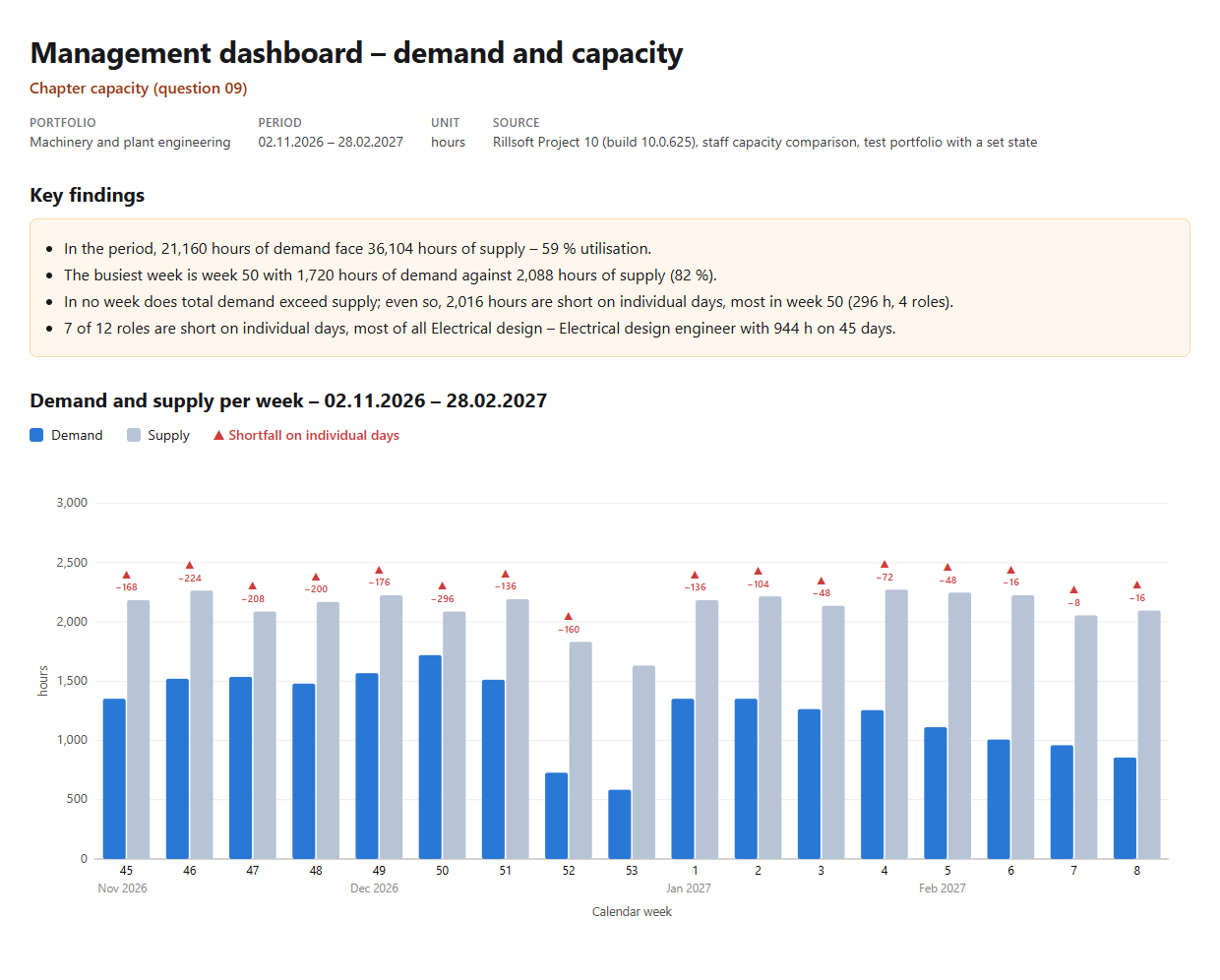
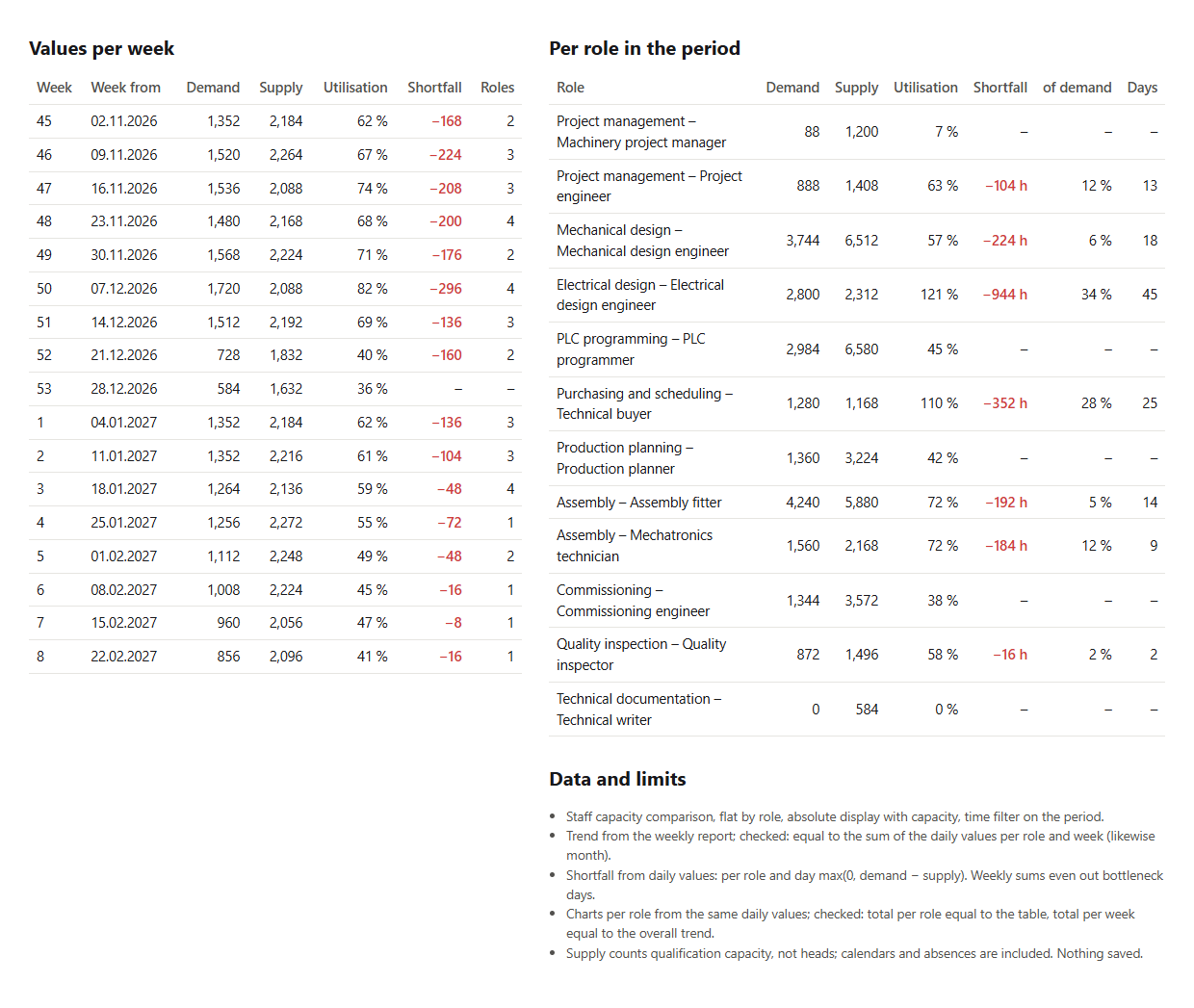
A chart with two columns per week, a chart of its own per role with a shortfall, a table per week, one per role and key findings. In the test portfolio Machinery and plant engineering (five projects, status date 16 Nov 2026 and a backlog in two projects set for the test), from November 2026 to February 2027 21,160 hours of demand face 36,104 hours of supply – 59 % utilisation. The busiest week is week 50 with 1,720 against 2,088 hours.
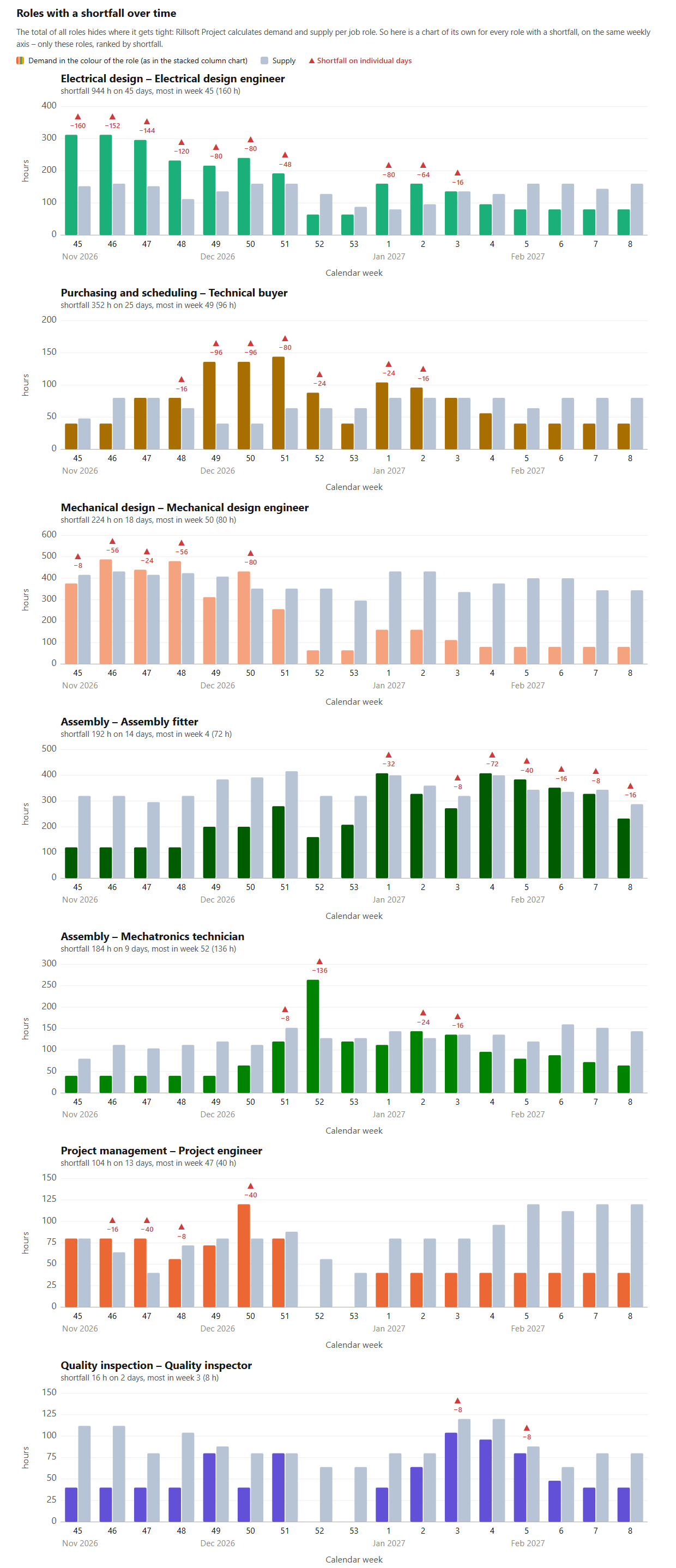
In no week does total demand exceed supply – and still 2,016 hours are short on individual days, in 16 of 17 weeks, most in week 50 with 296 hours. Seven of twelve roles are affected, most of all electrical design with 944 hours on 45 days. For each of these seven roles the report shows a chart of its own on the same weekly axis: electrical design is above supply every week from week 45 to week 51, assembly – mechatronics technician almost only in week 52 with 136 hours. Before drawing, the AI checks that the weekly values are exactly the sum of the daily values and that the charts per role add up to the overall trend.
Why it is useful
Management asks whether capacity is enough in the planning period. A total over weeks or months says little about that: in the example it is enough in every week, yet 2,016 hours are short on individual days. The chart shows both – the course of demand and supply and, where the days fall short, the missing hours. Rillsoft Project supplies every figure; the AI draws and summarises.How the answer is produced
The AI reads the staff capacity comparison per role with a time filter twice: at day scale for the shortfall and in the chosen time scale for demand and supply per period. It checks that both match, calculates the shortfall per role and day and sums it per period. Then it draws two columns per period on one axis, below it the same chart for every role with a shortfall from that role’s daily values, writes the key findings from these figures only and resets the view. The same chart is part D of the roles chapter in the management dashboard.rillsoft_project_tree_get rillsoft_view_state_get rillsoft_view_state_apply rillsoft_timescale_apply rillsoft_analysis_report_get
Limits
Supply counts qualification capacity, not heads; calendars and absences are included, so weeks with public holidays have less supply. The shortfall counts only days on which a role’s demand exceeds its supply. Compare with the program view only with the same time filter. The table per role and week for the capacity discussion comes from the prompt Compare demand with available capacity by week; all 22 questions are in the catalogue. The product page of Rillsoft Project describes capacity planning. Related prompts:Try it
Get started- Industry package
Machinery and plant engineering.rpp- Product version
- Rillsoft Project 10 (Build 10.0.625)
- Last verified
- 2026-10-17
- Verification
- Figures and statements verified on the named sample package against the named product build – MCP session, view and report; German and English package with identical figures.