All people, companies and projects shown are synthetic Rillsoft sample data – from the shipped industry packages or, where stated, from a test project.
The prompt
Which milestones fall within the period? Read all milestones in Rillsoft Project whose date lies in the period and give for each milestone the date, the project, whether it is fixed (a commitment) and its status from the program: reached, holds, moves (with new date and shift in working days), planned date or overdue. First ask me for project or portfolio, period and time scale; the reference date is the status date. Draw a timeline by time scale with one row per project, then a table and the figures per project. Do not change the plan.Read-only mode is enough
Show the detailed prompt
Create a milestone overview for the period from Rillsoft Project.
First ask me for:
- Scope: project or portfolio (name the open one and let me confirm),
- Period: start and end (if I give none, suggest the project period),
- Time scale: week or month for the timeline (suggest one with at most about 30 intervals),
- Thresholds: name the default and ask whether it applies – amber up to 5, red above 5 working days of shift.
The reference date is the status date; name it.
Data, read-only:
- Project structure with float: every milestone whose date lies in the period, per project. Fixed milestones are committed dates.
- Status per milestone from the program: before the reference date reached (100 %) or overdue; from the reference date holds (start float not negative) or moves (negative start float = calendar hours it would have to move – calculate the new date and the shift in working days by the project's calendar from it); not fixed = planned date.
- If float is missing, say so and do not rate.
- Delayed tasks from the conflict list, only with a delay above 0, as the cause of a moving or overdue milestone if they lie before it through the dependencies.
- Do not recalculate dates yourself; do not change the plan.
Report:
1. Header with scope, reference date, period, time scale and source.
2. Key findings with figures: how many milestones from how many projects, how many fixed; which commitments move with old and new date and working days; how many hold, are reached or overdue; the next milestone after the reference date; the busiest interval; projects without a milestone.
3. Timeline by time scale: one row per project, the reference date as a line, one symbol per milestone in its status colour, moving ones with a line to the new date; legend.
4. Table of all milestones: date, interval, project, milestone, fixed, status with symbol and colour, shift.
5. Table per project: milestones in the period, fixed, reached, holds, moves, next milestone, light; projects without a milestone “not rated”.
6. Causes per moving or overdue milestone.
7. Data and rules.In your words
- Quarter view: Which milestones does the portfolio have in the first quarter of 2027? Timeline by weeks, one row per project, and tell me which of them move.
- Before the steering committee: Show me the milestones of the next eight weeks with status – which are reached, which hold, which would have to move?
- One project: All milestones of Assembly line MX-200 up to the project end as a table: date, fixed, status, new date and working days if one moves.
What you need
- An open project or portfolio with milestones, maintained actual progress and a set status date.
- Committed dates as fixed milestones – milestones that are not fixed appear as planned dates.
- Dependencies between tasks so the AI can find the causes of moving dates; without them it stays with the status.
- Read-only mode is enough: the AI reads project structure, float, calendars and the conflict list and changes nothing.
What you get
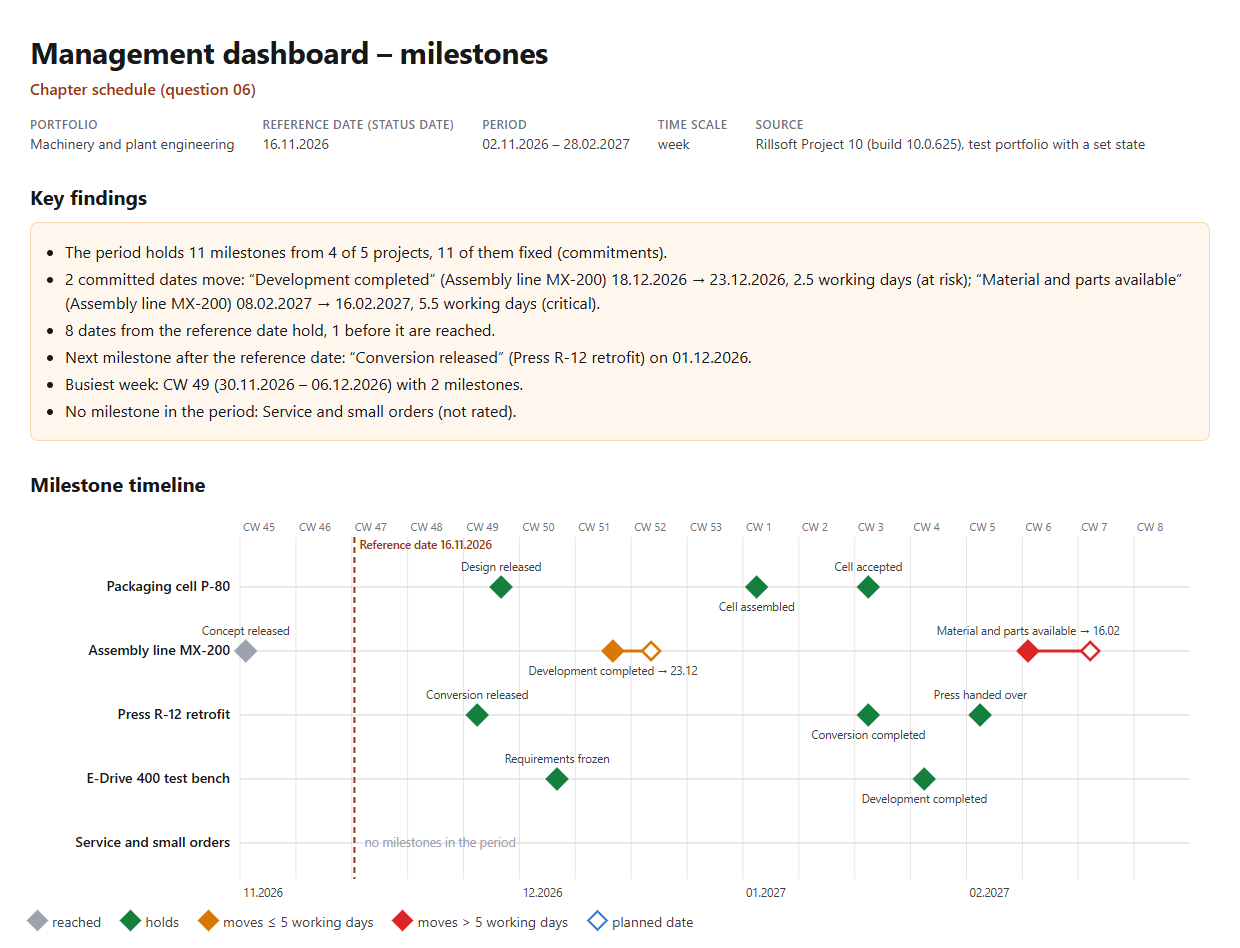
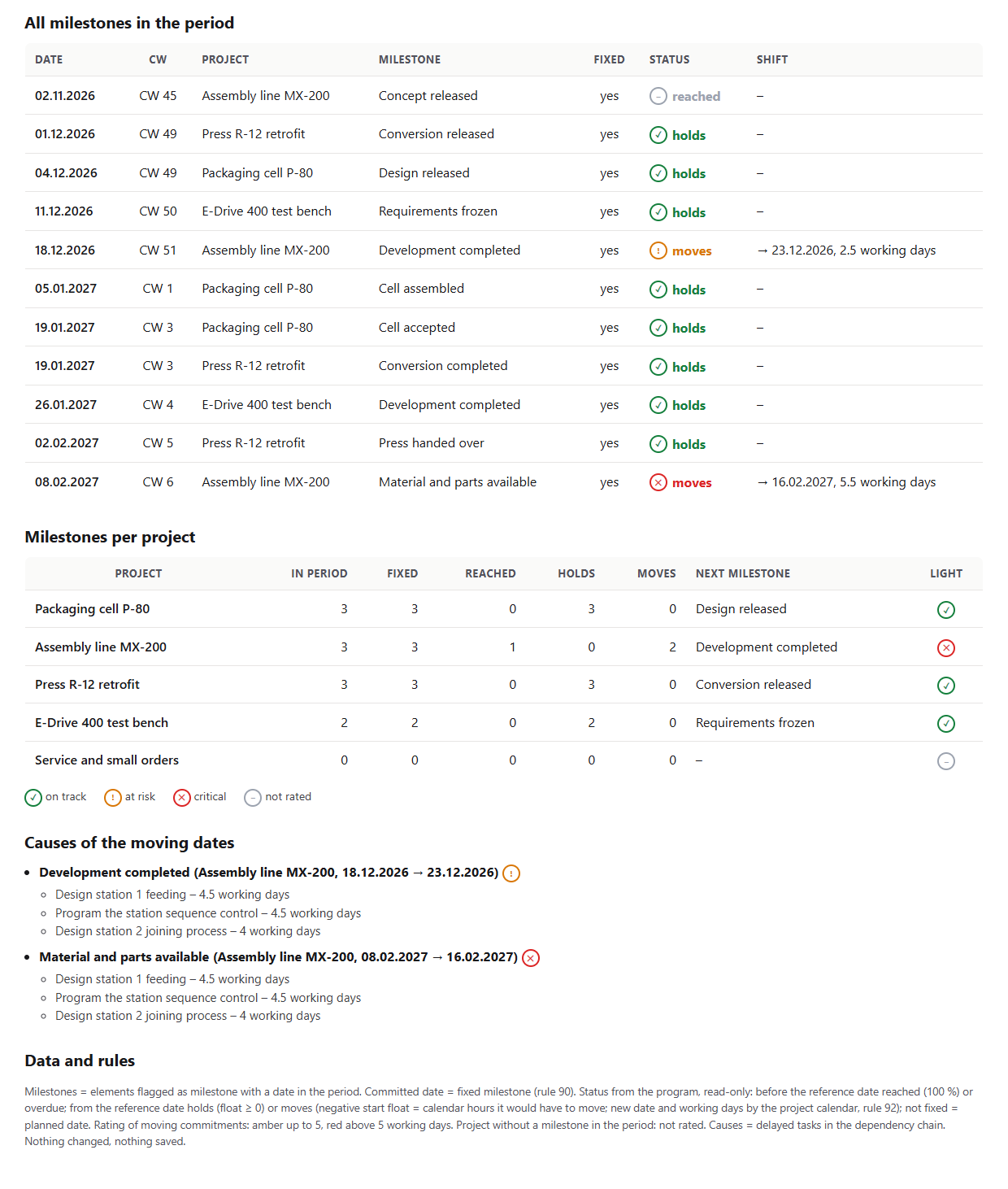
An overview with key findings, a timeline, two tables and the causes. In the test portfolio Machinery and plant engineering (five projects, status date 16 Nov 2026 and a backlog in two projects set for the test) the period 2 Nov 2026 to 28 Feb 2027 holds eleven milestones from four projects, all fixed. Two of them move, both in Assembly line MX-200: “Development completed” from 18 Dec to 23 Dec 2026 (2.5 working days, amber) and “Material and parts available” from 8 Feb to 16 Feb 2027 (5.5 working days, red). Eight dates from the reference date hold, one before it is reached.
The weekly timeline shows one row per project with the milestones as diamonds in their status colour; the busiest week is CW 49 with two milestones, the next one after the reference date is “Conversion released” in Press R-12 retrofit on 1 Dec 2026. Three delayed tasks with 4.5, 4.5 and 4 working days of delay lie before both moving dates. Service and small orders has no milestone in the period and is not rated.
Why it is useful
Management wants to know what is coming up in the next quarter – not only what is at risk. The Gantt view shows milestones, but not at a glance which are reached, which hold and which would have to move. Rillsoft Project knows the float of every fixed milestone; the AI turns that into a timeline with a status per milestone and says where it gets crowded – without touching the plan.How the answer is produced
The AI reads the project structure with float and takes every milestone whose date lies in the period. Before the reference date it counts as reached if it is 100 % complete, otherwise as overdue. From the reference date a fixed milestone holds if its start float is not negative; a negative float is the number of calendar hours it would have to move – from that the AI calculates the new date and, with the project calendar, the working days. Milestones that are not fixed are planned dates. Through the dependencies it names the delayed tasks before a moving date. In the test run, Rillsoft Project named exactly the same two dates with the same new dates when rescheduling from the status date.rillsoft_project_tree_get rillsoft_calendar_list rillsoft_project_conflict_list
Limits
The overview rates the plan at the status date, not a forecast. Commitments are fixed milestones; dates that exist only in a contract are invisible to the AI. Causes are delayed tasks in the dependency chain – without dependencies there are no causes. Float runs up to the next fixed frame. The question belongs to the catalogue of management questions; which commitments move is also answered by the prompt Delivery dates at risk. The product page of Rillsoft Project describes scheduling and milestones. Related prompts:Try it
Get started- Industry package
Machinery and plant engineering.rpp- Product version
- Rillsoft Project 10 (Build 10.0.625)
- Last verified
- 2026-10-17
- Verification
- Figures and statements verified on the named sample package against the named product build – MCP session, view and report; German and English package with identical figures.