All people, companies and projects shown are synthetic Rillsoft sample data – from the shipped industry packages or, where stated, from a test project.
The prompt
The local crew for "Fire walls and partitions" is fully booked. Find qualified bricklayers outside the preferred crew who are free in the period and fill the open balance.Changes the project (one undo step) Licence-dependent function
In your words
- Construction group: Which bricklayers from South or West can help the North branch in January?
- IT services: Who outside the backend team can take over the migration work?
What you need
- An open project whose subproject carries a preferred team.
- Read-only mode switched off for staffing; the candidate search alone also works in read-only mode.
- Candidate list and staffing are licence-dependent like their counterparts in the user interface.
What you get
In the sample package Buildwork Union the first step returns 15 candidates from NORTH: six already assigned, eight in a schedule conflict with the warehouse walls, one free – demand six, assigned six, open balance zero.
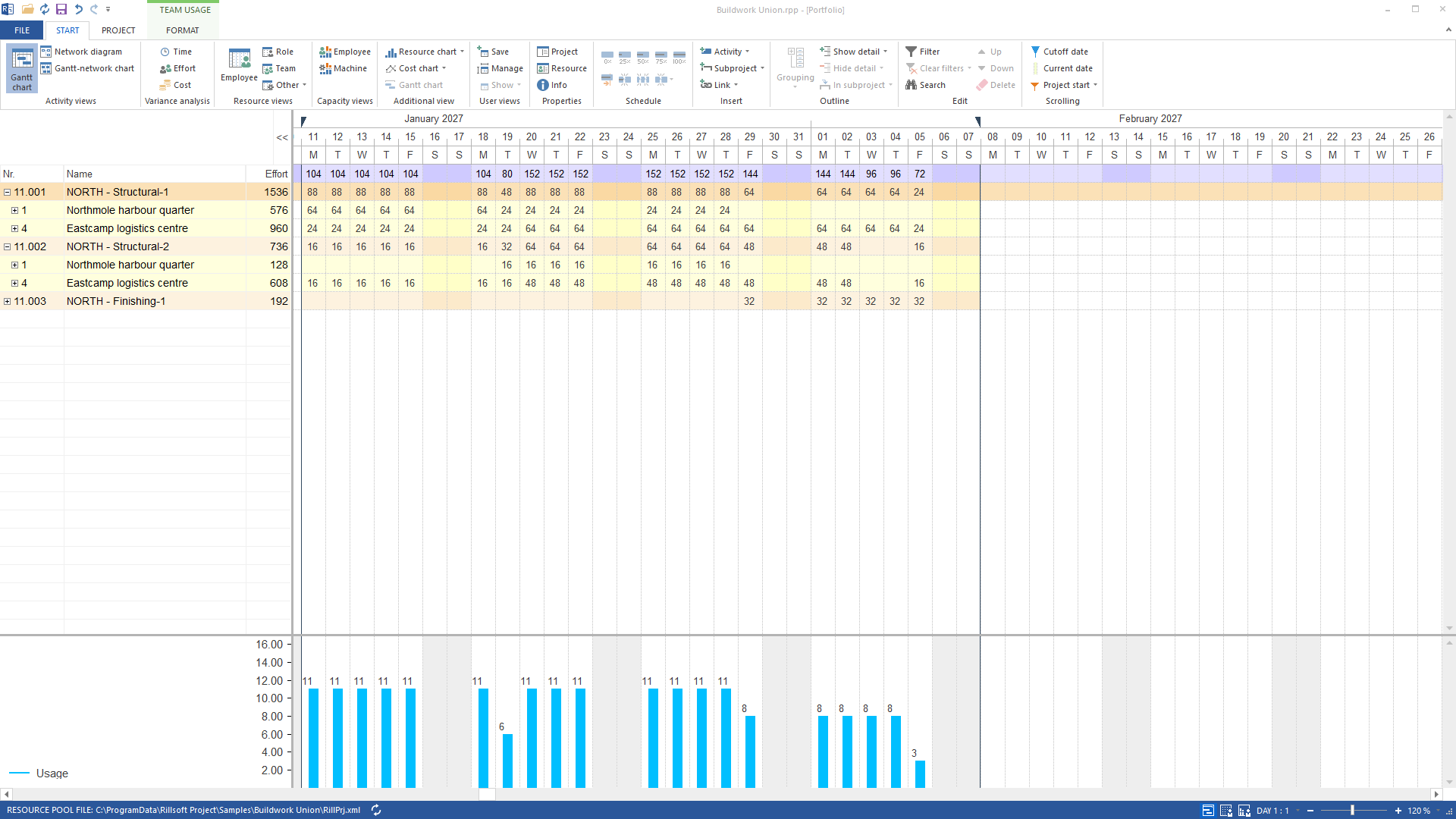
With the team filter opened there are 38 candidates, 23 of them free outside the NORTH crews: eight from SOUTH Structural-1, seven from SOUTH Structural-2, eight from WEST Structural-1. Nothing is assigned on the delivered package – the balance is covered, the answer says so and waits for a decision. The cross-check in the team view by team and project shows both NORTH crews with their tasks on Eastcamp and Northmole from 11 January to 7 February 2027. How the tie to the preferred team creates a shortage that disappears without it is shown by the example staff across sites on a railway project.
Why it is useful
Multi-site planning means: local first, then the group. The answer makes the second step deliberate and traceable instead of silently planning group-wide. Without the team filter as a preference mark there would only be group-wide or nothing – here the site stays the first step and the group the second.How the answer is produced
Candidate list with the preset team filter, the same list with the filter opened, assignment per person as its own undo step, team view by team and project as cross-check – the capacity view does not allow grouping by team and project. Balance and schedule conflicts are computed by Rillsoft Project.rillsoft_task_resource_candidate_list rillsoft_task_employee_assignment_set rillsoft_view_state_apply rillsoft_analysis_report_get rillsoft_history_undo
Limits
Schedule conflicts apply within the open project; no group-wide omniscience. The preferred team is a preference mark on the subproject, not an assignment; in the capacity view it acts as a filter – only its capacity counts, demand stays the same. Every assignment can be taken back individually with Ctrl+Z. The Rillsoft Project product page describes preferred teams.Try it
Get started- Industry package
09_baukonzern- Product version
- Rillsoft Project 10 (Build 10.0.623)
- Last verified
- 2026-09-27
- Verification
- Figures and statements verified on the named sample package against the named product build – MCP session, view and report; German and English package with identical figures.