All people, companies and projects shown are synthetic Rillsoft sample data – from the shipped industry packages or, where stated, from a test project.
The prompt
Which roles are overloaded? Read the staff capacity comparison per role at day scale in Rillsoft Project. First ask me for project or portfolio, period and unit. Name the roles that are overloaded in total already and those whose demand exceeds supply on individual days – with hours, percentage of demand, days and the peak week. Show a chart of its own per role with a shortfall, demand and supply per week. Rank by shortfall, not by utilisation, and rate: amber above 0, red above 10 %.Changes the project (one undo step)
Show the detailed prompt
Create a bottleneck overview per job role from Rillsoft Project.
First ask me for:
- Scope: project or portfolio (name the open one and let me confirm),
- Period: start and end (if I give none, suggest the next three months from the status date),
- Unit: hours or person-days (name the one set),
- Thresholds: name the default and ask whether it applies – amber above 0, red above 10 % shortfall of demand.
Data:
- Staff capacity comparison, flat by role, absolute with capacity, time filter on the period, day scale.
- Per role: demand, supply, utilisation; shortfall as the sum of the days on which demand exceeds supply, in hours and as a percentage of demand; number of those days, largest daily gap, week with the largest shortfall, months.
- Check that the shortfall of all roles together equals the sum over all roles and days.
- Do not recalculate anything from the plan; no statements about people.
Report:
1. Header with scope, period, unit and source.
2. Three to five key findings with figures: roles overloaded in total already; how many are short on individual days; the role most affected; a red role with low utilisation, if there is one.
3. Horizontal bars of the shortfall per role, largest first, colour and symbol by rating, hours, percentage and days at the bar.
4. Per role with a shortfall a chart of its own: demand and supply per week as two columns on one axis, above weeks with a shortfall a red symbol with the missing hours, same order as the bars, rating and figures in the title – the shortfall applies per role, not to all of them together.
5. Table of all roles with rating, demand, supply, utilisation, shortfall, days, largest daily gap, peak week and months.
6. Data basis and rules.
Reset the view afterwards and save nothing.In your words
- Quarter view: Which roles are overloaded next quarter – in total or on individual days?
- Staff planning: For which qualifications are we short of capacity from November to February, and in which week the most?
- Stricter: Show me the overloaded roles, but red from a shortfall of 5 percent.
What you need
- An open project or portfolio whose tasks carry job roles, and a resource pool with people in these roles.
- Answers to the AI’s questions: scope, period, unit and whether the default thresholds apply.
- Read-only mode is not enough: the AI switches view, time filter and time scale – one undo step each; business data stays untouched, and at the end it resets the view.
What you get
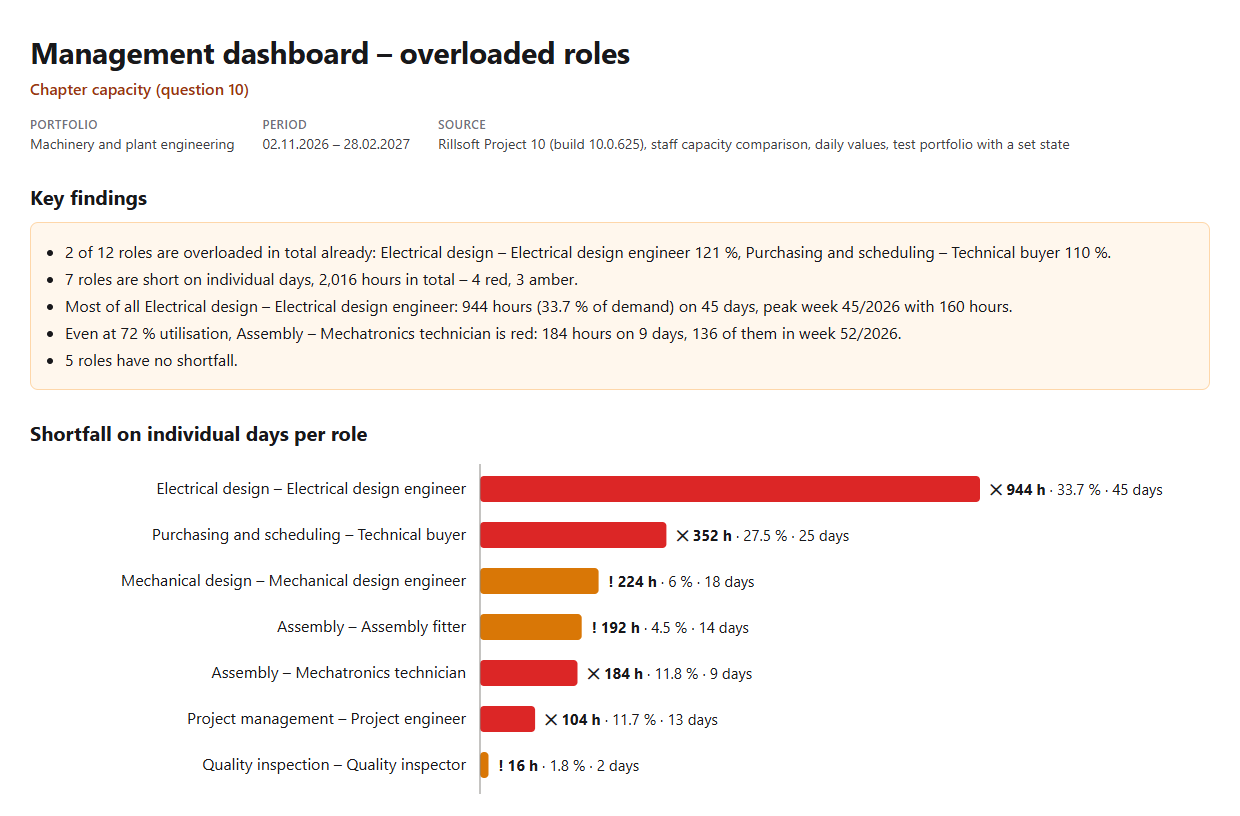
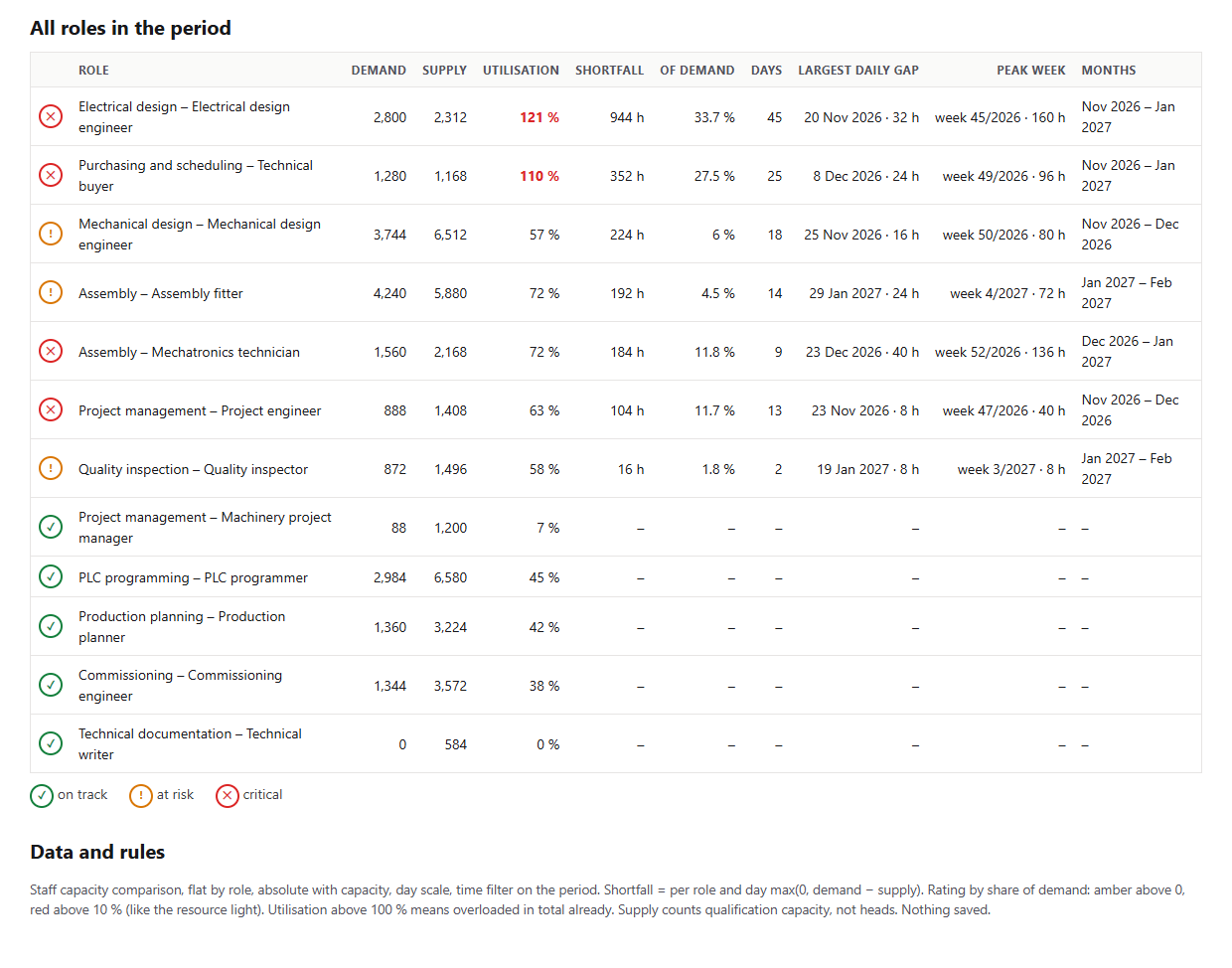
A bottleneck overview with key findings, bars, a weekly chart per role with a shortfall and a table of all roles. In the test portfolio Machinery and plant engineering (five projects, status date 16 Nov 2026 and a backlog in two projects set for the test), from November 2026 to February 2027 two of twelve roles are overloaded in total already: Electrical design at 121 % and Purchasing and scheduling at 110 %. Seven roles are short on individual days, 2,016 hours in total – four red, three amber.
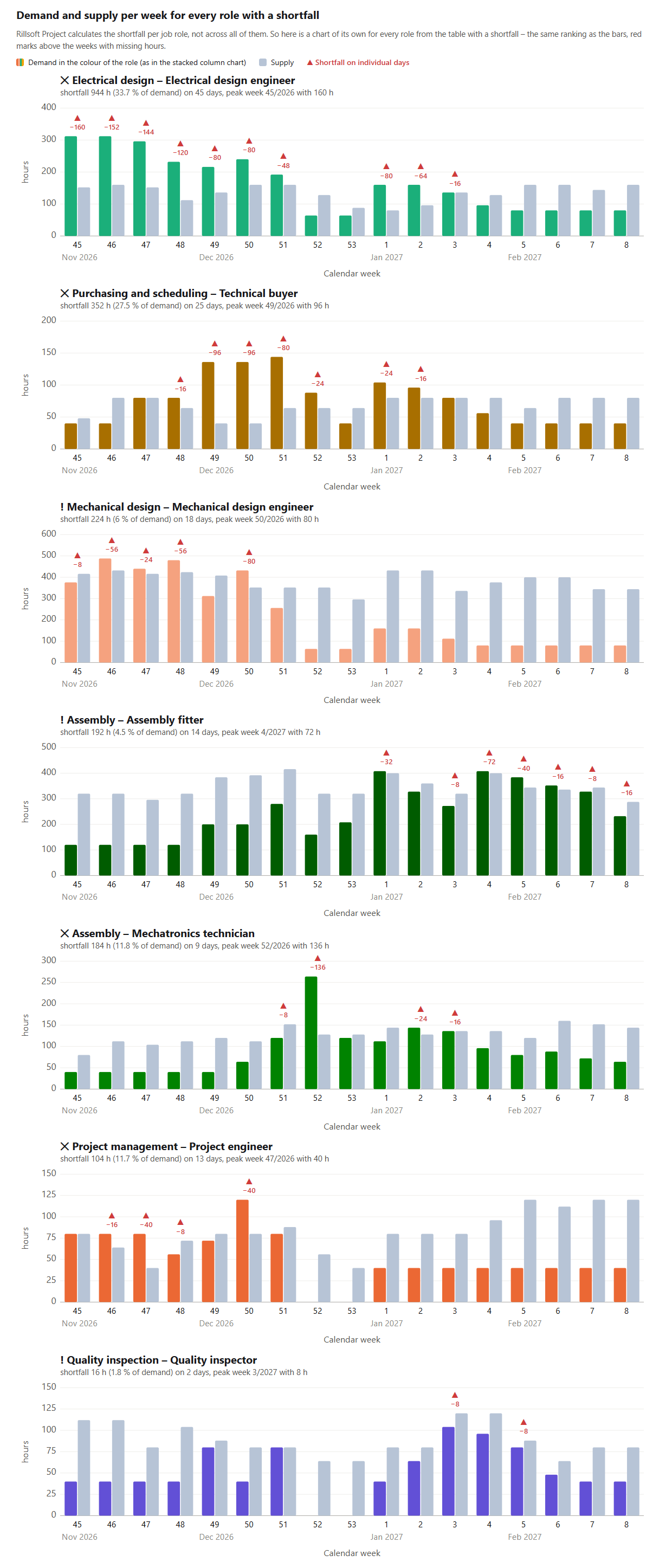
Electrical design is short the most: 944 hours, a third of its demand, on 45 days, most in week 45 with 160 hours. Assembly – Mechatronics technician is red at only 72 % utilisation: 184 hours on 9 days, 136 of them in week 52. That is exactly why the prompt ranks by the shortfall from daily values and not by utilisation. Below the bars, each of these seven roles has a chart of its own with demand and supply per week: electrical design is above supply every week from week 45 to week 51, purchasing and scheduling mainly in weeks 49 to 51, the mechatronics technician clearly only in week 52 – the total of all roles would hide that.
Why it is useful
For management, “overloaded” means two things: too few people for the volume, or too few people at the right time. Utilisation over the period only shows the first. Rillsoft Project calculates demand and supply per role and day; from these daily values the overview shows both – and which role is short of how many hours on which days.How the answer is produced
The AI reads the staff capacity comparison per role at day scale with a time filter. Per role it sums demand and supply and the hours of the days on which demand exceeds supply; plus the number of days, the largest daily gap and the peak week. Then it ranks by shortfall, rates like the resource light in the overall status, draws demand and supply per week for every role with a shortfall from the same daily values and resets the view. Part C of the management dashboard shows the same values.rillsoft_project_tree_get rillsoft_view_state_get rillsoft_view_state_apply rillsoft_timescale_apply rillsoft_analysis_report_get
Limits
The overview describes roles, not people; supply counts qualification capacity, not heads. People with two roles have shared capacity. Compare with the program view only with the same time filter. Who exactly is overloaded next week is answered by the prompt Who is overloaded next week?; all 22 questions are in the catalogue. The product page of Rillsoft Project describes capacity planning. Related prompts:Try it
Get started- Industry package
Machinery and plant engineering.rpp- Product version
- Rillsoft Project 10 (Build 10.0.625)
- Last verified
- 2026-10-17
- Verification
- Figures and statements verified on the named sample package against the named product build – MCP session, view and report; German and English package with identical figures.