All people, companies and projects shown are synthetic Rillsoft sample data – from the shipped industry packages or, where stated, from a test project.
The prompt
Which projects are affected by resource bottlenecks? Read the staff capacity comparison per role and per role and project on the day scale in Rillsoft Project. On every day on which the demand of a role exceeds its supply, every project with demand receives the shortfall of the role times its share of demand; the sum per project is its share of the shortfall. First ask me for portfolio or selected projects, period and unit; the reference date is the status date. Rank the projects by hours, colour by percent of demand (amber above 0, red above 10) and name per project the roles with a share, the tasks running on bottleneck days of their role and the overload conflicts. Reset the view afterwards and save nothing.Read-only mode is enough
Show the detailed prompt
Create a project-based bottleneck analysis from Rillsoft Project.
First ask me for:
- Scope: portfolio or selected projects (name the open one and let me confirm),
- Period: start and end (if I give none, suggest the project period),
- Unit: name the one set in the project,
- Thresholds: name the default and ask whether it applies – amber above 0, red above 10 percent of project demand.
The reference date is the status date; name it.
Data, read-only:
- Staff capacity comparison per role, absolute values with capacity, time filter on the period, time scale day: demand and supply per role and day; bottleneck day = demand above supply.
- The same comparison per role and project: demand per role, project and day (the supply there is the assignment, do not use it).
- Per project and role: demand on bottleneck days and share of the shortfall = sum over the bottleneck days of the project's demand divided by the role's demand times the role's shortfall. Sum per project = its share in hours; percent = share divided by the project's demand.
- Affected tasks: open tasks of the project with an assignment of the role that run on a bottleneck day of that role – mark as an approximation, the program does not provide demand per task in the capacity comparison.
- Overload conflicts from the conflict list “overload” per project.
- Reset the view and the time scale afterwards and save nothing.
Report:
1. Header with scope, reference date, period, unit and source.
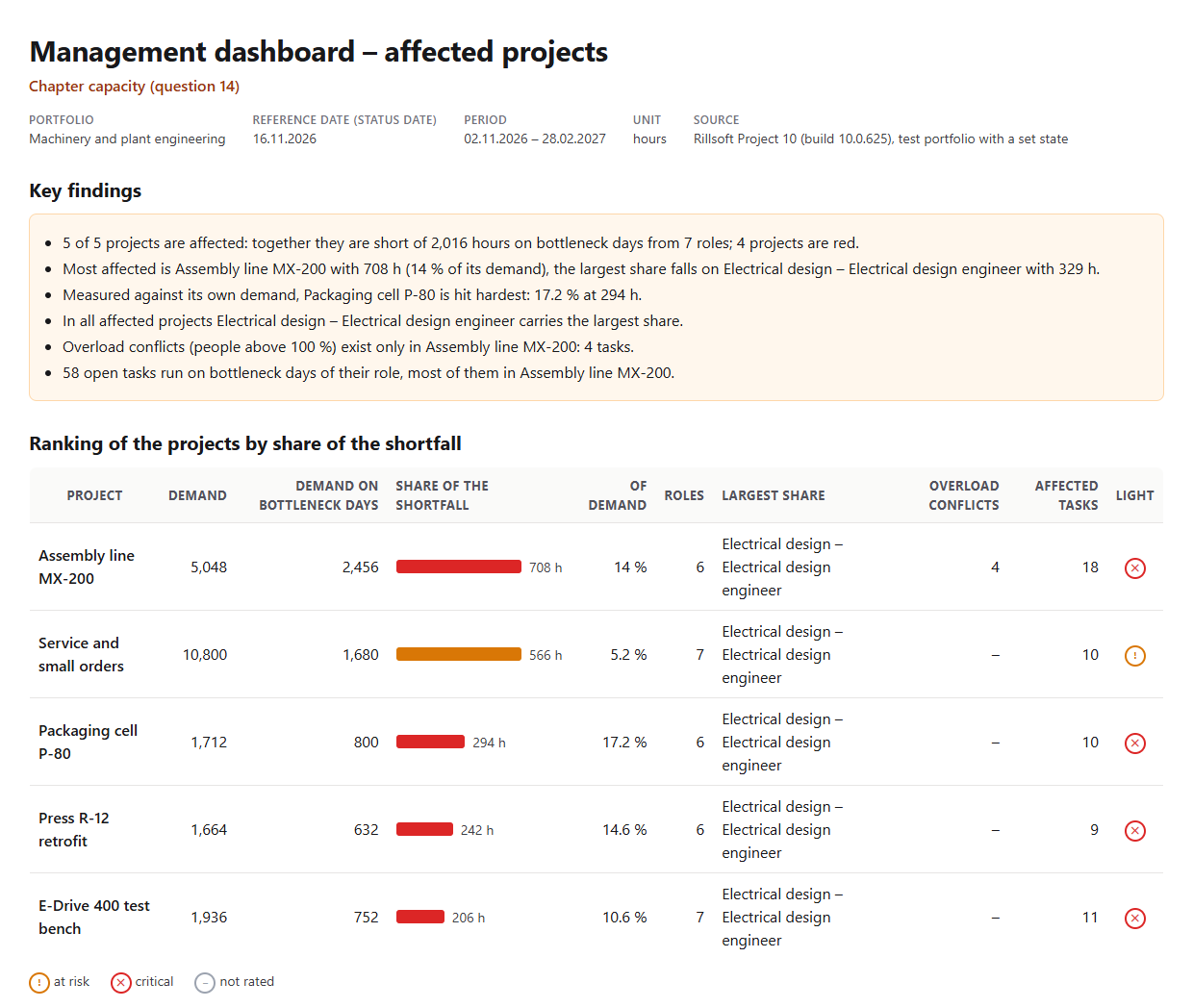
2. Key findings with figures: affected projects, missing hours and roles, red projects; the most affected project with hours, percent and largest role; the one hit hardest in percent; overload conflicts; affected tasks.
3. Ranking of the projects by hours: demand, demand on bottleneck days, share of the shortfall, percent of demand, roles, largest share, overload conflicts, affected tasks, light.
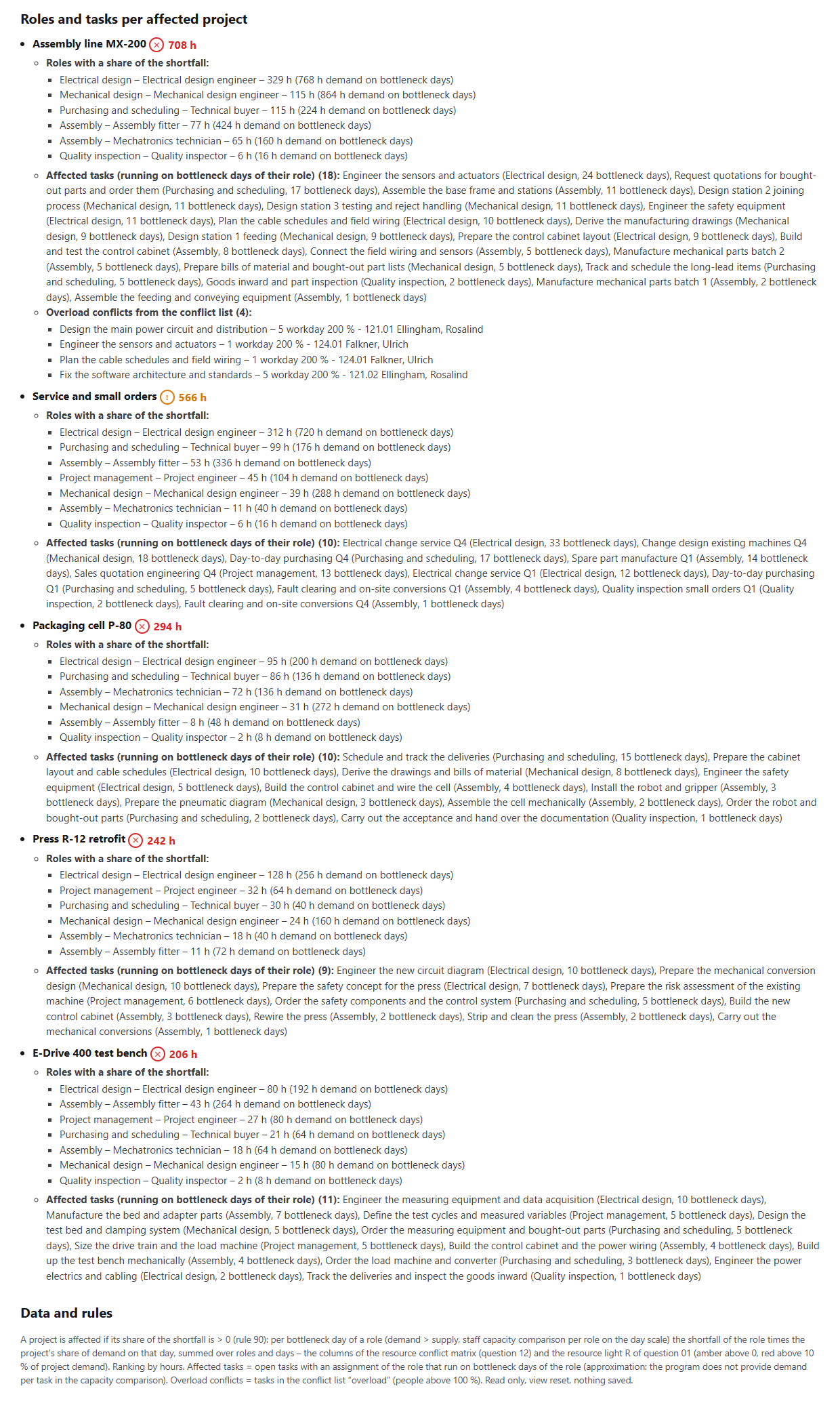
4. Per affected project: roles with share, affected tasks with role and bottleneck days, overload conflicts.
5. Data and rules.In your words
- Portfolio meeting: Which project suffers most from the bottlenecks in the first quarter of 2027 – in hours and in percent of its demand? And which roles are behind it?
- One project in focus: How strongly is Assembly line MX-200 affected by bottlenecks? Name the roles that are missing and the tasks running on bottleneck days.
- Stricter: List the affected projects, but red already from five percent of demand.
What you need
- An open portfolio with several projects, roles in the resource pool and people assigned to the roles – without assignment there is no supply.
- Demand through role assignments of the tasks; bottlenecks only arise on days on which the demand of a role exceeds its supply.
- Read-only mode is enough: the AI reads project structure, capacity comparison and conflict list, resets the view and saves nothing.
What you get
A ranking of the projects with key findings, a table and, per project, the roles and tasks behind it. In the test portfolio Machinery and plant engineering (five projects, status date 16 Nov 2026 and a backlog in two projects set for the test) all five projects are affected from 2 Nov 2026 to 28 Feb 2027: together they are short of 2,016 hours on bottleneck days from seven roles, four projects are red. Most affected is Assembly line MX-200 with 708 hours, 14 percent of its demand; measured against its own demand, Packaging cell P-80 is hit hardest with 17.2 percent at 294 hours. Service and small orders has the second-largest share with 566 hours, but at 10,800 hours of demand only 5.2 percent and stays amber.
In all five projects Electrical design carries the largest share, 329 hours in MX-200. Overload conflicts, people above 100 percent, exist only in MX-200 with four tasks. 58 open tasks run on bottleneck days of their role, 18 of them in MX-200 – marked as an approximation, because Rillsoft Project does not provide demand per task in the capacity comparison.
Why it is useful
The conflict matrix says which role is missing where; management asks the other way round: which project suffers, how much, and what does that mean for its tasks. Rillsoft Project calculates the capacity comparison per role and day; the AI distributes the shortfall of every bottleneck day to the projects by their share of demand and reads the result per project – the same figure that sets the resource light in the overall status, without touching the plan.How the answer is produced
The AI remembers the view, reads the staff capacity comparison per role and per role and project on the day scale with a time filter and determines the bottleneck days of every role. On every bottleneck day each project with demand receives the shortfall of the role times its share of demand; the sum is its share in hours, divided by the project demand the percentage for the light. It also reads the overload conflict list and names the open tasks assigned to a bottleneck role that run on its bottleneck days. In the test run the shares per project equalled exactly the columns of the resource conflict matrix and the resource light of the overall status, the sum the shortfall of all roles.rillsoft_view_state_get rillsoft_project_tree_get rillsoft_view_state_apply rillsoft_timescale_apply rillsoft_analysis_report_get rillsoft_project_conflict_list
Limits
Affected means a share of the shortfall on bottleneck days above zero – the definition from the catalogue, ranked by hours; percent of demand sets the light. Affected tasks are an approximation over the task duration, because the capacity comparison provides no demand per task. The supply in the comparison per role and project is the assignment, not the capacity. The question belongs to the catalogue of management questions; the view per role is the resource conflict matrix, the same figure sets R in the overall status. The product page of Rillsoft Project describes the capacity comparison. Related prompts:Try it
Get started- Industry package
Machinery and plant engineering.rpp- Product version
- Rillsoft Project 10 (Build 10.0.625)
- Last verified
- 2026-10-17
- Verification
- Figures and statements verified on the named sample package against the named product build – MCP session, view and report; German and English package with identical figures.