All people, companies and projects shown are synthetic Rillsoft sample data – from the shipped industry packages or, where stated, from a test project.
The prompt
How does the schedule deviate from the baseline? Open the project files of the portfolio one after another in Rillsoft Project, read the schedule variance view without time filter per project and give the project finish baseline and current, moved milestones and the tasks that are later, with the variance in working days by the project calendar. First ask me for portfolio or project; the reference date is the status date. Light from the largest shift of project finish and milestones: amber above 0, red above 5 working days; not rated without a baseline. Reset the view before every file switch, save nothing and reopen the portfolio at the end. Add that a baseline shows the difference, not a trend.Changes the project (one undo step)
Show the detailed prompt
Create a schedule variance against the baseline per project from Rillsoft Project.
First ask me for:
- Scope: portfolio or project (name the open one and let me confirm; in a portfolio the project files are opened one after another – ask whether unsaved changes may be discarded),
- Thresholds: name the default and ask whether it applies – amber above 0, red above 5 working days of shift.
The reference date is the status date; name it.
Data, read-only:
- Read the portfolio: the projects with their file paths.
- Per project file: set the view to the neutral plan view without time filter, open the file, project structure (milestones, calendar), schedule variance view without time filter, report with baseline and current plan per element. Without a baseline: not rated.
- Per project: project finish baseline and current with variance; moved milestones with baseline, current and working days by the project calendar; tasks later and earlier, the largest variances.
- Reopen the portfolio at the end; check and restore status date and unit, reset the view; save nothing, reschedule nothing.
Report:
1. Header with scope, reference date and source.
2. Key findings with figures: projects with a baseline, deviating, on the baseline, not rated; per deviating project the later tasks, the largest variance, the moved milestones and whether the project finish holds; the note that a baseline shows the difference, not a trend.
3. Table per project: baseline, project finish baseline and current, variance finish, milestones moved, tasks later of total, largest variance, light from the largest shift of project finish and milestones.
4. Per project the moved milestones and the largest variances of the tasks with baseline, current and working days.
5. Data and rules.In your words
- Steering committee: Which projects in the portfolio have slipped against their baseline – project finish, milestones, by how many working days?
- One project: How does Assembly line MX-200 deviate from the baseline? Show me the moved milestones and the ten tasks with the largest variance.
- Stricter: Schedule variance per project against the baseline, but red already from three working days.
What you need
- An open portfolio whose project files have a baseline – without a baseline a project is not rated, the portfolio itself has none.
- Write access for the MCP server, because opening the project files counts as a change; the plan itself is not changed and nothing is saved.
- A project calendar per project so the AI can convert calendar hours into working days.
What you get
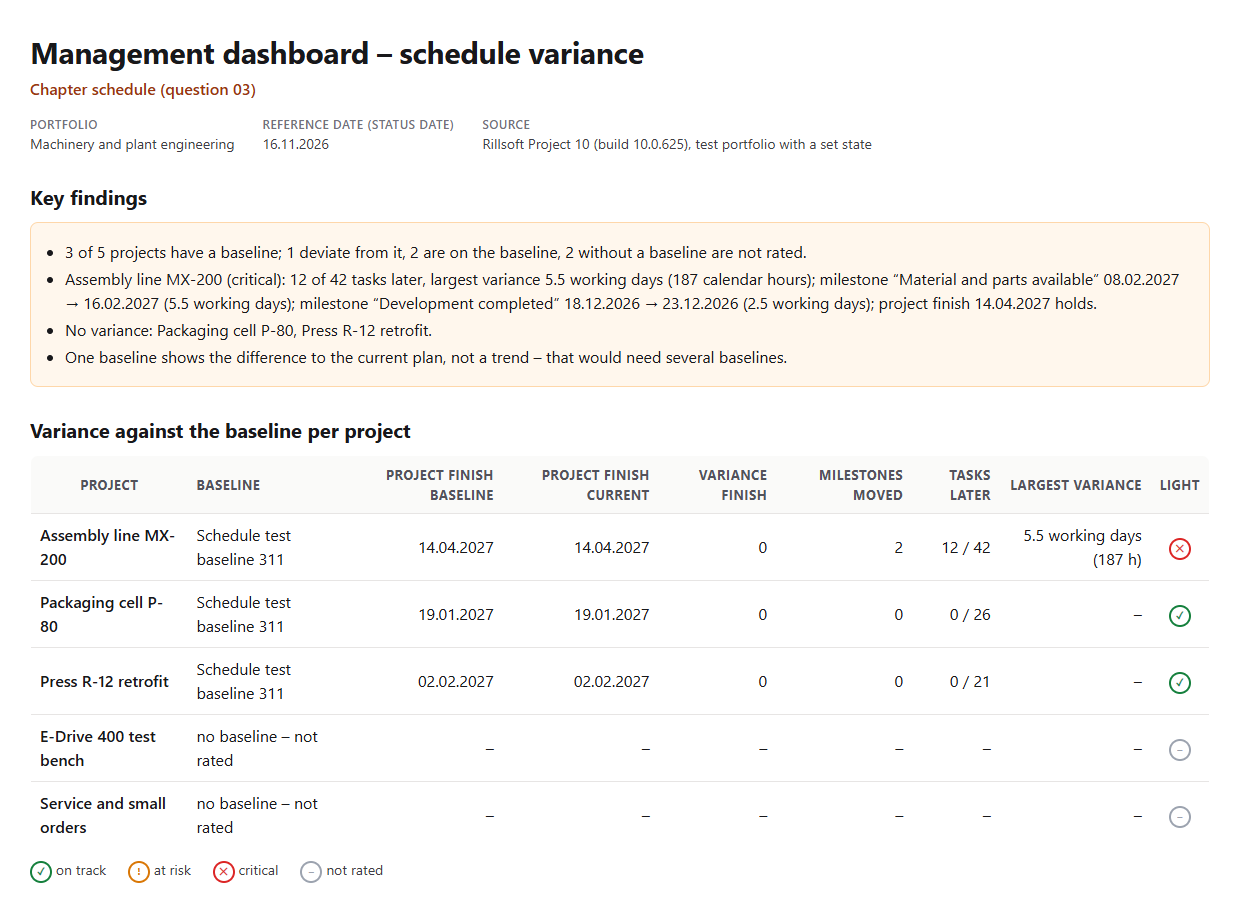
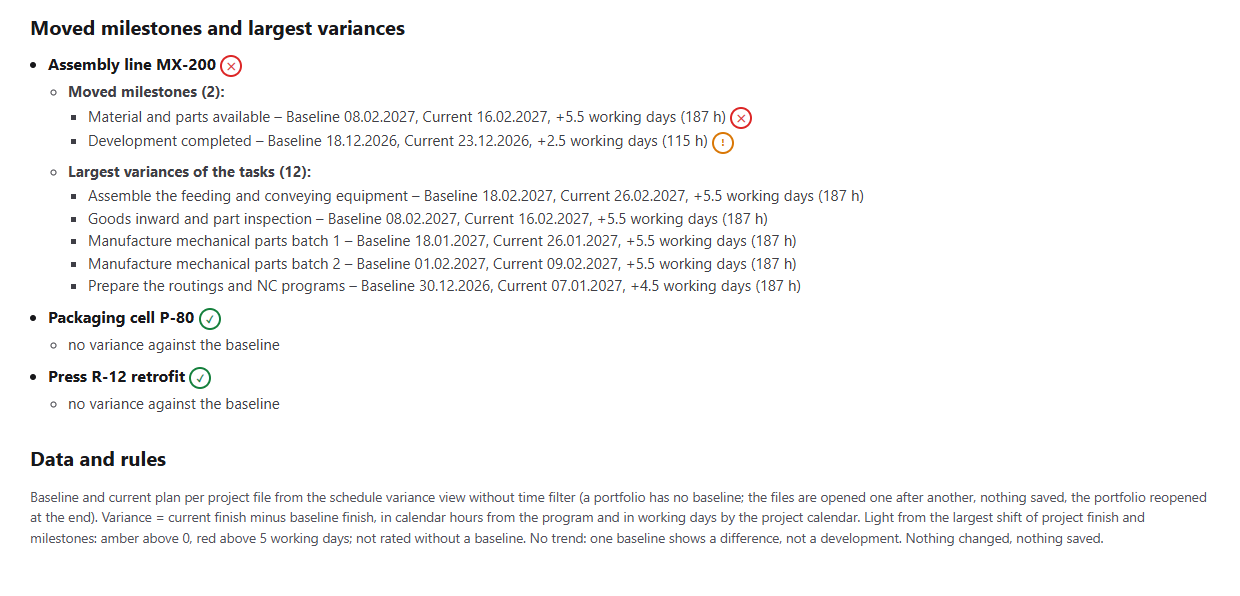
An overview with key findings, a table per project and the moved milestones and largest variances. In the test portfolio Machinery and plant engineering (five projects, status date 16 Nov 2026, prepared for the test: a baseline per project file, backlog and rescheduling in Assembly line MX-200, two projects without a baseline) three projects have a baseline. Assembly line MX-200 deviates: 12 of 42 tasks are later, by up to 5.5 working days (187 calendar hours), the milestones “Material and parts available” from 8 Feb to 16 Feb 2027 (5.5 working days) and “Development completed” from 18 Dec to 23 Dec 2026 (2.5 working days); the project finish on 14 Apr 2027 holds, the light is red.
Packaging cell P-80 and Press R-12 retrofit are on the baseline, E-Drive 400 test bench and Service and small orders have no baseline and are not rated. For this the AI opens the five project files one after another, saves nothing and reopens the portfolio at the end; status date and unit, which come from the file after reopening, it restores.
Why it is useful
Management wants to know how far the current plan is from the committed state – not only whether tasks are delayed. The committed state is held by the baseline; Rillsoft Project calculates the variance per element in the schedule variance view, but only in a single project. So the AI goes through the project files of the portfolio, summarises project finish, milestones and tasks per project and converts calendar hours into working days – without touching the plan.How the answer is produced
The AI reads the portfolio with the file paths, sets the neutral plan view before every file switch, opens each project file, reads project structure and calendars and the schedule variance view without time filter. From the report it takes baseline, current plan and variance in calendar hours per element; it recognises milestones through the project structure and calculates the working days with the project calendar. At the end it reopens the portfolio, restores status date and unit and resets the view. In the test run the values read matched those read from the program when the test set-up was prepared.rillsoft_view_state_get rillsoft_portfolio_file_open rillsoft_project_file_open rillsoft_project_tree_get rillsoft_calendar_list rillsoft_view_state_apply rillsoft_variance_report_get
Limits
A baseline shows the difference to the current plan, not a trend – that needs several baselines. A portfolio has no baseline, the AI reads the project files one after another; after reopening, status date and unit of the file apply, the AI restores them. The variance comes in calendar hours from the program; working days are calculated by the AI with the project calendar. The question belongs to the catalogue of management questions; the comparison per task in a single project is done by the prompt Compare with baseline, the costs against the baseline by the prompt Cost overrun by project. The product page of Rillsoft Project describes baselines. Related prompts:Try it
Get started- Industry package
Machinery and plant engineering.rpp- Product version
- Rillsoft Project 10 (Build 10.0.625)
- Last verified
- 2026-10-17
- Verification
- Figures and statements verified on the named sample package against the named product build – MCP session, view and report; German and English package with identical figures.