All people, companies and projects shown are synthetic Rillsoft sample data – from the shipped industry packages or, where stated, from a test project.
The prompt
Which roles have spare capacity in the period? Read the staff capacity comparison per role on the day scale in Rillsoft Project and calculate per role the spare capacity as the sum of the days on which supply exceeds demand – with hours, share of supply, number of days and peak week; next to it the shortfall on other days. First ask me for project or portfolio, period, time scale and unit; the reference date is the status date. Rank the roles by spare hours and draw a weekly chart of demand and supply per role. Per role, not per person. Reset the view afterwards and save nothing.Read-only mode is enough
Show the detailed prompt
Create an overview of the spare capacity per role from Rillsoft Project.
First ask me for:
- Scope: project or portfolio (name the open one and let me confirm),
- Period: start and end (if I give none, suggest the project period),
- Time scale: week or month for the charts (suggest one with at most about 30 intervals),
- Unit: name the one set in the project (hours, person-days or person-weeks).
The reference date is the status date; name it.
Data, read-only:
- Staff capacity comparison, grouped per role, absolute values with capacity, time filter on the period, time scale day: demand and supply per role and day.
- Calculate per role: spare capacity = sum over the days of max(0, supply − demand); shortfall = sum of max(0, demand − supply); share spare = spare divided by supply; days with spare capacity; peak week. Not supply minus demand over the period – that hides spare and missing days.
- Per role, not per person; people with two roles share their capacity.
- Reset the view and the time scale to the previous state afterwards and save nothing.
Report:
1. Header with scope, reference date, period, unit, time scale and source.
2. Key findings with figures: spare hours of total supply with share; the three roles with the most spare capacity; how many roles have no shortfall and how many both; the tightest role; the peak week.
3. Table per role, ranked by spare hours: supply, demand, spare with bar, share, days spare of total, peak week, shortfall.
4. One weekly chart per role: demand in the colour of the role, supply grey, spare capacity and shortfall from daily values as symbols above the columns; the three roles with the most spare capacity first.
5. Data and rules.In your words
- Taking on a new project: Which roles still have room in the first quarter of 2027? I want to see the spare hours per role and the weeks in which they are spare.
- Resource meeting: Show me the spare capacity per role for the next eight weeks, chart per role – and say where the same role is missing on other days.
- One role only: How much spare capacity does the role PLC programming have from November to February, on which days and in which week the most?
What you need
- An open project or portfolio with roles in the resource pool and people assigned to the roles – without assignment there is no supply.
- Demand through role assignments of the tasks; the capacity unit is set in the project (hours, person-days, person-weeks).
- Read-only mode is enough: the AI reads the capacity comparison, resets the view and saves nothing.
What you get
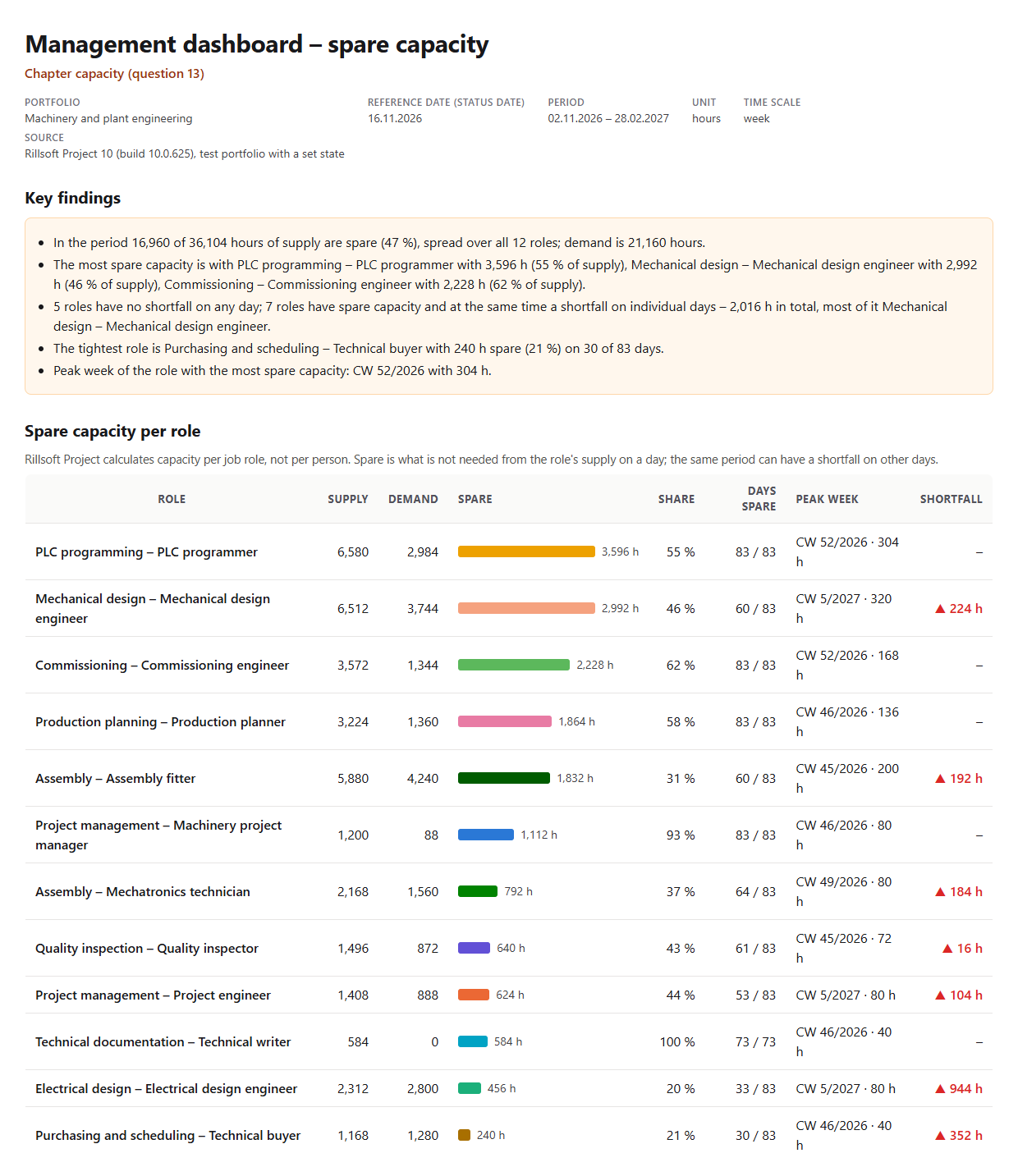
An overview with key findings, a ranking per role and a weekly chart per role. In the test portfolio Machinery and plant engineering (five projects, status date 16 Nov 2026 and a backlog in two projects set for the test) 16,960 of 36,104 hours of supply are spare from 2 Nov 2026 to 28 Feb 2027, 47 percent, spread over all twelve roles. The most spare capacity is with PLC programming with 3,596 hours (55 percent of supply), Mechanical design with 2,992 hours (46 percent) and Commissioning with 2,228 hours (62 percent).
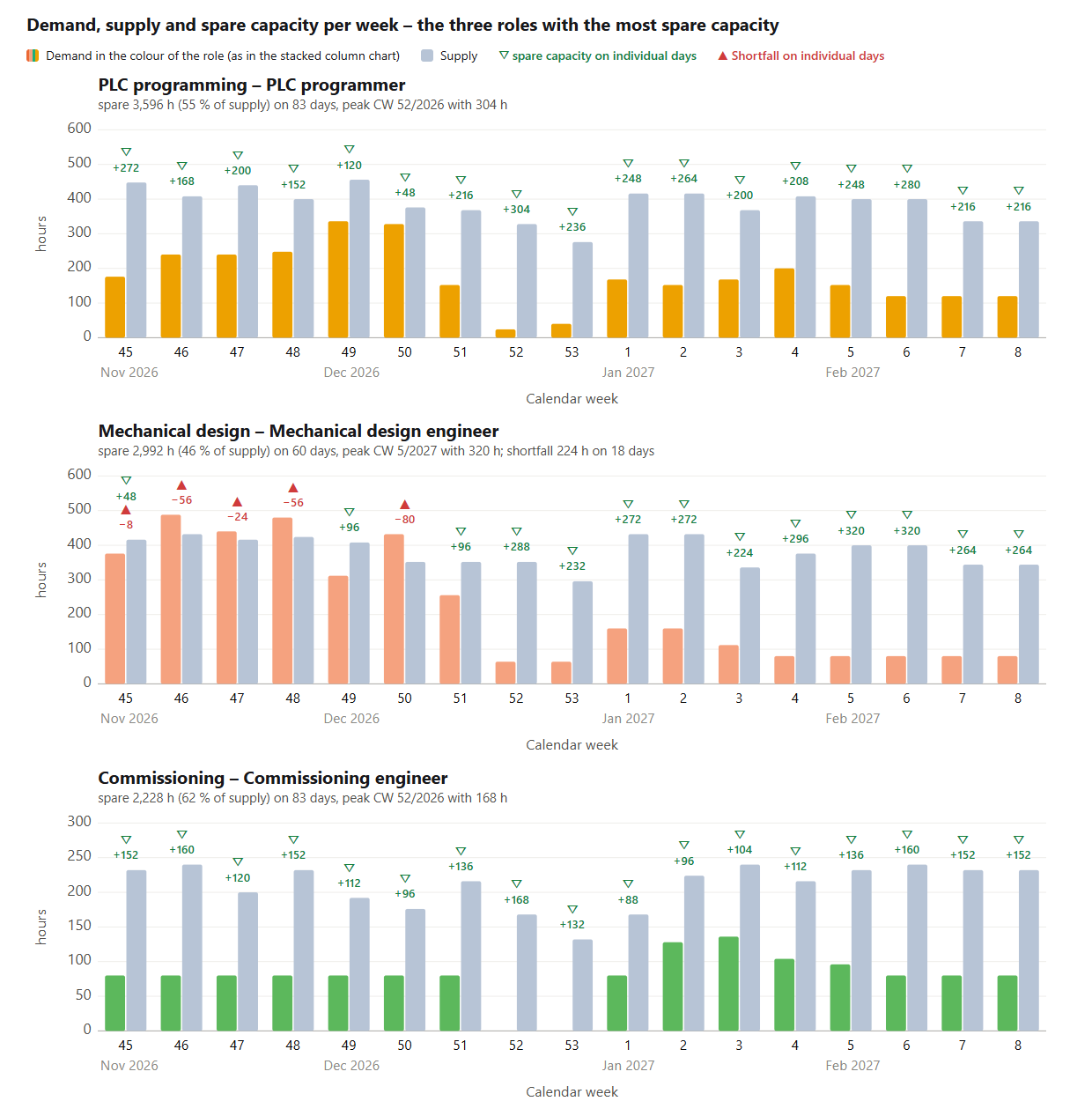
Five roles have no shortfall on any day; seven have spare capacity and at the same time a shortfall on individual days, 2,016 hours in total, most of it Electrical design with 944 hours next to 456 spare hours. The tightest role is Purchasing and scheduling with 240 spare hours on 30 of 83 days. The charts show demand and supply per week for each role with the spare hours in green and the shortfall in red.
Why it is useful
Whoever takes on a new project or reallocates work needs the spare hours per role – not the difference between supply and demand over the period, which nets spare days against missing days. Rillsoft Project calculates the capacity comparison per role and day; the AI adds up the days with a surplus, names the share, the days and the peak week and puts the shortfall next to it – per role, not per person, because teams mix qualifications.How the answer is produced
The AI remembers the view, sets the staff capacity comparison per role with a time filter to the day scale and reads demand and supply per role and day. Spare is the sum of the days on which supply exceeds demand; shortfall the sum of the other days. Per role it calculates share, days and the weekly series for the chart and resets the view. In the test run supply, demand and shortfall matched the prompts Demand and supply trend and Overloaded roles, and spare minus shortfall equalled supply minus demand for every role.rillsoft_view_state_get rillsoft_view_state_apply rillsoft_timescale_apply rillsoft_analysis_report_get
Limits
Spare is calculated per role, not per person; who is free is answered by the prompt Available resources for a project. People with two roles share their capacity, spare hours must not be added across roles. Values come in the unit of the program; FTE is not available in the capacity comparison. The question belongs to the catalogue of management questions; the shortfall of the same roles is rated by the prompt Overloaded roles. The product page of Rillsoft Project describes the capacity comparison. Related prompts:Try it
Get started- Industry package
Machinery and plant engineering.rpp- Product version
- Rillsoft Project 10 (Build 10.0.625)
- Last verified
- 2026-10-17
- Verification
- Figures and statements verified on the named sample package against the named product build – MCP session, view and report; German and English package with identical figures.