All people, companies and projects shown are synthetic Rillsoft sample data – from the shipped industry packages or, where stated, from a test project.
The prompt
Staff the open roles in the project “Packaging cell P-80” with suitable people. For each task, tell me whom you suggest and why, and assign only after I confirm.Changes the project (one undo step) Licence-dependent function
In your words
- IT services: Staff the open developer roles in the ERP module, but only with people from the backend team.
- Construction: Who can take the open places in the shell construction? Suggest, we assign after we have talked.
What you need
- An open project whose tasks carry roles; the people are in the resource pool with these roles.
- Read-only mode is enough for the suggestion, not for the assignment.
- The candidate list and the “Assign staff” wizard are licensed like their counterparts in the user interface.
What you get
In the sample package Machinery and plant engineering, the packaging cell P-80 is planned with roles only: 26 tasks are in “Unassigned resources”. The AI reads the candidates per task and suggests whoever is not yet assigned, has no schedule conflict and is fully available in the period – with free capacity and cost as the reason. After confirmation the “Assign staff” wizard fills 34 places in 24 tasks with 19 people; nobody is overloaded afterwards. Four tasks stay open or half staffed, and the answer says why: on 1 October the project needs four project engineers at the same time, two are fully available – the third is not available in early October. The deliveries in December get no technical buyer because the two are available at only 80 % and 40 %. And on 21 December there are five places for mechatronics technicians and four people.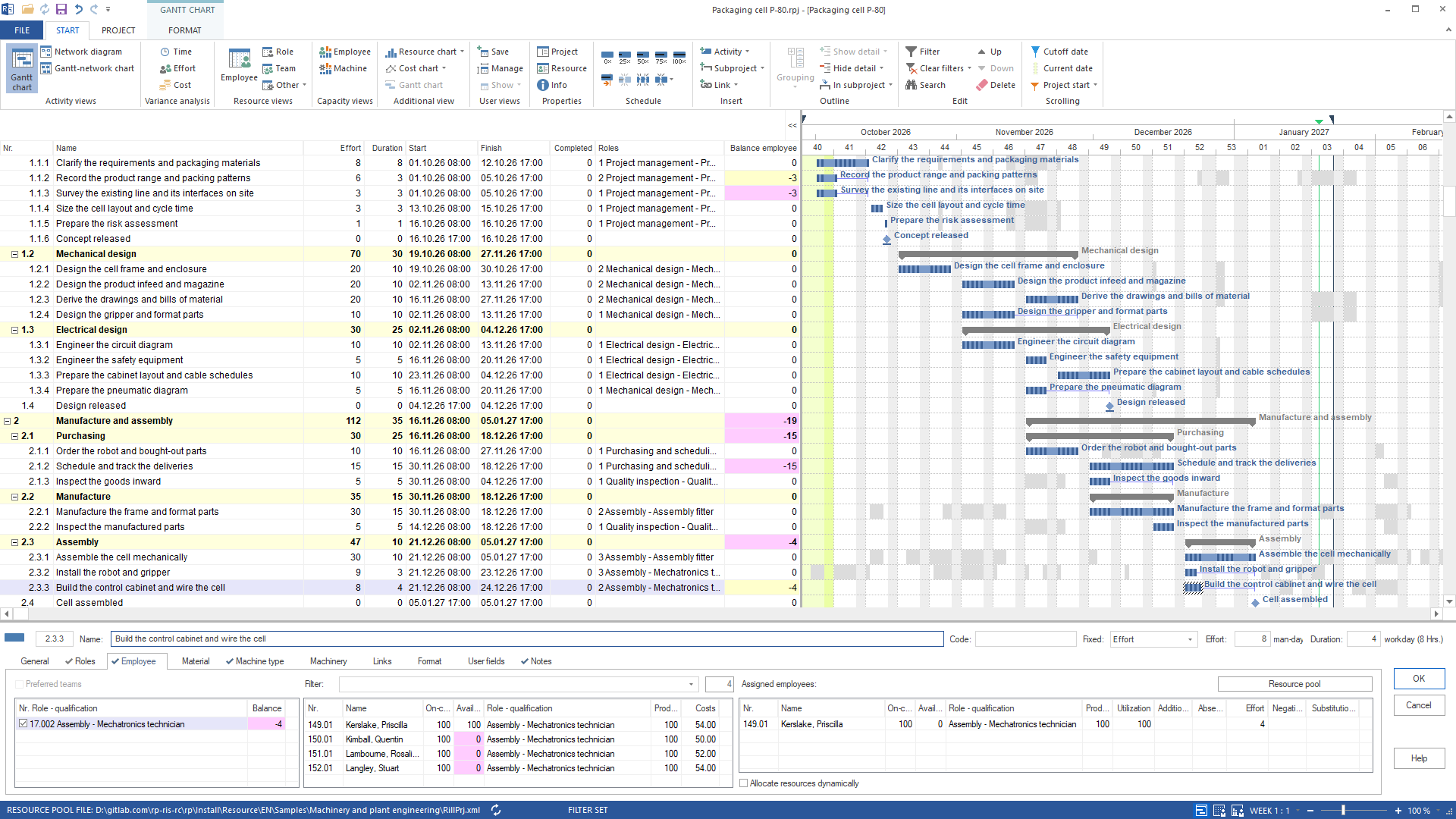
Why it is useful
Roles are planned quickly, assigning people takes time: going through the candidates task by task, checking availability and conflicts. The suggestion takes that work off your hands and justifies each choice with figures from the plan. What does not work out is listed with its reason – as a list for the talk with the department head instead of a silent remainder in the conflict list.How the answer is produced
The AI reads the candidate list for all tasks of the project – per role demand and balance, per person free capacity, availability, cost and schedule conflict – and words the suggestion from it. After you confirm, it calls the “Assign staff” wizard: it assigns only where the role is still open, the person has no schedule conflict and is fully available – one call, one undo step. Then the AI reads the candidate and conflict lists again and reports what stays open. A single person it assigns withrillsoft_task_employee_assignment_set.rillsoft_task_resource_candidate_list rillsoft_task_resource_assignment_fill rillsoft_task_employee_assignment_set rillsoft_project_conflict_list rillsoft_project_tree_get
Limits
The suggestions come from skill, availability, free capacity, cost and schedule conflict in the open plan – not from past projects. Whoever is not fully available in the period is left out by the wizard; the AI names these people, and they are assigned only on explicit request. Schedule conflicts apply to what is open: in a single project only that project, in a portfolio all the projects it contains. The same wizard assigns machines with type machine; in the example three machine requirements stayed open. The Rillsoft Project product page describes the staffing wizards.Try it
Get started- Industry package
02_maschinenbau- Product version
- Rillsoft Project 10 (Build 10.0.624)
- Last verified
- 2026-09-29
- Verification
- Figures and statements verified on the named sample package against the named product build – MCP session, view and report; German and English package with identical figures.