All people, companies and projects shown are synthetic Rillsoft sample data – from the shipped industry packages or, where stated, from a test project.
The prompt
Who is overloaded next week? For each person, list the affected tasks and the hours above capacity.Changes the project (one undo step)
In your words
- Manufacturing: Which maintenance staff are double-booked in the week of the shutdown window?
- IT services: Who in the backend team has more work next week than fits into their working hours?
What you need
- An open project or portfolio with people assigned by name.
- Read-only mode is not enough: the AI switches the personnel view and the weekly scale – one undo step each; project data stays untouched.
- “Overloaded” is the statement of the personnel view and of the conflict list “Overloaded resources”; shortfall per skill is a different prompt.
What you get
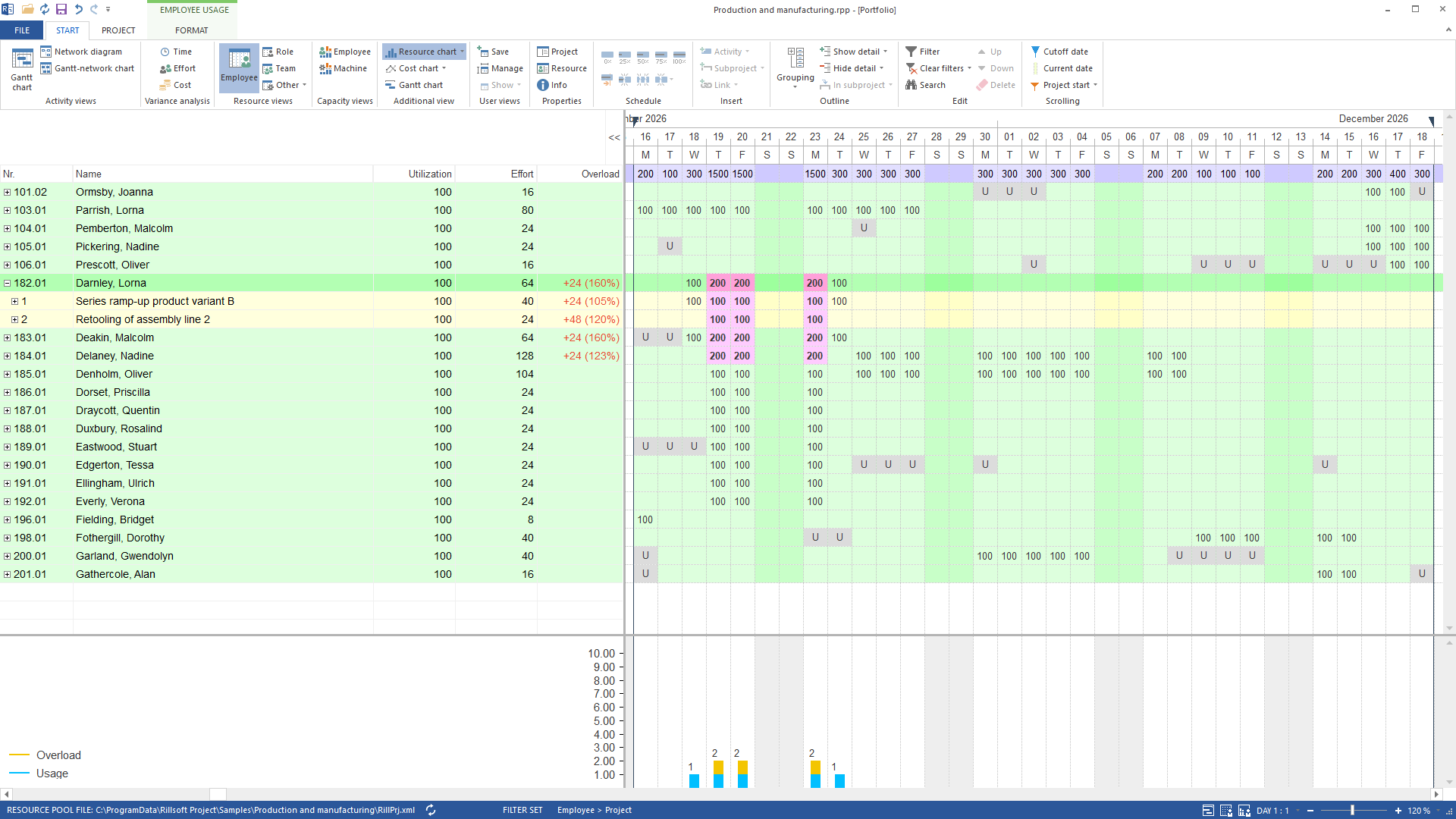
In the sample package Production and manufacturing (portfolio, five projects) only the lead project Series ramp-up product variant B is staffed by name – as shipped, nobody is overloaded in the week of 16 November. The example therefore staffs Retooling of assembly line 2 by name as well: “Erect the new stations mechanically” and “Convert the conveying equipment and utility routing” need six maintenance technicians each from 19 to 23 November, and the pool has eleven.
After that the answer names three people: Darnley and Deakin are on the maintenance backlog of line 1 in the series ramp-up and on “Erect the new stations” at the same time, Delaney on both retooling tasks. All three stand at 200 % on 19, 20 and 23 November – 24 hours above their capacity each. The twelve assignments are undo steps in the session; nothing is saved.
Why it is useful
The question is asked on Monday and needs an answer before shift planning. Who is affected decides between postponing, restaffing or approving overtime – the answer delivers the list, not the decision. Without the calculated workload per person this would be a list of the week’s tasks; only the comparison with capacity says who is above 100 %.How the answer is produced
The AI sets the personnel view to the coming week, reads the report per person and cross-checks it with the conflict list “Overloaded resources”. The personnel view is authoritative: the conflict list names only one overloaded person per task – in the example Deakin is missing there. The same view is on screen in Rillsoft Project at the same time.rillsoft_view_state_apply rillsoft_timescale_apply rillsoft_analysis_report_get rillsoft_project_conflict_list
Limits
Overload requires an assignment by name; a task carrying only a role overloads nobody. Absences are already deducted from supply. Several Rillsoft instances are not added up. The Rillsoft Project product page describes the personnel view.Try it
Get started- Industry package
03_produktion- Product version
- Rillsoft Project 10 (Build 10.0.623)
- Last verified
- 2026-09-27
- Verification
- Figures and statements verified on the named sample package against the named product build – MCP session, view and report; German and English package with identical figures.